
What is tool calling in AI? Build a simple .NET example
An AI model answers your query. But what if you want it not just to respond, but to do something? This action can be anything, such as sending a message, checking the weather in my city or booking a ticket to Tokyo. Large language models (LLMs) are great at understanding language and generating responses. However, they cannot access your database, read or write a file, call APIs on your behalf, or do some tasks in your application. Tool calling bridges this gap by allowing an AI model to request that your application execute a specific function with specific arguments. In this post, I will present the overall concepts around tool calling.
What is tool calling?
Tool calling (function calling) is the AI capability by which an LLM can request the execution of external functions or APIs that your application invokes while generating its response. In tool calling, you provide tool descriptions and parameters so the LLM returns JSON describing which tools to call, and the application executes them. A tool can be .NET code, an external API, a database, or any other executable operation. The application returns the execution results to the LLM, which incorporates them into the context to make its response more accurate.
Tool calling transforms an LLM from a smart text generator into something that can trigger actions and interact with the world around it.
Consider an example where you have to book an air ticket to Tokyo with an AI agent. A tool-calling loop involves the following steps:
- The user submits a message
The user inputs a message: "Book me a flight to Tokyo this Friday."
- The AI model decides which tool to use
The AI model takes the user's message as input and determines what action is needed. In this case, it decides that it first needs to search for available flights.
The model produces a tool call containing the tool name and the arguments to use:
{
  "name": "search_flights",
  "arguments": {
    "to": "Tokyo",
    "date": "Friday"
  }
}
A tool definition will look like the following in C# .NET.
var tools = new object[]
{
    new
    {
        type = "function",
        function = new
        {
            name = "search_flights",
            description = "Search available flights",
            parameters = new
            {
                type = "object",
                properties = new
                {
                    to = new
                    {
                        type = "string",
                        description = "Destination city"
                    },
                    date = new
                    {
                        type = "string",
                        description = "Travel date"
                    }
                },
                required = new[] { "to", "date" }
            }
        }
    },

    new
    {
        type = "function",
        function = new
        {
            name = "book_flight",
            description = "Book a flight using its flight ID",
            parameters = new
            {
                type = "object",
                properties = new
                {
                    id = new
                    {
                        type = "string",
                        description = "Flight ID"
                    }
                },
                required = new[] { "id" }
            }
        }
    }
};- The application executes the tool
The model's response containing the selected tool and its arguments is passed back to the application.
At this point, the AI model is not involved in executing the tool. The application passes the request to a Model Context Protocol (MCP) client, which communicates with the external MCP server. The MCP server then calls the underlying flight booking API.
The flight service might return:
[
  {
    "id": "NH205",
    "departure": "09:40",
    "price": "$620"
  },
  {
    "id": "EK312",
    "departure": "14:30",
    "price": "$710"
  },
  {
    "id": "QR806",
    "departure": "19:20",
    "price": "$680"
  }
]
This result is then passed back to the AI model.
- The AI model decides what to do next
After receiving the flight search results, the model selects a suitable flight to book.
It produces another tool call:
{
  "name": "book_flight",
  "arguments": {
    "id": "NH205"
  }
}
The application sends this request through the MCP client to the MCP server, which handles the booking using the external flight API.
The result might be:
{
  "id": "NH205",
  "status": "confirmed",
  "seat": "22A"
}- The AI model produces the final response
The booking result is passed back to the AI model, which uses it to produce a final response for the user: “Done, NH205, Friday at 09:40, seat 22A. Your flight is confirmed.”
The whole process looks like this:
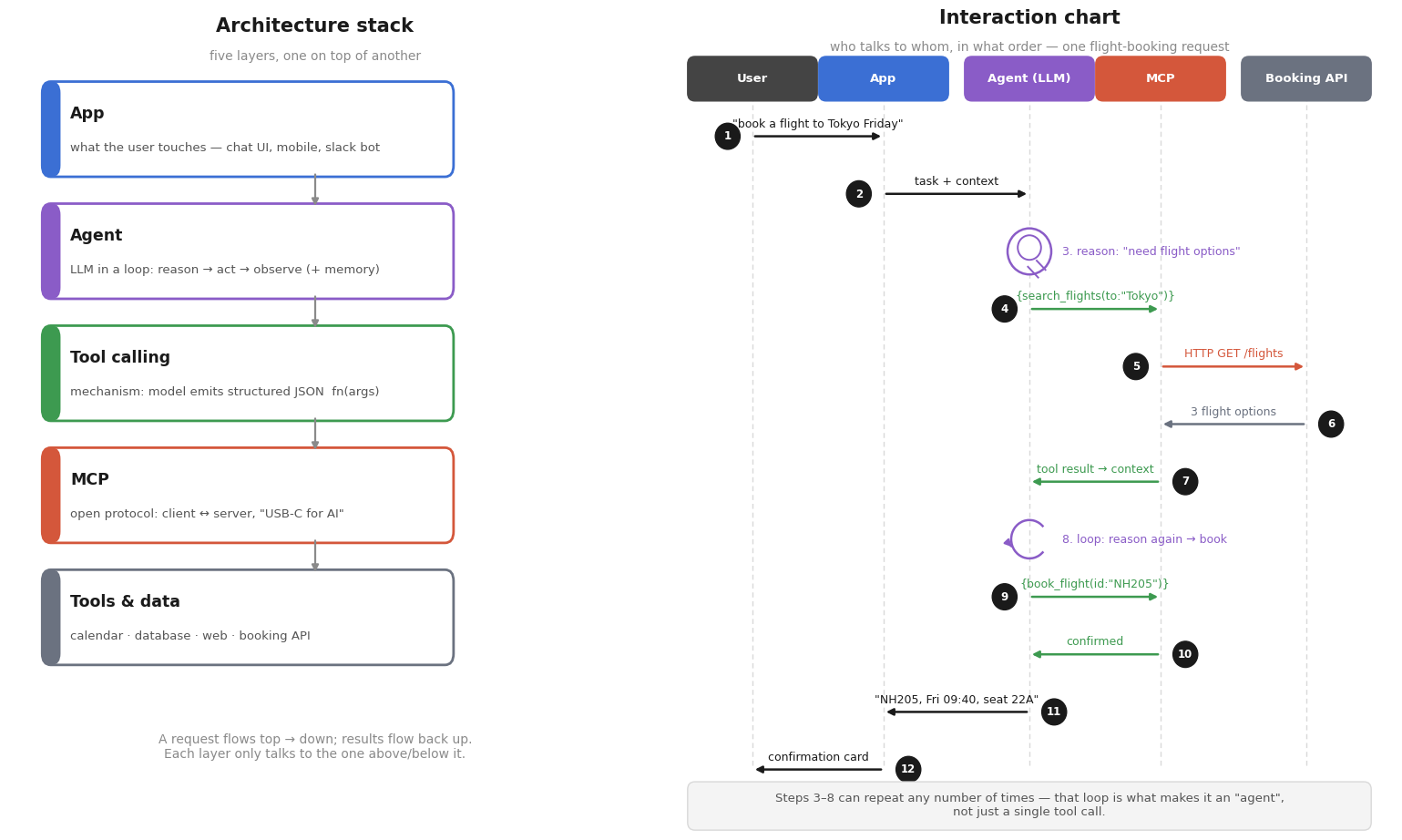
In practical agentic applications, the tool calling loop can run more than once. The model sometimes uses the result of one tool to decide which tool to call next or what arguments to pass to it. In our example, the search results determined the flight ID passed to book_flight. Tool calls use tokens in two ways: first for sending the tool definitions to the model, and second for adding the tool results to the context.
Why use tool calling?
As seen in our example, tool calling enables an AI agent to become more than an answering tool. An AI agent can be your assistant, doing tasks on your behalf by using the tool descriptions and asking your application to carry them out.
Common use cases for tool calling include:
- Calling external APIs: Tasks like checking the weather, searching flights, tracking a package, getting stock prices, or sending an email.
- Retrieving information from internal data stores: You can use it for querying a database to answer, "What are our best-selling products this month?"
- Taking actions on behalf of users: Similar to our example, function calling is really helpful for user tasks such as creating a support ticket, booking a meeting, placing an order, updating a customer record, or canceling a reservation.
- Working with business systems: More implementations can be made in businesses, such as retrieving a customer's invoices from an ERP/CRM system or checking the status of a work order in a CAFM system.
- Performing calculations or specialized processing: Another personal assistance it can give is in tasks like calculating shipping costs, generating a quotation, converting currencies using current rates, or running a financial calculation.
- Connecting AI to software applications: For example, allowing an AI assistant to create GitHub issues, query Jira tickets, update a CRM, or interact with project-management software.
- Interacting with IoT and physical systems: You can automate tasks like retrieving sensor readings, checking a device's status, or sending an allowed command to an IoT device.
Conclusion
LLMs become much more useful when they can interact with systems outside the language model. Instead of relying solely on the information in the model's training data, an agent can use tools to access real-time information or perform actions. Tool calling provides the mechanism for this interaction. The model decides which tool it needs, specifies the arguments, and waits for your application to execute it. The returned result is then provided back to the model so it can decide what to do next or generate a final response. Now that you know how tool calling works, you can start adding it to your own applications.
Now that you understand the concepts behind tool calling, go ahead and build your first MCP server in ASP.NET Core.
elmah.io: Error logging and Uptime Monitoring for your web apps
This blog post is brought to you by elmah.io. elmah.io is error logging, uptime monitoring, deployment tracking, and service heartbeats for your .NET and JavaScript applications. Stop relying on your users to notify you when something is wrong or dig through hundreds of megabytes of log files spread across servers. With elmah.io, we store all of your log messages, notify you through popular channels like email, Slack, and Microsoft Teams, and help you fix errors fast.

See how we can help you monitor your website for crashes Monitor your website