
Getting started with RAG in ASP.NET Core
Nowadays, everyone talks about AI. Building with AI, integrating AI into your application, and similar topics are hot topics. In today's post, I'll step into the .NET AI world by building a very simple Retrieval-Augmented Generation (RAG) implementation.
As it is our baby step, I intentionally designed a beginner-friendly introduction rather than a production-ready RAG implementation. We won't build a vector database or use embeddings yet. Instead, we'll use simple keyword matching to simulate the retrieval process and focus on understanding how the pieces of a RAG system fit together.
In future posts, we will climb the Everest of .NET AI, but for today sticking to the baby steps. Our idea is that instead of asking an AI model to answer a question using only what it already knows, we first retrieve relevant information from our own knowledge base and provide that information to the model as context.
What is Retrieval-Augmented Generation (RAG)?
RAG is an architecture for optimizing the performance of an artificial intelligence (AI) model by integrating it with external knowledge bases. RAG allows AI models to combine their powerful capabilities with a specific domain's or an organization's internal knowledge base to generate more relevant and accurate responses.
No matter how great an interior designer is, he cannot give you great design by just looking from the outside and not getting information about your home from inside. He needs to know what rooms look like and how they are placed. If you do not give him this information, he will make assumptions or give a very generic solution that sometimes proves wrong. A Large Language Model (LLM) works the same way, no matter how powerful Claude, ChatGPT, or any other model is, if you want it to work on your project, it needs its information. RAG basically combines AI's power with the organization's internal data to utilize it properly. Without the context, an AI model may rely on assumptions and generate information that may look credible but is not supported by your data. This is commonly known as an AI hallucination.
RAG helps AI propose concrete answers based on the data, otherwise, it can fall into guessing and lead to hallucinations.
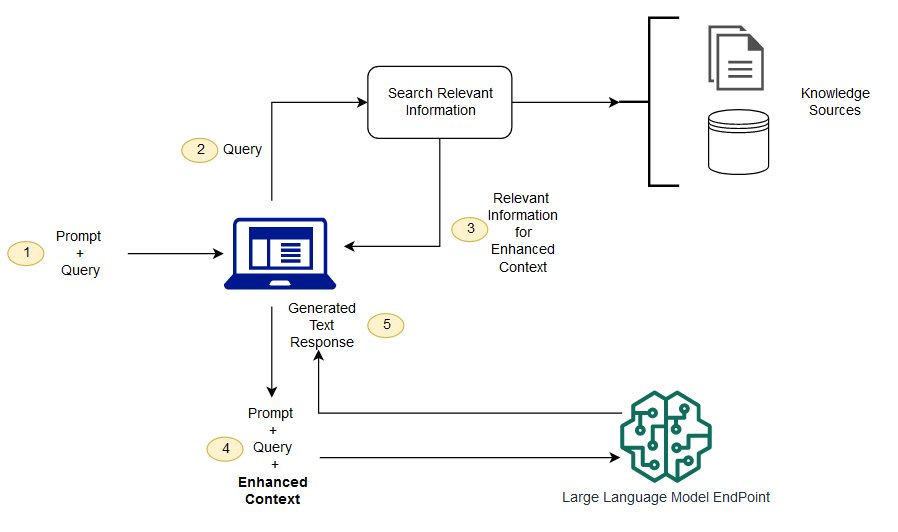
So RAG works in 3 steps: Retrieve ➡️ Augment ➡️ Generate
We retrieve relevant information from our knowledge base, add it to the AI prompt as context, and then let the AI model generate an answer based on that information.
Starting with RAG in an ASP.NET Core API
To take our first baby step, let's design an API with a simple RAG architecture.
Step 1: Create Api project
dotnet new webapi -n RAGPlaygroundStep 2: Create an input model
namespace RAGPlayground.Models;

public class QueryInp
{
    public string Question { get; set; } = string.Empty;
}
Step 3: Add a document store
The document store will represent our knowledge base, exposing a method called Search.
public interface IDocumentStore
{
    List<string> Search(string query);
}
Its implementation is as follows:
public class DocumentStore : IDocumentStore
{
    private readonly List<string> _documents =
    [
        "Minimal APIs simplify endpoint development in ASP.NET Core.",
        "Entity Framework Core streamlines database operations.",
        "Background services process long-running tasks efficiently.",
        "Dependency injection improves application maintainability."
    ];

    public List<string> Search(string query)
    {
        return _documents
            .Select(doc => new
            {
                Document = doc,
                Score = CalculateScore(doc, query)
            })
            .OrderByDescending(x => x.Score)
            .Where(x => x.Score > 0)
            .Take(3)
            .Select(x => x.Document)
            .ToList();
    }

    private int CalculateScore(string doc, string query)
    {
        var score = 0;

        var queryWords = query
            .ToLower()
            .Split(' ', StringSplitOptions.RemoveEmptyEntries);

        foreach (var word in queryWords)
        {
            if (doc.ToLower().Contains(word))
            {
                score++;
            }
        }

        return score;
    }
}
DocumentStore is a simple in-memory document repository that simulates the retrieval part of a RAG system. It stores a collection of documents and returns the most relevant ones based on keyword matching.
The _documents list contains the collection on which search is performed. Search involves four steps:
- Calculate a relevance score for every document.
- Sort documents from highest score to lowest.
- Remove documents with a score of zero.
- Return the top three matching documents.
The CalculateScore method converts the query string to lowercase before splitting it into individual words. Then it checks if each word appears in the document. The more query words found in the document, the higher the score becomes for that document.
Step 4: Create RAG layer
public interface IRagService
{
    Task<string> AskAsync(string question);
}
The service implementation.
using RAGPlayground.Contracts;

namespace RAGPlayground.Services;

public class RagService: IRagService
{
    private readonly IDocumentStore _documentStore;

    public RagService(IDocumentStore documentStore)
    {
        _documentStore = documentStore;
    }

    public async Task<string> AskAsync(string question)
    {
        var context = _documentStore.Search(question);

        if (context is null || !context.Any())
        {
            return "No relevant information found.";
        }
        var prompt = $"""
                      Based only on the context below, answer the user's question.

                      If the answer cannot be found in the context, say:
                      "I don't have enough information."

                      Context:
                      {context.First()}

                      Question:
                      {question}
                      """;

        return await Task.FromResult(prompt);
    }
}
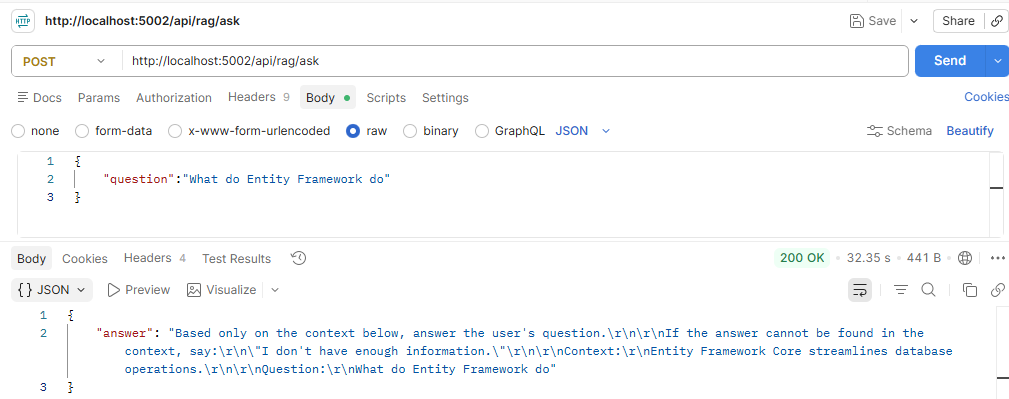
The service layer is much simpler. It calls the underlying document store layer and returns the document with the highest score. The prompt variable concatenates context and question, mimicking the augmentation step of the RAG.
Step 5: Add a controller
using Microsoft.AspNetCore.Mvc;
using RAGPlayground.Contracts;
using RAGPlayground.Models;

namespace RAGPlayground.Controllers;

[ApiController]
[Route("api/[controller]")]
public class RagController : ControllerBase
{
    private readonly IRagService _ragService;

    public RagController(IRagService ragService)
    {
        _ragService = ragService;
    }

    [HttpPost("ask")]
    public async Task<IActionResult> Ask([FromBody] QueryInp input)
    {
        var answer = await _ragService.AskAsync(input.Question);
        return Ok(new { answer });
    }
}
Now, I am exposing everything to the user via an ask endpoint.
Step 6: Run the project
dotnet runIn Postman, we can test the ask endpoint:
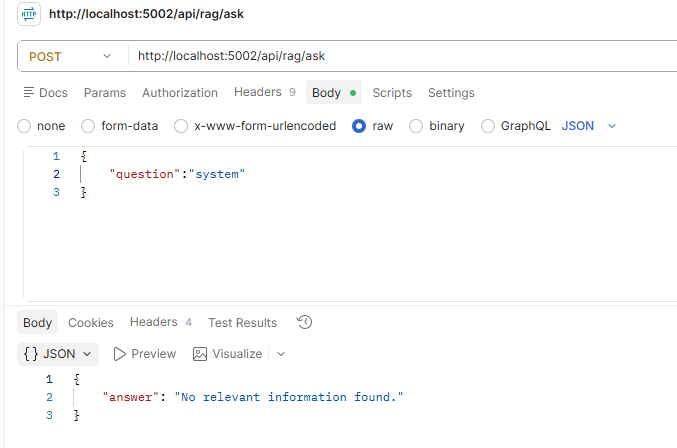
If a word is not found, a fitting answer is provided:
Step 7: Use simulation with an AI model
In production, you will use an AI such as OpenAI, Grok, Azure OpenAI, etc. In that case, the service layer method will include a contextual prompt. The AI client service is
public interface IAiClient
{
    Task<string> GenerateAsync(string prompt);
}
Its implementation is as follows:
public class AiClient : IAiClient
{
    public Task<string> GenerateAsync(string prompt)
    {
        // Call your actual AI provider here.
        // For example: OpenAI, Azure OpenAI, Claude, Grok, etc.

        throw new NotImplementedException(
            "Connect an AI provider here.");
    }
}
Dependency injection registration:
builder.Services.AddScoped<IAiClient, AiClient>();The updated RagService will look like:
public class RagService: IRagService
{
    private readonly IDocumentStore _documentStore;
    private readonly IAiClient _aiClient;

    public RagService(IDocumentStore documentStore, IAiClient aiClient)
    {
        _documentStore = documentStore;
        _aiClient = aiClient;
    }

    public async Task<string> AskAsync(string question)
    {
        var context = _documentStore.Search(question);

        if (context is null || !context.Any())
        {
            return "No relevant information found.";
        }
        var prompt = $"""
                      Based only on the context below, answer the user's question.

                      If the answer cannot be found in the context, say:
                      "I don't have enough information."

                      Context:
                      {context.First()}

                      Question:
                      {question}
                      """;
        var answer = await _aiClient.GenerateAsync(prompt);

        return answer;
    }
}
The answer will be fetched via the AI client you are using. Finally, the answer is generated by an AI client, which we have abstracted for this article; in future posts, we will use a real AI client to go one step further. That last stage represents the generation part of the RAG.
What to consider while choosing RAG?
While RAG enhances the accuracy of AI models, you need to keep in mind a few points before going forward:
- If the information your AI needs is very small and rarely changes, you can include it directly in the AI's system prompt instead of building a document search pipeline. Information like FAQs and product features is usually small enough to fit a few hundred tokens and send with every request. You don't need a RAG pipeline in such cases.
- Structured questions such as how many customers onboarded last year or how much revenue our company generated are database queries rather than AI prompts. Consider function calling that lets the model query your APIs instead.
- RAG is not good at answering questions that require analyzing an entire dataset, because RAG is designed to retrieve only the most relevant pieces, not every document. Don't use RAG for aggregation problems like finding this month's shopping trends or counting complaint categories.
- A recommended approach to designing a RAG application is a layered approach, with prompt building, retrieval logic, and LLM integration residing in separate services.
- To improve retrieval in a production-grade application, use embeddings instead of word matching. Once documents become embeddings, you need a vector database to store them.
- Secure your API with JWT authentication and authorization to avoid information leaking to unauthorized users. Role-based Access Control (RBAC) is useful for restricting access to the application.
- For a SaaS application, isolate tenants to better track and limit prompts for each client.
Conclusion
RAG empowers AI's accuracy by connecting it with system-specific knowledge. We saw how to use RAG architecture in an ASP.NET Core API using a basic knowledge base. For a real AI LLM integration, we will continue from here by implementing the AiClient class. Later, we list best practices to consider to use it effectively.
Code: https://github.com/elmahio-blog/RAGPlayground.git
elmah.io: Error logging and Uptime Monitoring for your web apps
This blog post is brought to you by elmah.io. elmah.io is error logging, uptime monitoring, deployment tracking, and service heartbeats for your .NET and JavaScript applications. Stop relying on your users to notify you when something is wrong or dig through hundreds of megabytes of log files spread across servers. With elmah.io, we store all of your log messages, notify you through popular channels like email, Slack, and Microsoft Teams, and help you fix errors fast.

See how we can help you monitor your website for crashes Monitor your website