
What happens when you call await? A step-by-step runtime breakdown
We are all using async-await in our applications. But one thing that bothers me every time is how it is different from sync and how it actually works. In today's post, I will clear up the confusion for you and me.
Synchronous programming
Synchronous programming is a sequential way of executing code, where each line runs one by one. The next line does not start until the previous one completes, leaving the whole application on hold.
Asynchronous programming
Asynchronous programming is a non-blocking approach to code execution that does not execute in sequence. It allows long-running tasks, such as fetching from the database or reading content from files, to run without stalling the whole application. It initiates those delaying tasks and continues running other code while waiting for the result. The async/await keywords help define asynchronous programming. async is used with a method that runs asynchronously, and await pauses execution until the task completes. Note: In UI apps, a SynchronizationContext ensures code resumes back on the UI thread, whereas in console apps or ASP.NET Core, it resumes on any free ThreadPool thread.
Why do we need asynchronous programming?
Each .NET application runs on a main thread or request thread that starts your work.
- In a console app, it's the
Mainmethod. - In ASP.NET Core, it's the thread handling the incoming HTTP request.
- In UI apps, it's the UI thread that displays the screen.
It performs the big responsibility of staying responsive and keeping the application moving. If this thread gets blocked, the application stops receiving HTTP requests, the UI freezes, and the application slows or breaks. So protecting this thread is critically important. Therefore, we go with asynchronous.
A brief peek at async/await execution
public async Task<int> GetDataCountAsync()
{
    Console.WriteLine("Before await");

    var response = await httpClient.GetAsync("/users");
    var count = await response.Content.ReadAsAsync<int>();
    Console.WriteLine("After await");

    return count;
}
The method runs synchronously until it reaches the first await.
When the compiler notices async/await code, it generates a state machine. More precisely, it generates a struct (or class, depending on optimization) implementing IAsyncStateMachine. The state machine stores the current state of the asynchronous method, from which it resumes execution later.
private struct GetDataCountAsyncStateMachine : IAsyncStateMachine
{
    public int state;
    public AsyncTaskMethodBuilder<int> builder;
    private HttpClient httpClient;
    private TaskAwaiter<HttpResponseMessage> awaiter1;
    private TaskAwaiter<int> awaiter2;

    void MoveNext()
    {
        switch (state)
        {
            case 0: /* first await segment */
            case 1: /* second await segment */
            // ...
        }
    }
}
The method pauses, runs in the background, and frees the main thread. The caller can continue doing other work, but any code that depends on the awaited result, cannot run until the await completes.
So, can we say that if I have 2 awaits, the state machine divides the method into 3 segments: before the 1st await, between the 1st and 2nd await, and after the 2nd await? When an await point is reached, the state machine yields control back to the caller and frees the thread. Once the underlying asynchronous operation completes, the runtime invokes MoveNext() again to execute the next segment.
Suspension: Where the Magic Actually Happens
If the awaited task is not yet complete, the state machine calls:
awaiter.OnCompleted(stateMachine.MoveNext);This registers a continuation telling "call MoveNext() again when this task finishes" and then returns control to the caller. The calling thread is now free to do other work. This is the entire point of async/await: releasing the thread during the wait instead of blocking it.
At this point, GetDataCountAsync() returns an incomplete Task<int> to its caller, backed by the AsyncTaskMethodBuilder.
For network or disk I/O, no thread is actively running during the wait. The runtime hands the operation off to the OS and network hardware (via mechanisms like I/O Completion Ports). When the hardware receives the data, the OS signals the runtime, which queues the state machine to resume on an available ThreadPool thread.
Now, understand with an analogy. You have a few household chores, such as washing and drying clothes, cleaning the house, and cooking. If you proceed sequentially, each task will start only after the previous one is completed. Hence, the entire window will be occupied by a single task. However, that is time-consuming and inefficient. Here comes asynchronous tasking (async/await in programming terms), where you will leave time-consuming tasks on an automated thread and free yourself (the main thread) for other tasks in parallel. Once the delayed task is completed, you can get its results.
using System;
using System.Threading;
using System.Threading.Tasks;

public class HelloWorld
{
    static async Task WashAndDryClothes()
    {
        Log("WashAndDryClothes Started");

        string clothes = await WashClothes();

        Log($"Got result from WashClothes: {clothes}");

        await DryClothes(clothes);

        Log("WashAndDryClothes Finished");
    }

    static async Task<string> WashClothes()
    {
        Log("Washing clothes...");

        await Task.Delay(3000);

        Log("Washing completed");

        return "Clean Clothes";
    }

    static async Task DryClothes(string clothes)
    {
        Log($"Drying {clothes}...");

        await Task.Delay(2000);

        Log("Drying completed");
    }

    static async Task CleanHouse()
    {
        Log("Cleaning house...");

        await Task.Delay(4000);

        Log("Cleaning completed");
    }

    static async Task CookFood()
    {
        Log("Cooking food...");

        await Task.Delay(5000);

        Log("Cooking completed");
    }

    static void Log(string message)
    {
        Console.WriteLine(
            $"{DateTime.Now:HH:mm:ss.fff} | Thread {Thread.CurrentThread.ManagedThreadId} | {message}");
    }
    public static async Task  Main(string[] args)
    {
         Log("Main Started");

        Task task1 = WashAndDryClothes();
        Task task2 = CleanHouse();
        Task task3 = CookFood();

        Log("All tasks started");

        await Task.WhenAll(task1, task2, task3);

        Log("All tasks completed");
    }
}
Each method represents a chore, and to mimic the time of the chore, I added Task.Delay. The result is:
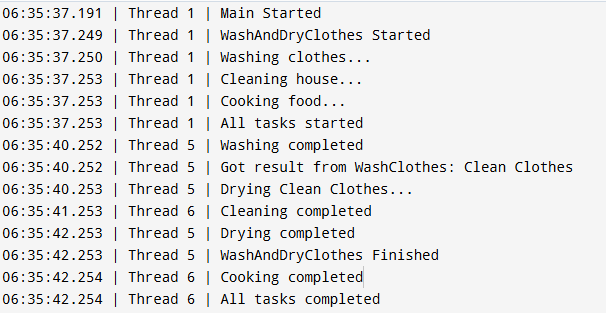
So Thread 1 just starts and goes to WashClothes which is called from WashAndDryClothes. The .NET ThreadPool already exists before the application starts. It has many worker threads, such as Thread 1, Thread 5, and Thread 6. At this moment, Thread 1 is executingMain(), while the other threads are simply idle, waiting for work. After logging WashAndDryClothes Started and Washing clothes... it finds that the method will take 3 seconds. Now, the thread does not wait, realizing that this operation will not finish immediately. Instead of waiting for 3 seconds, it does three things:
- It registers a 3 second callback in .NET's internal timer queue (which doesn't hold or block a thread while waiting).
- It saves the current state of the
WashClothesstate machine (state = 0) along with everything needed to continue later. - It registers a continuation that says:
When this 3-second delay completes, call WashClothes.MoveNext().Thread 1 then immediately returns from WashClothes(), then returns from WashAndDryClothes(), and starts executing the later part of the in Main(). When it meets CleanHouse();, it logs Cleaning house... and sees a 4000 ms delay. The same three things happen:
- A 4-second timer is created.
- The
CleanHousestate machine saves its current state. - It registers:
"When the 4-second delay completes, call CleanHouse.MoveNext()."Thread 1 returns to the Main method again to handle other tasks. Now it goes toCookFood(), where it waits 5 seconds.
- An OS-managed 5-second timer is created.
- The
CookFoodstate machine saves its state (state = 0). - It registers:
"When the 5-second delay completes, call CookFood.MoveNext()." Now all three tasks have been started.
Thread 1 executes.
await Task.WhenAll(task1, task2, task3);Since none of the three tasks have finished yet, the Main state machine also saves its state and registers:
"When all three tasks complete, call Main.MoveNext()."Now Thread 1 has nothing left to do, so it joins the other idle threads in the ThreadPool and becomes idle.
Well, after 3 seconds. The 3-second timer expires.
The OS/.NET timer system tells the Task.Delay object:
"Your delay has finished."
The Task.Delay completes, which queues the registered continuation:
WashClothes.MoveNext()The ThreadPool now looks for any available worker thread. It finds that Thread 5 is available. It assigns the continuation to Thread 5.
Hence, Thread 5 executes:
WashClothes.MoveNext()WashClothes continues after the await, logs:
Washing completedreturns "Clean Clothes", and completes. Because WashAndDryClothes was waiting for that result, its continuation is immediately ready too:
WashAndDryClothes.MoveNext()Since Thread 5 is already running, it simply continues on the same thread. It executes:
string clothes = awaiter.GetResult();Logs:
Got result from WashClothes: Clean ClothesThen starts:
await DryClothes(clothes);It reaches another Task.Delay(2000), saves its state, registers another continuation, and Thread 5 becomes idle again.
After 4 seconds, the 4-second timer expires. The continuation.
CleanHouse.MoveNext()is queued. The ThreadPool looks for a free worker and finds Thread 6 is idle.
Thread 6 executes.
CleanHouse.MoveNext()It logs.
Cleaning completedand finishes.
Now 5 seconds have passed. The two timers are now completing almost together. First, the DryClothes delay finishes. The ThreadPool looks for a free worker.
As Thread 5 was done with WashAndDryClothes and is free again.
It executes:
DryClothes.MoveNext()Logs:
Drying completedDryClothes finishes, which immediately allows WashAndDryClothes to continue. Since Thread 5 is already executing, it continues directly into:
WashAndDryClothes.MoveNext()and logs:
WashAndDryClothes FinishedAlmost at the same time, the 5-second timer for CookFood expires. The continuation:
CookFood.MoveNext()is queued.
Till now, Thread 6 is available and executes:
Cooking completedNow all three tasks have completed. Task.WhenAll also becomes complete. Its registered continuation is:
Main.MoveNext()Since Thread 6 is already executing, it continues directly into Main.MoveNext() and logs.
All tasks completedThe application is now finished.
What are the benefits of asynchronous programming?
Because of its miraculous non-blocking nature, asynchronous programming offers key benefits for modern applications.
Better CPU utilization
In sequential execution, a thread is doing absolutely nothing while waiting for a resource, such as data or file content. Instead of wasting a thread, the thread becomes available for other requests.
Scalability
Another big benefit is the potential to scale your application. Imagine your API takes hundreds of milliseconds to process while different users access it at once. The non-blocking nature will allow all requests without stalling the server on a long-running database hit.
Better responsiveness
Definitely, this one is the key reason modern developers use async/await. UI thread remains free, and users can interact with the application without spoiling their experience.
Higher server throughput
Imagine a server with 10 ThreadPool threads. Each request waits 2 seconds for SQL. In the synchronous world, each of them will occupy one thread, and the 11th thread has to wait. In the asynchronous world, a thread becomes available immediately without depending on others, and the thread pool assigns the next task to it without leaving any threads idle.
Efficient memory usage
Blocking a thread ties up its ~1 MB stack allocation doing nothing. Under high load, this forces the ThreadPool to spin up hundreds of threads, consuming gigabytes of memory. Async frees the thread immediately, keeping memory usage limited to a small heap-allocated state machine until the task completes.
Cleaner code than callbacks
Without it, you had to make callbacks for dependent calls like
GetData(result =>
{
    Save(result, x =>
    {
        SendEmail(x, y =>
        {
            Console.WriteLine(y);
        });
    });
});
async/await will let you do this with
var data = await GetData();

var saved = await Save(data);

await SendEmail(saved);
When should you use async?
Asynchronous programming's non-blocking approach is strongly recommended for tasks such as database calls, file I/O, HTTP calls, network operations, and Cloud APIs. However, for any complex calculations, it does not help, like if the CPU is calculating something on the already-fetched data, because in any case the CPU has to perform the calculations.
Conclusion
Async/await is a cornerstone in modern applications. Any task that delays is awaited, and that is the only recommended way to handle such tasks. We peeked inside async/await with analogous examples of how it worked. Apart from keeping the UI responsive, it pays off in CPU, memory, and scalability too.
elmah.io: Error logging and Uptime Monitoring for your web apps
This blog post is brought to you by elmah.io. elmah.io is error logging, uptime monitoring, deployment tracking, and service heartbeats for your .NET and JavaScript applications. Stop relying on your users to notify you when something is wrong or dig through hundreds of megabytes of log files spread across servers. With elmah.io, we store all of your log messages, notify you through popular channels like email, Slack, and Microsoft Teams, and help you fix errors fast.

See how we can help you monitor your website for crashes Monitor your website