
Using C# 14 to build "Smart records" for config & settings models
Think of your application's configuration as the control panel of an aircraft. Every switch, dial, and indicator influences how the system operates. A single incorrect setting can change the application's behavior in unexpected ways. In this post, I will build configuration models that are safer, cleaner, and easier to maintain using modern C# features.
The first choice that comes to mind is mutable POCO (Plain Old CLR Object) classes for configuration. That intuition does the job, but its values can be changed unexpectedly or accept invalid values. With records, you can create configuration models that behave more like a protected cockpit. C# records enable configuration values to be validated and immutable, designed to prevent mistakes before takeoff.
Why do traditional configuration classes become a problem?
A typical configuration class often looks like this:
public class DatabaseSettings
{
  public string ConnectionString { get; set; }
  public int CommandTimeout { get; set; }
  public bool EnableRetry { get; set; }
}
Although it looks simple, this design has several drawbacks.
Properties can be modified anywhere, leading to object inconsistency. No validation exists, and invalid values are accepted. It has no computed properties for a custom representation of the values. For any invalid value, the application will continue until it encounters the problem caused by the value.
Records are data models which by nature are immutable, making them ideal for configuration values. That is a big win for records, as we can only copy a record using the with keyword, but the original object remains untouched. Also, records can validate themselves, preventing invalid inputs while keeping the options pattern alive. Such validations not only keep technical blunders away, but implement business logic as well. They also work beautifully with pattern matching, so we can compare values cleanly. For all these reasons, I have called it smart records.
Using smart records for appsettings configuration in ASP.NET Core
Step 1: Create Api project.
dotnet new webapi -n SmartRecordApiStep 2: Add Configuration
In appsettings.json add the following configuration:
"WeatherSettings": {
  "City": "Karachi",
  "TemperatureUnit": "Celsius",
  "RefreshInterval": 30,
  "EnableForecast": true
}
Step 3: Create a smart record
Create a new file named Configuration/WeatherSettings.cs:
namespace SmartRecordDemo.Configuration;

public record WeatherSettings
{
    public required string City { get; init; }
    public required string TemperatureUnit { get; init; }
    public int RefreshInterval { get; init; }
    public bool EnableForecast { get; init; }
}

public static class WeatherSettingsExtensions
{
    extension(WeatherSettings settings)
    {
        public void Validate()
        {
            if (string.IsNullOrWhiteSpace(settings.City))
                throw new ArgumentException("City is required.");

            if (settings.RefreshInterval <= 0)
                throw new ArgumentException(
                    "RefreshInterval must be greater than zero.");

            if (settings.TemperatureUnit is not ("Celsius" or "Fahrenheit"))
                throw new ArgumentException(
                    "TemperatureUnit must be Celsius or Fahrenheit.");
        }

        public string DisplayName =>
            $"{settings.City} ({settings.TemperatureUnit})";
    }
}
C#14 brought a new syntax for extension methods. Inside, DisplayName is a computed property for display, while Validate is a helper Property. The Validate method includes different checks to ensure self-data validity.
Step 4: Register the options pattern
In Program.cs include the following code:
using SmartRecordApi.Configurations;

var builder = WebApplication.CreateBuilder(args);

builder.Services.AddOpenApi();

builder.Services
    .AddOptions<WeatherSettings>()
    .Bind(builder.Configuration.GetSection("WeatherSettings"))
    .PostConfigure(settings => settings.Validate());

builder.Services.AddControllers();

var app = builder.Build();

app.MapControllers();

if (app.Environment.IsDevelopment())
{
    app.MapOpenApi();
}

app.UseHttpsRedirection();

app.Run();
Bind() reads from appsettings.json while PostConfigure() validates the settings after binding. Here, I called the Validate method at registration. As I will declare a new controller and will not use minimal API, I had to add builder.Services.AddControllers and app.MapControllers.
Step 5: Add a controller
using Microsoft.AspNetCore.Mvc;
using Microsoft.Extensions.Options;
using SmartRecordApi.Configurations;

namespace SmartRecordApi.Controllers;

[ApiController]
[Route("api/weather")]
public class WeatherController : ControllerBase
{
    private readonly WeatherSettings _settings;

    public WeatherController(IOptions<WeatherSettings> options)
    {
        _settings = options.Value;
    }

    [HttpGet]
    public IActionResult Get()
    {
        return Ok(new
        {
            _settings.City,
            _settings.TemperatureUnit,
            _settings.RefreshInterval,
            _settings.EnableForecast,
            _settings.DisplayName
        });
    }
}
Here, WeatherSettings is injected using the options pattern.
Step 6: Run the project.
dotnet run
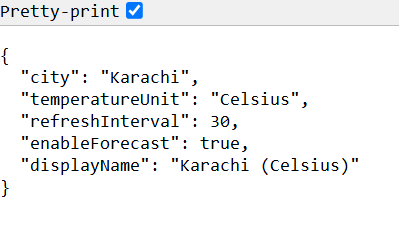
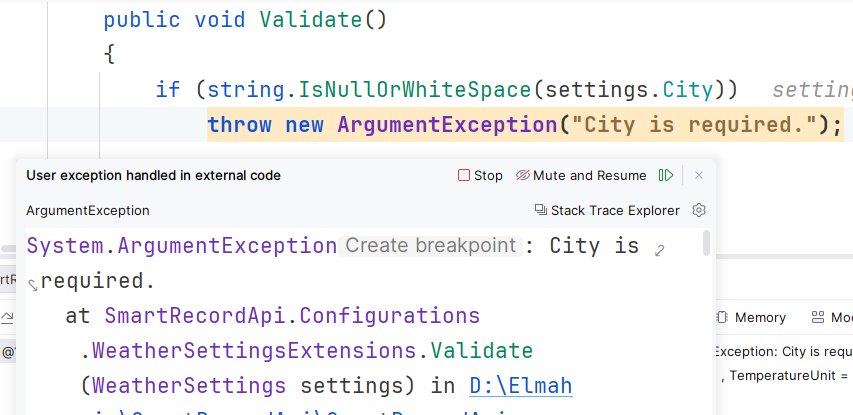
Let's check validity. I have kept the city empty fow now:
"WeatherSettings": {
  "City": "",
  "TemperatureUnit": "Celsius",
  "RefreshInterval": 30,
  "EnableForecast": true
}
A traditional way to define the records is:
public record WeatherSettings
{
    public required string City { get; init; }
    public required string TemperatureUnit { get; init; }
    public int RefreshInterval { get; init; }
    public bool EnableForecast { get; init; }

    // Computed Property
    public string DisplayName =>
        $"{City} ({TemperatureUnit})";

    // Helper Property
    public bool IsAutoRefreshEnabled =>
        RefreshInterval > 0;

    public void Validate()
    {
        if (string.IsNullOrWhiteSpace(City))
            throw new InvalidOperationException("City is required.");

        if (RefreshInterval <= 0)
            throw new InvalidOperationException("RefreshInterval must be greater than zero.");

        if (TemperatureUnit is not ("Celsius" or "Fahrenheit"))
            throw new InvalidOperationException("TemperatureUnit must be Celsius or Fahrenheit.");
    }
}
Here DisplayName is a computed property for display, IsAutoRefreshEnabled is a helper for RefreshInterval validation. While all other checks are in the Validate method. Although that works, it is from prior C# versions.
Best Practices
- Write validations in the extension method for business requirements and data validity and use them in creation or startup.
- Use computed properties instead of repeating calculations.
- Group related settings into nested records.
- Keep helper methods focused on configuration-related behavior.
- Avoid putting unrelated business logic into configuration models.
- Use the
withexpression when creating modified copies. - Combine records with the Options pattern for clean dependency injection.
Conclusion
Configuration models shouldn't just store data, they should protect it. Records are suited for such cases, i.e., making configuration objects immutable, self-validating, expressive, and easier to maintain. C# 14 puts the cherry on top with new extension method declarations. Instead of relying on mutable classes with scattered validation, records allow you to centralize rules, reduce bugs, and write cleaner ASP.NET Core applications. As modern C# evolves, embracing records for configuration is a simple yet powerful step toward building more reliable and maintainable software.
Code: https://github.com/elmahio-blog/SmartRecordApi
elmah.io: Error logging and Uptime Monitoring for your web apps
This blog post is brought to you by elmah.io. elmah.io is error logging, uptime monitoring, deployment tracking, and service heartbeats for your .NET and JavaScript applications. Stop relying on your users to notify you when something is wrong or dig through hundreds of megabytes of log files spread across servers. With elmah.io, we store all of your log messages, notify you through popular channels like email, Slack, and Microsoft Teams, and help you fix errors fast.

See how we can help you monitor your website for crashes Monitor your website