
The complete guide to mastering Dapper micro-ORM in .NET
For developers who want to taste ORM but don't want to leave SQL either, Dapper is a perfect choice. Dapper runs SQL queries like ADO.NET but returns results as C# objects, like Entity Framework Core. Apart from its abstracting nature, you leverage high-speed data access. The feature set of Dapper is quite large and covers key areas of database work, such as JOINs, aggregate functions, database procedures and functions, transactions, etc. In today's post, I will walk through everything needed to get you started with Dapper.
What is Dapper?
Dapper is a micro-ORM (Object Relational Mapper) for .NET. Developed by Stack Overflow, Dapper offers higher performance database operations faster than full ORMs like Entity Framework Core (EF Core). It suits developers who work with ADO.NET because of its query commands, unlike EF Core, which operates on objects rather than SQL. SQL Queries are directly mapped to strongly typed objects like any ORM.
Why Use Dapper?
As Dapper is a micro-ORM that offers a thin abstraction between the database and applications, it introduces very little overhead. For these reasons, it is an optimal choice for high-performing scenarios. Similar to ADO .NET, you can get full control over SQL queries. You can think of it as the middle ground between ADO.NET and an ORM like EF Core, which uses data as strongly typed C# objects. One can view the SQL generated by EF Core, but can't granularly control it. Dapper uses minimal dependencies, keeping the architecture lightweight. That is one of the reasons Dapper best suits microservices, financial systems, web APIs, and modular APIs.
Commonly used Dapper methods
To summarize the most commonly used Dapper methods, let's go ahead and create a new project.
Step 1: Create a project
dotnet new console -n UserDapperDemo
cd UserDapperDemo
Step 2: Install the required packages
dotnet add package Dapper
dotnet add package Npgsql
dotnet add package Microsoft.Extensions.Configuration
dotnet add package Microsoft.Extensions.Configuration.Json
Npgsql provides a NpgsqlConnection class for connecting to PostgreSQL. The Configuration* packages are useful when we create and include appsettings.json in the project.
Step 3: Create models
namespace UserDapperDemo.Models;

public class Movie
{
    public int Id { get; set; }
    public string Title { get; set; } = string.Empty;
    public int DirectorId { get; set; }
    public double Rating { get; set; }
}
namespace UserDapperDemo.Models;
public class Director
{
public int Id { get; set; }
public string Name { get; set; } = string.Empty;
}Step 4: Add appsettings.json and its configuration
{
  "ConnectionStrings": {
    "PostgresConnection": "Host=localhost;Port=5432;Database=movieDb;Username=postgres;Password=1234"
  }
}
In the .proj file add the following item group:
    <ItemGroup>
        <None Update="appsettings.json">
            <CopyToOutputDirectory>PreserveNewest</CopyToOutputDirectory>
        </None>
    </ItemGroup>
Step 5: Configure connection factory
using System.Data;
using Microsoft.Extensions.Configuration;
using Npgsql;

namespace UserDapperDemo.Data;

public class DbConnectionFactory
{

    private readonly string _connectionString;

    public DbConnectionFactory()
    {

        var config = new ConfigurationBuilder()
            .SetBasePath(Directory.GetCurrentDirectory())
            .AddJsonFile("appsettings.json")
            .Build();

        _connectionString = config.GetConnectionString("PostgresConnection");
    }

    public IDbConnection CreateConnection()
        => new NpgsqlConnection(_connectionString);
}
It makes a centralized database connection point.
Step 6: Prepare the database
Run the following query for the database
CREATE TABLE IF NOT EXISTS public."Director"
(
    "Id" integer NOT NULL DEFAULT nextval('"Director_Id_seq"'::regclass),
    "Name" text COLLATE pg_catalog."default" NOT NULL,
    CONSTRAINT "Director_pkey" PRIMARY KEY ("Id")
)
CREATE TABLE IF NOT EXISTS public."Movie"
(
    "Id" integer NOT NULL DEFAULT nextval('"Movie_Id_seq"'::regclass),
    "Title" text COLLATE pg_catalog."default" NOT NULL,
    "DirectorId" integer,
    "Rating" numeric,
    CONSTRAINT "Movie_pkey" PRIMARY KEY ("Id"),
    CONSTRAINT "Movie_DirectorId_fkey" FOREIGN KEY ("DirectorId")
        REFERENCES public."Director" ("Id") MATCH SIMPLE
        ON UPDATE NO ACTION
        ON DELETE NO ACTION
)
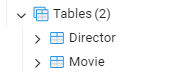
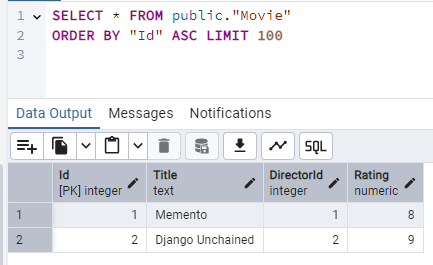
So, our database tables look like:
Step 7: Implement Dapper methods
I will follow a repository pattern to test some of Dapper's most common methods. This is just for the sake of demoing common methods. Whether or not you want to implement repositories in your code is entirely up to you. Some people love repositories while others absolutely hate them.
The movie repository will be:
public class MovieRepo
{
    private readonly DbConnectionFactory _factory;
    public MovieRepo(DbConnectionFactory factory)
    {
        _factory = factory;
    }

    //methods
}
QueryAsync<T>()
public async Task<IEnumerable<Movie>> GetAllMoviesAsync()
{
    using var connection = _factory.CreateConnection();

    return await connection.QueryAsync<Movie>(
        "SELECT * FROM \"Movie\""
    );
QueryAsync returns multiple rows of data asynchronously. It is used when we need to fetch multiple rows of data. Its synchronous counterpart is Query<>().
QueryFirstAsync<T>()
public async Task<Movie> GetFirstMovie()
{
    using var connection = _factory.CreateConnection();

    return await connection.QueryFirstAsync<Movie>(
        "SELECT * FROM \"Movie\" ORDER BY \"Id\" LIMIT 1"
    );
}
A single row-returning operation that returns the first row that matches the given condition. It expects the record to exist, otherwise, it throws an exception. QueryFirst<T>() is for synchronous operation.
QueryFirstOrDefaultAsync<T>()
public async Task<Movie?> GetMovieByTitle(string title)
{
    using var connection = _factory.CreateConnection();

    return await connection.QueryFirstOrDefaultAsync<Movie>(
        "SELECT * FROM \"Movie\" WHERE \"Title\" = @Title",
        new { Title = title }
    );
}
As the name suggests, it returns the first row that matches the condition, or otherwise returns the default value. A similar sync method is QueryFirstOrDefault.
QuerySingleAsync<T>()
public  async Task<Movie> GetMovieById(int id)
{
    using var connection = _factory.CreateConnection();

    return await connection.QuerySingleAsync<Movie>(
        "SELECT * FROM \"Movie\" WHERE \"Id\" = @Id",
        new { Id = id }
    );
}
QuerySingleAsync or QuerySingle (sync version) expects exactly one row to match the condition. If fewer or more are found, it throws an exception. QuerySingle is ideal when filtering a record by ID, as ID does not duplicate.
QuerySingleOrDefaultAsync<T>()
public  async Task<Movie?> GetMovieSafe(int id)
{
    using var connection = _factory.CreateConnection();

    return await connection.QuerySingleOrDefaultAsync<Movie>(
        "SELECT * FROM \"Movie\" WHERE \"Id\" = @Id",
        new { Id = id }
    );
}
Returns one record matched or null. Use QuerySingleOrDefault if you want non-async.
ExecuteAsync
public  async Task<int> InsertMovie(Movie movie)
{
    using var connection = _factory.CreateConnection();

    return await connection.ExecuteAsync(
        @"INSERT INTO ""Movie"" (""Title"", ""director_id"", ""rating"")
  VALUES (@Title, @DirectorId, @Rating)",
        movie
    );
}
public async Task<int> UpdateMovieAsync(Movie movie)
{
using var connection = _factory.CreateConnection();
return await connection.ExecuteAsync(
@"UPDATE ""Movie""
SET ""Title"" = @Title, ""Rating"" = @Rating
WHERE ""Id"" = @Id",
movie
);
}ExecuteAsync runs the command and returns the number of rows affected. Specifically, this and its Execute methods are used for Insert, Update, and Delete operations.
ExecuteScalarAsync
public async Task<int> GetMovieCount()
{
    using var connection = _factory.CreateConnection();

    return await connection.ExecuteScalarAsync<int>(
        "SELECT COUNT(*) FROM \"Movie\""
    );
}
ExecuteScalarAsync or ExecuteScalar returns a single value as a result of SQL aggregation functions such as COUNT(), AVG(), and SUM().
QueryMultipleAsync
public async Task<(IEnumerable<Movie>, IEnumerable<Director>)> GetDashboard()
{
    using var connection = _factory.CreateConnection();

    var sql = @"
        SELECT * FROM ""Movie"";
        SELECT * FROM ""Director"";
    ";

    using var multi = await connection.QueryMultipleAsync(sql);

    var movies = multi.Read<Movie>();
    var directors = multi.Read<Director>();

    return (movies, directors);
}
The method is complex, running multiple commands from a single command. QueryMultiple is the sync version of it. Instead of hitting the database multiple times, QueryMultiple lets you fetch multiple datasets in a single round-trip.
Step 8: Set up Program.cs
using UserDapperDemo.Models;
using UserDapperDemo.Data;
using UserDapperDemo.Data.Repos;

var factory = new DbConnectionFactory();

var repo = new MovieRepo(factory);

// INSERT
repo.InsertMovie(new Movie
{
    Title = "Inception",
    DirectorId = 1,
    Rating = 9.0
});

Console.WriteLine("=== ALL MOVIES ===");
// QUERY
var movies = await repo.GetAllMoviesAsync();

foreach (var m in movies)
{
    Console.WriteLine($"Id: {m.Id}, Title: {m.Title}, Rating: {m.Rating}");
}

Console.WriteLine("\n=== SINGLE MOVIE (QueryFirst) ===");
// SINGLE
var movie1 = await repo.GetFirstMovie();

Console.WriteLine($"Id: {movie1.Id}, Title: {movie1.Title}, Rating: {movie1.Rating}");

Console.WriteLine("\n=== SINGLE MOVIE (QueryFirstOrDefault) ===");
// SINGLE
var movie2 = await repo.GetMovieByTitle("Memento");

Console.WriteLine($"Id: {movie2.Id}, Title: {movie2.Title}, Rating: {movie2.Rating}");

Console.WriteLine("\n=== SINGLE MOVIE (QuerySingle) ===");
// SINGLE
var movie3 = await repo.GetMovieById(1);

Console.WriteLine($"Id: {movie3.Id}, Title: {movie3.Title}, Rating: {movie3.Rating}");

Console.WriteLine("\n=== SINGLE MOVIE (QuerySingleOrDefault) ===");
// SINGLE
var movie4 = await repo.GetMovieSafe(1);

Console.WriteLine($"Id: {movie4.Id}, Title: {movie4.Title}, Rating: {movie4.Rating}");

Console.WriteLine("\n=== MOVIE COUNT (ExecuteScalar) ===");
// COUNT
var count = await repo.GetMovieCount();
Console.WriteLine($"Total Movies: {count}");

Console.WriteLine("\n=== DASHBOARD (QueryMultiple) ===");
// MULTIPLE
var (allMovies, directors) = await repo.GetDashboard();
foreach (var m in allMovies)
{
    Console.WriteLine($"Id: {m.Id}, Title: {m.Title}, Rating: {m.Rating}");
}

foreach (var d in directors)
{
    Console.WriteLine($"Id: {d.Id}, Name: {d.Name}");
}
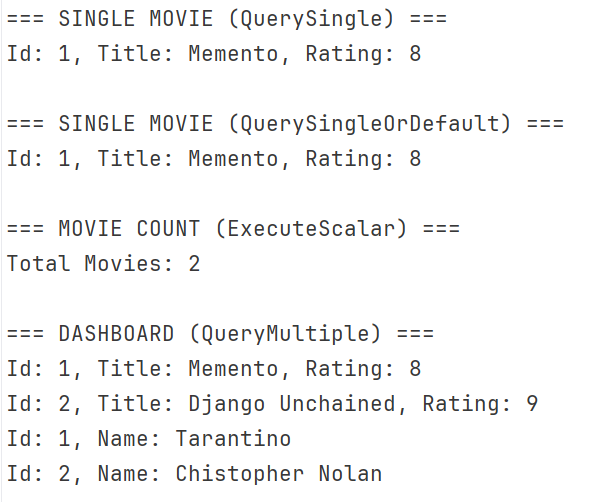
Here we are using movieRepo to call all of its methods.
Step 9: Run and test
dotnet run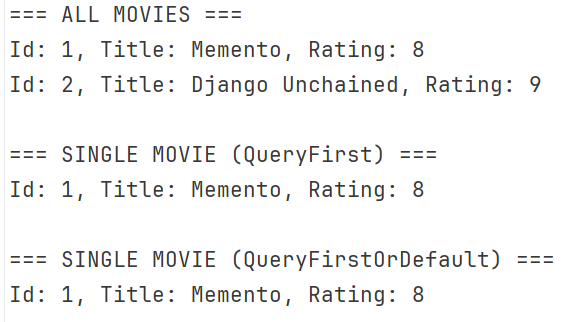
Advanced Dapper Features
We have seen some of the most common dapper methods till now. However, Dapper offers ways to tackle them as well for complex scenarios.
Working with transactions
When inserting or updating data, an exception in between the operation can leave the database inconsistent. Transactions rescue and atomize the data manipulation operations as one, either the whole block executes or fails and rolls back. Let's see how we can do it in Dapper.
public async Task CreateMovieWithDirector(Movie movie, string directorName)
{
    using var connection = _factory.CreateConnection();
    connection.Open();

    using var transaction = connection.BeginTransaction();

    try
    {
        var directorId = await connection.ExecuteScalarAsync<int>(
            @"INSERT INTO ""Director"" (""Name"")
          VALUES (@Name)
          RETURNING ""Id"";",
            new { Name = directorName },
            transaction
        );

        movie.DirectorId = directorId;

        await connection.ExecuteAsync(
            @"INSERT INTO ""Movie"" (""Title"", ""DirectorId"", ""Rating"")
          VALUES (@Title, @DirectorId, @Rating)",
            movie,
            transaction
        );

        transaction.Commit();
    }
    catch
    {
        transaction.Rollback();
        throw;
    }
}
I opened a transaction on the connection, then we first created the director before the movie, as the movie depends on the directorId. At last transaction.Commit() commits the transaction to write everything in the database, while the catch block rolls back the transaction using transaction.Rollback(). Note that I am using a parameterized query to keep the database safe from SQL injection attacks and unwanted data.
In Program.cs:
Console.WriteLine("\n=== Transaction ===");
await repo.CreateMovieWithDirector(
    new Movie()
    {
        Title = null,
        Rating = 9,
    },
    "Martin Scorsese"
);
I intentionally kept the title null, as per the repo method, the director will be added successfully, but during Movie creation, there is an error. The transaction will roll back the director insertion when the second half fails as well.
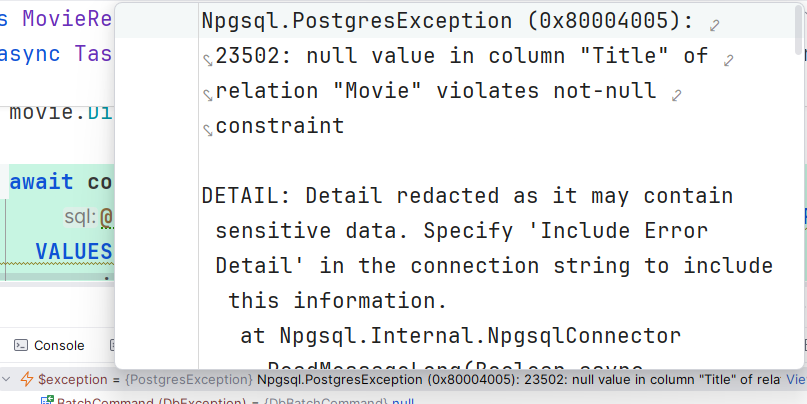
Upon correct values it will be done:
new Movie()
    {
        Title = "The Departed",
        Rating = 9
    },
Using Stored Procedures/Functions
Stored procedures and functions encapsulate complex logic and provide reusable calls. For such detailed operations, you should not write a raw query spanning dozens of lines in the code that can be difficult to maintain and organize. The best way is to abstract into functions or procedures. Let's consider a function
CREATE FUNCTION public.get_movies_by_director(
	p_director_id integer)
    RETURNS TABLE("Id" integer, "Title" text, "Rating" numeric)
    LANGUAGE 'plpgsql'
    COST 100
    VOLATILE PARALLEL UNSAFE
    ROWS 1000

AS $BODY$
BEGIN
    RETURN QUERY
    SELECT m."Id", m."Title", m."Rating"
    FROM "Movie" m
    WHERE m."DirectorId" = p_director_id;
END;
$BODY$;
repo method that calls the function
public async Task<IEnumerable<Movie>> GetMoviesByDirector(int directorId)
{
    using var connection = _factory.CreateConnection();

    return await connection.QueryAsync<Movie>(
        @"SELECT * FROM get_movies_by_director(@DirectorId)",
        new { DirectorId = directorId }
    );
}
var moviesByDirector = await repo.GetMoviesByDirector(1);
foreach (var m in moviesByDirector)
{
Console.WriteLine($"{m.Id} - {m.Title} - {m.Rating}");
}Result:

Bulk Operations with Dapper
Bulk operations are important features supported by Dapper. When inserting a large amount of data, you do not want to hit the database separately for each record, nor should you. SQL allows bulk insertion or update at once, and you can run the query with ExecuteAsync.
public async Task BulkInsertMovies(IEnumerable<Movie> movies)
{
    using var connection = _factory.CreateConnection();

    await connection.ExecuteAsync(
        @"INSERT INTO ""Movie"" (""Title"", ""DirectorId"", ""Rating"")
          VALUES (@Title, @DirectorId, @Rating)",
        movies
    );
}
Program.cs call
await repo.BulkInsertMovies(new List<Movie>
{
    new Movie { Title = "Batman Begins", DirectorId = 1, Rating = 8.2 },
    new Movie { Title = "The Dark Knight", DirectorId = 1, Rating = 9.0 }
});
Opt between Buffered and Unbuffered Query
By default, Dapper loads everything into the buffer memory. The behavior can be problematic with large datasets, so choose unbuffered queries that stream results rather than storing them in memory.
var movies = await connection.QueryAsync<Movie>(
    sql,
    buffered: false
);
Multi-Mapping (Handling JOIN Queries)
JOINs are a common way to get data from multiple tables in SQL. That common feature is workable using Dapper as well. With the same QueryAsync you can run queries with JOIN commands.
public async Task<IEnumerable<MovieWithDirector>> GetMoviesWithDirectors()
{
    using var connection = _factory.CreateConnection();

    var sql = @"
    SELECT
        m.""Id"",
        m.""Title"",
        m.""Rating"",
        d.""Name"" AS ""DirectorName""
    FROM ""Movie"" m
    JOIN ""Director"" d ON m.""DirectorId"" = d.""Id"";
";

    var result = await connection.QueryAsync<MovieWithDirector>(sql);

    return result;
}
We need a model to get the results
namespace UserDapperDemo.Models;

public class MovieWithDirector
{
    public int Id { get; set; }
    public string Title { get; set; } = string.Empty;
    public double Rating { get; set; }
    public string DirectorName { get; set; } = string.Empty;
}
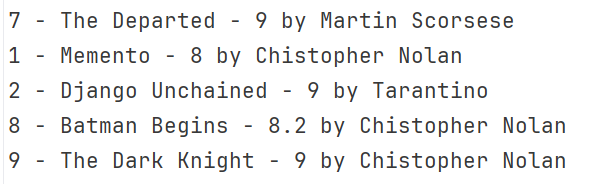
Simply printing them all after calling the repo method
var moviesWithDirectors = await repo.GetMoviesWithDirectors();

foreach (var m in moviesWithDirectors)
{
    Console.WriteLine($"{m.Id} - {m.Title} - {m.Rating} by {m.DirectorName}");
}
Result
Best Practices When Using Dapper
Following some practices can make Dapper work better than usual. These ways make the application fast, maintainable, and secure.
Use Parameterized Queries
That is general advice to always use parameters to prevent SQL injection attacks. Apart from security, some special characters, such as "," and")", can cause errors when inserting or updating string values.
Prefer Async Methods
To avoid thread block and support asynchronous, go with async versions like QueryAsync and ExecuteAsync. Applications usually run different threads in parallel, preferring async methods in Dapper.
Organize SQL Queries
Good architecture makes a project maintainable. You should handle data access as well when using Dapper. Repository pattern is a preferable choice however choose as per your requirement. Keeping long queries in files will also save mess in the code.
Manage Connections Efficiently
Database connections are like portals to the database. Open and close them the right way with using statements or connection factories to ensure that connections open only once and are properly closed after each query.
Avoid Business logic in the SQL queries
Validate the inputs and other business rules before passing them to SQL queries. This avoids unnecessary checks on SQL and keeps the single responsibility in the data access layer.on SQL and keep the single responsibility on the data access layer.
Avoid checks like
CASE WHEN rating > 5 THEN 'Good' ELSE 'Bad'It is generally good to keep the repository or other data access separate from business rules.
Cache frequently-accessed data
Database operations are always costly, try to reduce them as much as possible. Caching is one of the best ways to reduce database processing and delays. First, identify which data are most requested or don't change frequently. Set up caching and save them to provide quick access to users, rather than requesting the same data from the dataset every time.
You can follow some generic recommendations for the application apart from Dapper.
Conclusion
We rediscovered Dapper from its basic methods to its advanced features. Later, we reviewed some recommendations for using Dapper. Like any other feature, Dapper has its own world and definitions. I defined its commonly used methods and some of the advanced features. I shared a real example of how those methods and features address most database requirements. By following the tips in the article, you can scale up the use of the high-performance library.
Code: https://github.com/elmahio-blog/MovieDapperDemo.git
elmah.io: Error logging and Uptime Monitoring for your web apps
This blog post is brought to you by elmah.io. elmah.io is error logging, uptime monitoring, deployment tracking, and service heartbeats for your .NET and JavaScript applications. Stop relying on your users to notify you when something is wrong or dig through hundreds of megabytes of log files spread across servers. With elmah.io, we store all of your log messages, notify you through popular channels like email, Slack, and Microsoft Teams, and help you fix errors fast.

See how we can help you monitor your website for crashes Monitor your website