
Pattern matching in C#: Advanced scenarios you didn't know
Pattern matching is not just condition checking. It reflects how you think as a developer. Matching and validation can be achieved in a naive, descriptive way. However, a cleaner approach stands out in terms of readability and sometimes performance. Pattern matching combines patterns to express complex logic in a single, readable line. In today's post, I will cover some advanced pattern-matching solutions that developers often miss.
Implementation of pattern-matching scenarios
To show pattern matching in code, I will start by creating a console application to test out different examples.
Step 1: Create the project
dotnet new console -n PatternMatchingDemo
cd PatternMatchingDemo
Step 2: Create records
For models, I will use records because we need value types here.
namespace PatternMatchingDemo.Records;
public record Address(string City, string Country);
public record User(string Name, int Age, Address Address, List<string> Roles);
public record Request(string Source, int Priority);
public record Point(int X, int Y);
Step 3: Define collections
To use pattern matching, we need a few collections. Defining an in-memory collection, while it will mimic any real data.
var users = new List<User>
{
    new("Ali", 25, new Address("Karachi", "Pakistan"), new List<string> { "Admin", "User" }),
    new("Sara", 17, new Address("Chicago", "United States"), new List<string> { "User" }),
    new("Kennedy", 65, new Address("London", "UK"), new List<string> { "Guest" })
};

var requests = new List<Request>
{
    new("System", 10),
    new("User", 3),
    new("System", 2)
};
Step 4: Use pattern matching for different requirements
That's it for the setup. In the next sections, I will showcase pattern matching for different requirements and purposes.
Property pattern (nested matching)
foreach (var user in users)
{
    if (user is { Address.City: "Karachi" })
    {
        Console.WriteLine($"{user.Name} is from Karachi");
    }
}
Property pattern provides a clean way to match an object's properties, even when they are nested. It helps in JSON matching and DTO validation without verbosity. A traditional way without a property pattern would be:
if (user != null && user.Address != null && user.Address.City == "Karachi" && user.Age > 18)Pattern matching with not
foreach (var user in users)
{
    if (user is not { Address.City: "Karachi" })
    {
        Console.WriteLine($"{user.Name} is NOT from Karachi");
    }
}
This one is just the opposite of the previous pattern. It simply excludes the given condition and fetches all other records.
Matching multiple cases in one pattern
foreach (var user in users)
{
    if (user is { Address.City: "Karachi" or "Lahore" })
    {
        Console.WriteLine($"{user.Name} is from a major city");
    }
}
The same property matching can be extended to multiple cases. Well, the pattern is very much descriptive itself, referring to what it actually does.
Pattern matching inside LINQ
var adultsFromPakistan = users
    .Where(u => u is { Age: > 18, Address.Country: "Pakistan" })
    .ToList();

foreach (var user in adultsFromPakistan)
{
    Console.WriteLine($"{user.Name} is adult from Pakistan");
}
One of the most usable scenarios is pattern matching inside LINQ. It filters collections based on object shape and conditions.
Matching partial objects
foreach (var user in users)
{
    if (user is { Name: "Ali" })
    {
        Console.WriteLine("Found Ali");
    }
}
To match a condition, you don't even need to know the structure completely. As the example shows, you can check on a field as well.
Relational + logical patterns
foreach (var user in users)
{
    if (user.Age is > 18 and < 60)
    {
        Console.WriteLine($"{user.Name} is Adult");
    }
    else if (user.Age is < 18 or > 60)
    {
        Console.WriteLine($"{user.Name} is Special Age Group");
    }
}
The relational pattern has made the comparison easier to read. Rather than just mathematical logical operators, you can use readable keywords. Apart from readability, it offers applications like comparing ages, checking a threshold, or checking a range.
Switch expression
foreach (var user in users)
{
    var category = user.Age switch
    {
        < 13 => "Child",
        < 20 => "Teen",
        < 60 => "Adult",
        _ => "Senior"
    };

    Console.WriteLine($"{user.Name} => {category}");
}
A switch case is a well-known way to compare multiple conditions. It is an ideal way of handling multiple cases instead of using a cluster of else-if. If you have some complex code to execute, then the following version is workable:
foreach (var user in users)
{
    string category;

    // Traditional switch statement with cases
    switch (user.Age)
    {
        case < 13:
            category = "Child";
            break;
        case < 20:
            category = "Teen";
            break;
        case < 60:
            category = "Adult";
            break;
        default:
            category = "Senior";
            break;
    }

    Console.WriteLine($"{user.Name} => {category}");
}
Type + condition pattern
object value = 150;

if (value is int number && number > 100)
{
    Console.WriteLine("Large number (old way)");
}

if (value is int and > 100)
{
    Console.WriteLine("Large number (pattern matching way)");
}
The pattern checks type and condition simultaneously, liberating you from separate casting and checking logic. It is useful for object or dynamic data.
List pattern
int[] nums = { 1, 2, 3 };

if (nums is [1, 2, 3])
{
    Console.WriteLine("Exact match");
}

if (nums is [1, .., 3])
{
    Console.WriteLine("Starts with 1 and ends with 3");
}
List matching is available in C# 11 and later versions. You can match the array/list structure and content and validate without a loop. List patterns can be handy for validating sequences, checking API payload lists, and detecting start/end patterns.
Positional pattern
var point = new Point(10, 20);

if (point is (10, 20))
{
    Console.WriteLine("Point matched (10,20)");
}
Another value comparison pattern matches objects based on their constructor/deconstructed values. Positional patterns are ideal for value types, such as records, because their comparisons are lightweight.
Combined pattern
foreach (var user in users)
{
    if (user is
        {
            Age: > 18,
            Address.City: "Lahore",
            Roles: ["User", ..]
        })
    {
        Console.WriteLine($"{user.Name} is eligible Lahore user");
    }
}
This code combines different patterns. Actually, this is one of the most realistic scenarios in which complex objects and requirements are combined to implement different patterns.
Null pattern
User? maybeUser = null;

if (maybeUser is not null)
{
    Console.WriteLine("User exists");
}
else
{
    Console.WriteLine("User is null");
}
Null pattern is a cleaner and more readable alternative to the traditional != null. Its usage spans large applications, input checks, and condition matching.
Guard clause
number = 7;

var result = number switch
{
    int n when n % 2 == 0 => "Even",
    int n when n % 2 != 0 => "Odd",
    _ => "Unknown"
};

Console.WriteLine(result);
A guard clause allows an additional condition inside a switch case. It tackles complex branching logic and mathematical conditions, giving flexibility when patterns alone aren't enough.
Request handling
foreach (var request in requests)
{
    var response = request switch
    {
        { Source: "System", Priority: > 5 } => "Critical System Request",
        { Source: "User", Priority: <= 5 } => "Normal User Request",
        _ => "Fallback"
    };

    Console.WriteLine($"{request.Source} ({request.Priority}) => {response}");
}
Request handling is a remarkable way to implement business logic while keeping it readable within a switch statement. It has a ton of use cases, like event processing, request routing, and validating business rules.
Step 5: Run and test
dotnet run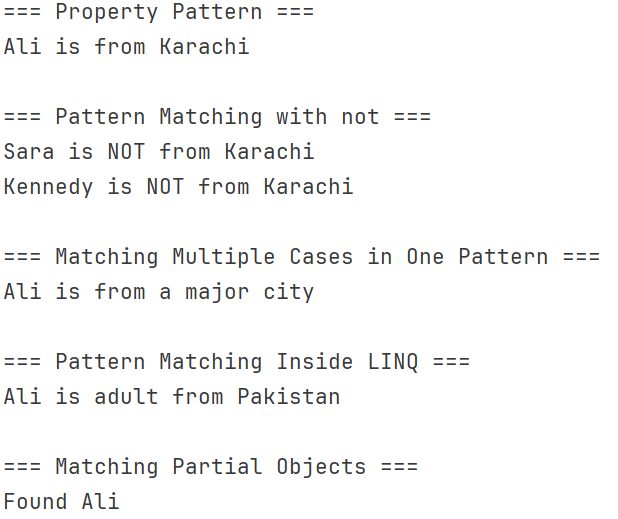
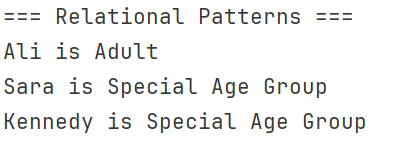
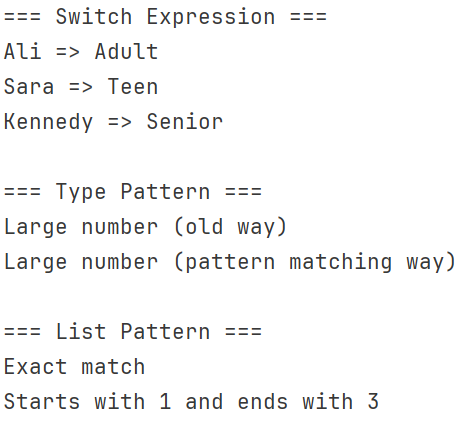
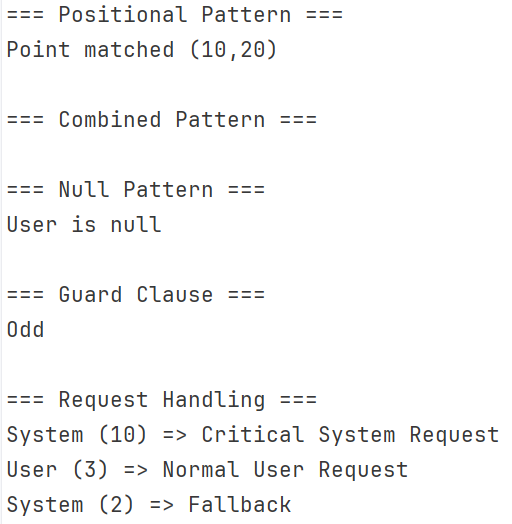
The results are expected and correct. However, we did the job more cleanly by combining patterns as needed.
Conclusion
Pattern matching has tons of usage. From validation to condition check, it is prominent. Using the right pattern at the right place can save a lot of code. In today's post, I shared some scenarios and their pattern solutions. In real scenarios, you have to know the patterns and use a combination when needed. This is real art.
Code: https://github.com/elmahio-blog/PatternMatchingDemo.git
elmah.io: Error logging and Uptime Monitoring for your web apps
This blog post is brought to you by elmah.io. elmah.io is error logging, uptime monitoring, deployment tracking, and service heartbeats for your .NET and JavaScript applications. Stop relying on your users to notify you when something is wrong or dig through hundreds of megabytes of log files spread across servers. With elmah.io, we store all of your log messages, notify you through popular channels like email, Slack, and Microsoft Teams, and help you fix errors fast.

See how we can help you monitor your website for crashes Monitor your website