
New in .NET 11: Faster ASP.NET Core APIs with runtime async
.NET 11 is officially out. Microsoft has released .NET 11 as Standard-Term Support (STS) as a successor to .NET 9 (STS) and .NET 10 (LTS). Like every version, it is not just an update but brings something new to the table. In this series, we will explore which aspects of software can be upgraded with the latest release. Today, I will shed light on runtime async in .NET 11.
Asynchronous programming is a recommended approach for operations that can block the thread, such as database and file read/write. Traditionally, .NET manages async and await tasks with the compiler-generated state machine. However, these compiler services slow down app performance and add overhead. .NET 11 introduces runtime-native async, replacing the old way with runtime-managed suspension and resumption. Today, we will see how it improves in an actual project.
What is a stack trace?
A stack trace is a diagnostic tool that shows a list of the method calls that were executing at a specific moment, such as when an error occurs. It helps trace the sequence of method calls from the most recent to the initial method, identifying the cause of the error.
Comparing .NET 11's runtime async with a .NET 10 program
I will run and compare mockup request programs in .NET 10 and .NET 11. The central idea of the demonstration is that the C# code remains the same, but the way async methods are executed changes.
.NET 10 application
Step 1: Create a new console application
Open a terminal and run the following command.
dotnet new console -n RuntimeAsync.Net10Step 2: Configure the .csproj file
<Project Sdk="Microsoft.NET.Sdk">
  <PropertyGroup>
    <OutputType>Exe</OutputType>
    <TargetFramework>net10.0</TargetFramework>
    <ImplicitUsings>enable</ImplicitUsings>
    <Nullable>enable</Nullable>
  </PropertyGroup>
</Project>
I specified .NET 10 as the target framework along with other traditional console app setup.
Step 3: Add the demonstration code
using System.Diagnostics;

Console.WriteLine($"Runtime: {System.Runtime.InteropServices.RuntimeInformation.FrameworkDescription}");
Console.WriteLine("Runtime Async comparison demo");
Console.WriteLine();

Console.WriteLine("1) Live stack trace after an asynchronous suspension:");
await FirstAsync();

Console.WriteLine();
Console.WriteLine("2) Small async workload (illustrative timing, not a benchmark):");

const int iterations = 20_000;

// Warm up the JIT before taking the sample.
await RunWorkloadAsync(1_000);

var stopwatch = Stopwatch.StartNew();
var result = await RunWorkloadAsync(iterations);
stopwatch.Stop();

Console.WriteLine($"Completed {iterations:N0} asynchronous yields.");
Console.WriteLine($"Result: {result:N0}");
Console.WriteLine($"Elapsed: {stopwatch.Elapsed.TotalMilliseconds:N2} ms");

static async Task FirstAsync()
{
    await SecondAsync();
}

static async Task SecondAsync()
{
    await ThirdAsync();
}

static async Task ThirdAsync()
{
    await Task.Yield();

    Console.WriteLine("Stack captured inside ThirdAsync:");
    Console.WriteLine(new StackTrace(fNeedFileInfo: false));
}

static async Task<int> RunWorkloadAsync(int iterations)
{
    var total = 0;

    for (var i = 0; i < iterations; i++)
    {
        await DoOneAsync(i);
        total += i;
    }

    return total;
}

static async Task DoOneAsync(int value)
{
    await Task.Yield();
    _ = value;
}
FrameworkDescription identifies the runtime executing the application. I called FirstAsync() and waited for its completion. FirstAsync is a nested call, so the execution order is:
- the application calls
FirstAsync(). FirstAsync()callsSecondAsync().SecondAsync()callsThirdAsync().ThirdAsync()reachesawait Task.Yield().- Execution yields, allowing the current thread to do other work.
- The continuation resumes and prints a stack trace.
This chain demonstrates how async methods appear in a live stack trace when execution resumes after suspension.
The latter part measures async execution overhead.
var result = await RunWorkloadAsync(20_000);To repeatedly exercise asynchronous suspension and resumption to measure execution time, we need a bigger sample of work. A single async operation is too small to provide a meaningful timing comparison. I am repeating it 20,000 times to increase the workload. It executes as follows.
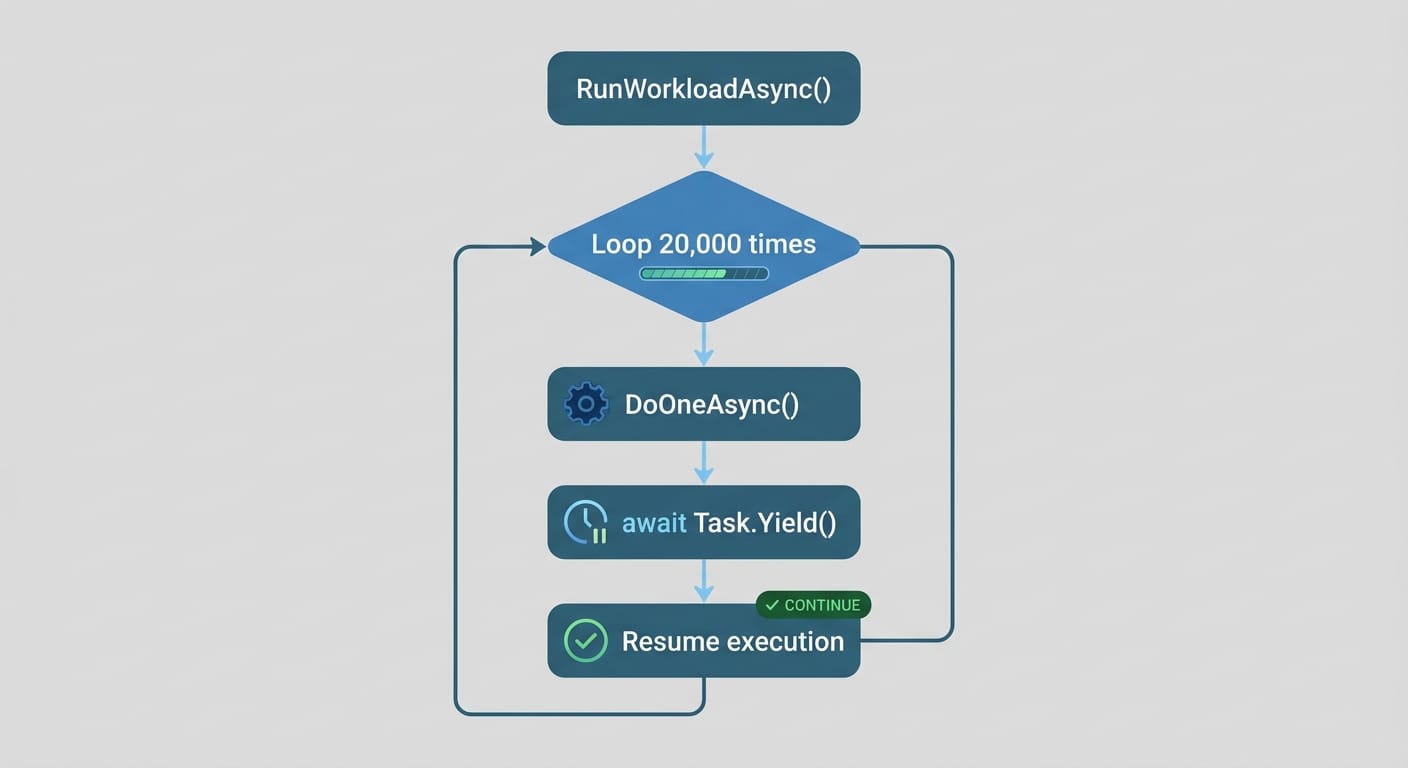
The DoOneAsync method mimics a sequential async operation. Task.Yield() forces the method to yield execution and schedule its continuation to run later. The loop over DoOneAsync is waiting for each asynchronous operation to finish before proceeding to the next iteration. In a real scenario, DoOneAsync() might instead query PostgreSQL, call an external HTTP API, or read from Azure storage.
Step 4: Run the project
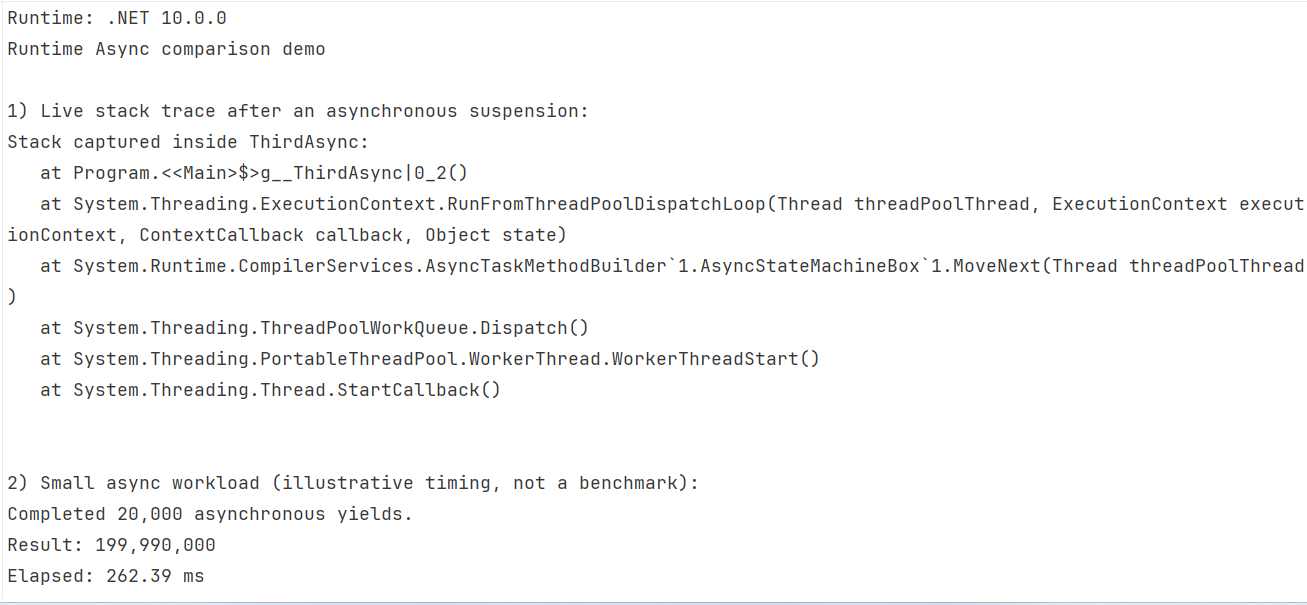
dotnet runOutput
.NET 11 application
So, similarly, I will create one console application in .NET 11 as well. Before going to project creation, make sure you have .NET 11 installed from Microsoft here.
Step 1: Create a new console application
dotnet new console -n RuntimeAsync.Net11Step 2: Configure the .csproj file
<Project Sdk="Microsoft.NET.Sdk">
  <PropertyGroup>
    <OutputType>Exe</OutputType>
    <TargetFramework>net11.0</TargetFramework>
    <ImplicitUsings>enable</ImplicitUsings>
    <Nullable>enable</Nullable>
    <Features>$(Features);runtime-async=on</Features>
  </PropertyGroup>
</Project>
runtime-async=on enables Runtime Async for eligible application code.
Step 3: Copy the same Program.cs
Copy the complete Program.cs from your .NET 10 project into this project.
Step 4: Run the application
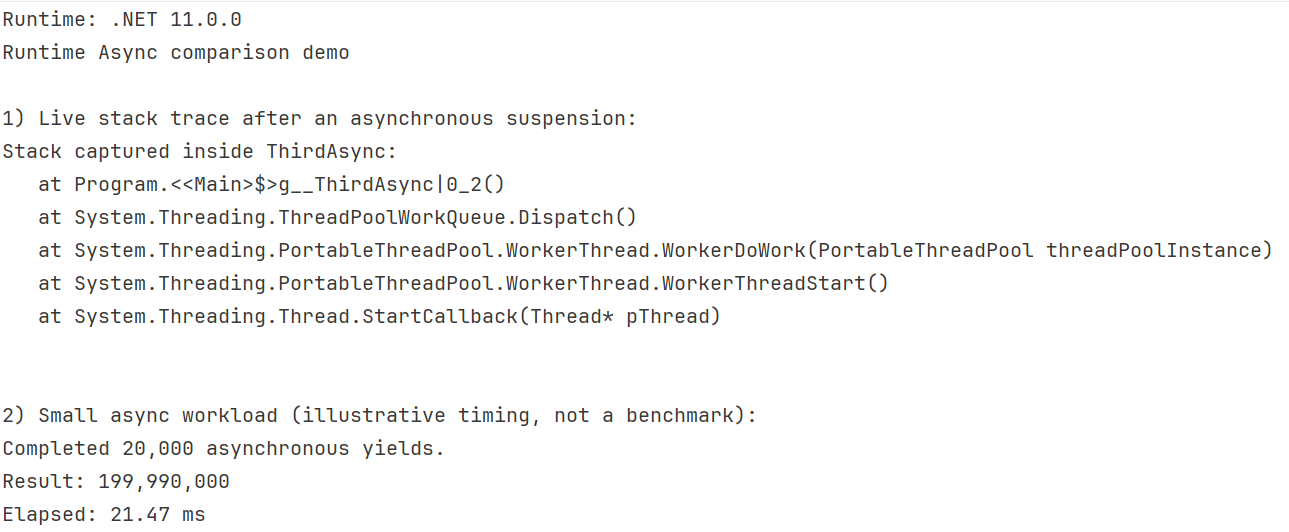
dotnet runThe application should now report the .NET 11 runtime.
What Runtime Async changed in .NET 11?
As we saw earlier, the compiler generates the state machine for async await operations. Runtime Async changes this at its heart and takes over more of the suspension and resumption work instead of relying on the traditional compiler-generated state-machine implementation for eligible methods. This is the central architectural change in .NET 11.
These state machines keep track of the method's current state, preserve the required local variables, and resume execution when an awaited operation completes. The traditional method works well. However, managing these state machines introduces additional overhead, particularly in applications that execute large numbers of asynchronous operations.
.NET 11 introduces Runtime Async V2, which changes how eligible async methods are implemented and executed. As the name suggests, the runtime is responsible for managing asynchronous execution rather than relying on the traditional compiler-generated state machine. As we saw in the example code, you don't need to change anything, but the execution of async methods is handled internally.
Let's break down the changes in .NET 11's Runtime Async.
Cleaner Live Stack Traces
One of the most visible improvements is how .NET represents asynchronous methods in live stack traces.
With the traditional implementation, compiler-generated state machines introduce additional stack frames. These frames expose internal implementation details and can make it harder to follow the actual application call chain, as seen in the console of our .NET 10 project.
Runtime Async removes this state-machine infrastructure from the visible call stack. Instead, stack traces show the original async methods directly.
Without Runtime Async, the stack trace contains additional frames such as AsyncMethodBuilderCore.Start<TStateMachine>, exposing the compiler-generated state-machine infrastructure.
With Runtime Async enabled, those internal frames disappear, leaving a much cleaner call chain. It is particularly useful when working with profilers, diagnostic logging, and debugger call stack windows.
Note that this improvement concerns live stack traces, such as those captured using new StackTrace(). Exception stack traces were already able to reconstruct the async call chain through existing compiler-generated exception-handling mechanisms.
Lower Allocation Overhead
Runtime Async V2 helps reduce unnecessary allocations in asynchronous execution.
For example, the runtime can reuse continuation objects more aggressively and avoid saving local variables that do not need to be preserved across an asynchronous suspension. It also optimizes how async methods handle suspension points, reducing the amount of generated code and associated execution overhead.
These improvements can be particularly useful in applications that execute large numbers of asynchronous operations, where even small reductions in per-operation overhead can add up.
More Efficient JIT Compilation
.NET 11 also improves how the JIT compiler handles runtime-async methods. Previously, certain async methods could require an additional layer of indirection when returning tasks. The JIT can now generate a dedicated runtime-async version of eligible methods, avoiding that extra layer.
Other improvements include:
- Tail-merged suspension points: Reduces duplicated generated code and helps produce smaller machine code.
- Tiered async compilation: Allows frequently executed async methods to benefit from further JIT optimizations after warm-up.
- Task and ValueTask factory optimizations: Recognizes common operations such as
Task.FromResult,Task.CompletedTask, andValueTask.FromResultto generate more efficient execution paths. - Tail-await optimizations: Improves methods that directly return another asynchronous operation, including paths involving
Task.Yield().
Together, these changes help reduce the execution overhead of asynchronous methods.
Reduced ExecutionContext Overhead
Another improvement involves ExecutionContext, which carries ambient information across asynchronous operations, including values stored in AsyncLocal<T>.
Traditionally, task continuations captured and restored this context upon resumption. However, in cases where there was no ambient state to restore, this could introduce unnecessary work.
.NET 11 can detect when a continuation has nothing to restore and skip the capture and restoration process. This benefits Task, Task<T>, ValueTask, and ValueTask<T>, as well as the Runtime Async execution path.
For applications with high-throughput asynchronous workloads, avoiding unnecessary context operations can help reduce overhead.
NativeAOT and ReadyToRun Support
Runtime Async is not limited to applications using the JIT compiler. .NET 11 also supports NativeAOT and ReadyToRun (R2R) compilation. This means that applications using ahead-of-time compilation can also benefit from the new asynchronous execution model.
The runtime also removes previous restrictions that prevented runtime-async methods from being inlined during crossgen2 compilation, improving optimization opportunities for ReadyToRun applications.
Improved Debugging Experience
Runtime Async also improves the debugging experience.
Breakpoints can bind correctly inside runtime-async methods, and developers can step across await boundaries without being taken through compiler-generated state-machine infrastructure. Combined with cleaner live stack traces, this makes asynchronous code easier to inspect and debug.
Conclusion
.NET 11 is out, with features and improvements across the .NET ecosystem. In this series of articles covering what is new in .NET 11, I covered Runtime Async replacing the compiler-generated state machine. I compared .NET 10 and .NET 11 projects side by side. The difference is in how eligible async methods are handled internally by the runtime, not in how developers write them. Overall, Runtime Async changes more than just the way async methods appear in stack traces. It introduces a runtime-managed execution model, along with improvements to allocation, continuation handling, JIT compilation, and debugging.
Code: https://github.com/elmahio-blog/RuntimeAsyncComparison
elmah.io: Error logging and Uptime Monitoring for your web apps
This blog post is brought to you by elmah.io. elmah.io is error logging, uptime monitoring, deployment tracking, and service heartbeats for your .NET and JavaScript applications. Stop relying on your users to notify you when something is wrong or dig through hundreds of megabytes of log files spread across servers. With elmah.io, we store all of your log messages, notify you through popular channels like email, Slack, and Microsoft Teams, and help you fix errors fast.

See how we can help you monitor your website for crashes Monitor your website