
Designing APIs for AI agents: your API has a new user
For years, APIs have had one primary audience: applications. A frontend calls an endpoint, receives a response, and the developer handles whatever happens next. All of it was from a human user. Now, we have a new player: AI. Instead of simply following predefined application logic, an agent can decide which endpoints to call, determine the order of operations, retry failed requests, and carry out multi-step tasks based on a user's goal. Your API is no longer just serving an application, it may be serving an AI system capable of taking action. Companies like Stripe, Twilio, and Shopify have already launched dedicated Model Context Protocol servers to capture agent-driven traffic.
In this article, I will share practical patterns that can make an ASP.NET Core API easier for AI agents to discover, understand, and use safely. This isn't a complete guide, but a checklist you can follow to make APIs AI-compatible.
Design an ASP .NET Core API for AI agents
Let's incorporate the necessary points into an API.
Step 1: Create project
dotnet new webapi -n AgentReadyApi
cd AgentReadyApi
Step 2: Install the required packages
dotnet add package Microsoft.EntityFrameworkCore.Design
dotnet add package Microsoft.AspNetCore.Authentication.JwtBearer
dotnet add package Npgsql.EntityFrameworkCore.PostgreSQL
dotnet add package Microsoft.EntityFrameworkCore
dotnet add package Scalar.AspNetCore
A notable NuGet package is Scalar.AspNetCore apart from those that provide EF Core and the database. I will use Scalar UI with the OpenAPI document to display and test endpoints.
Step 3: Create models and enum
For our database tables, add an Invoice table.
public class Invoice
{
    public Guid Id { get; set; }

    public string CustomerId { get; set; } = null!;

    public decimal Amount { get; set; }

    public string Currency { get; set; } = "USD";

    public InvoiceStatus Status { get; set; }

    public string ClientReference { get; set; } = null!;

    public DateTime CreatedAt { get; set; }

    public DateTime? UpdatedAt { get; set; }
}
Make sure to create the Status enum.
public enum InvoiceStatus
{
    Draft = 1,
    Finalized = 2,
    Paid = 3,
    Cancelled = 4
}
Status is necessary to restrict input to fixed values rather than an open-ended string.
Step 4: Set up DbContext
public class AppDbContext : DbContext
{
    public AppDbContext(DbContextOptions<AppDbContext> options)
        : base(options)
    {
    }

    public DbSet<IdempotencyRecord> IdempotencyRecords => Set<IdempotencyRecord>();
    public DbSet<Invoice> Invoices => Set<Invoice>();

    protected override void OnModelCreating(ModelBuilder modelBuilder)
    {
        modelBuilder.Entity<Invoice>(entity =>
        {
            entity.HasKey(x => x.Id);

            entity.Property(x => x.CustomerId)
                .IsRequired()
                .HasMaxLength(100);

            entity.Property(x => x.Currency)
                .IsRequired()
                .HasMaxLength(3);

            entity.Property(x => x.Amount)
                .HasPrecision(18, 2);

            entity.Property(x => x.Status)
                .HasConversion<string>();

            entity.Property(x => x.CreatedAt)
                .IsRequired();
        });
    }
}
Well, I have used the fluent API to configure the necessary model. Alternatively, you can use attributes as well.
Create strong Data Transfer Objects (DTOs)
Don't let an AI agent discover your database model. Introduce DTOs for the input.
public class CreateInvoiceRequest
{
    /// <summary>
    /// Customer that owns the invoice.
    /// </summary>
    [Required]
    public string CustomerId { get; init; } = null!;

    /// <summary>
    /// Invoice amount. Must be greater than zero.
    /// </summary>
    [Range(0.01, 999999999)]
    public decimal Amount { get; init; }

    /// <summary>
    /// Three-letter ISO currency code.
    /// </summary>
    [Required]
    [StringLength(3, MinimumLength = 3)]
    public string Currency { get; init; } = "USD";

    /// <summary>
    /// Unique client-side reference used for reconciliation.
    /// </summary>
    [Required]
    public string ClientReference { get; init; } = null!;
}
Also, for operations like update and cancel, we need separate DTOs.
public class CancelInvoiceRequest
{
    /// <summary>
    /// The unique identifier of the cancellation intent previously created for the invoice.
    /// </summary>
    public Guid IntentId { get; init; }

    /// <summary>
    /// The unique identifier of the invoice to cancel.
    /// </summary>
    public Guid InvoiceId { get; init; }

    /// <summary>
    /// The date and time when the cancellation intent expires.
    /// </summary>
    public DateTime ExpiresAt { get; init; }
}
Enrich OpenAPI documentation
Give a summary of each property so the machine user can connect the dots predictively. Use attributes like [Required] and [StringLength] to enrich the document with data validation so AI knows the data limits. Sometimes you need to define an attribute for your business logic.
Write machine-readable error responses
Standard HTTP status codes are insufficient for AI agents. We need proper responses for both successful and error cases.
Invoice response class.
public class InvoiceResponse
{
    public Guid Id {get; set; }
    public string CustomerId {get; set; }
    public decimal Amount {get; set; }

    public string Currency {get; set; }
    public string Status {get; set; }

    public DateTime CreatedAt {get; set; }
    public string ClientReference { get; set; } = null!;
}
Paginated response.
public record PaginatedResponse<T>(
    IReadOnlyList<T> Items,
    string? NextCursor
);
For consistency and reusability, I added a generic response class.
Step 5: Create Services
public interface IInvoiceService
{
    Task<PaginatedResponse<InvoiceResponse>> GetInvoicesAsync(
        string? status,
        int limit,
        string? cursor,
        CancellationToken cancellationToken);

    Task<InvoiceResponse> CreateAsync(
        CreateInvoiceRequest request,
        string idempotencyKey,
        CancellationToken cancellationToken);

    Task<InvoiceResponse> GetByIdAsync(
        Guid id,
        CancellationToken cancellationToken);

    Task<InvoiceResponse> FinalizeAsync(
        Guid id,
        CancellationToken cancellationToken);

    Task<CancelInvoiceRequest> CreateCancellationIntentAsync(
        Guid id,
        CancellationToken cancellationToken);

    Task<InvoiceResponse> CancelAsync(
        CancelInvoiceRequest input,
        CancellationToken cancellationToken);
}
The implementation.
public sealed class InvoiceService : IInvoiceService
{
    private readonly AppDbContext _db;

    public InvoiceService(AppDbContext db)
    {
        _db = db;
    }

    public async Task<PaginatedResponse<InvoiceResponse>> GetInvoicesAsync(
        string? status,
        int limit,
        string? cursor,
        CancellationToken cancellationToken)
    {
        if (limit <= 0)
        {
            throw new ApiException(
                StatusCodes.Status400BadRequest,
                "INVALID_LIMIT",
                "Limit must be greater than zero.");
        }

        if (limit > 100)
        {
            throw new ApiException(
                StatusCodes.Status400BadRequest,
                "LIMIT_TOO_LARGE",
                "Limit cannot be greater than 100.");
        }

        var query = _db.Invoices
            .AsNoTracking()
            .AsQueryable();

        // Optional status filter
        if (!string.IsNullOrWhiteSpace(status))
        {
            if (!Enum.TryParse<InvoiceStatus>(
                    status,
                    ignoreCase: true,
                    out var invoiceStatus))
            {
                throw new ApiException(
                    StatusCodes.Status400BadRequest,
                    "INVALID_STATUS",
                    $"Invalid invoice status '{status}'.");
            }

            query = query.Where(x => x.Status == invoiceStatus);
        }

        // Cursor pagination
        if (!string.IsNullOrWhiteSpace(cursor))
        {
            if (!Guid.TryParse(cursor, out var cursorId))
            {
                throw new ApiException(
                    StatusCodes.Status400BadRequest,
                    "INVALID_CURSOR",
                    "The supplied cursor is invalid.");
            }

            query = query.Where(x => x.Id > cursorId);
        }

        var invoices = await query
            .OrderBy(x => x.Id)
            .Take(limit + 1)
            .ToListAsync(cancellationToken);

        var hasMore = invoices.Count > limit;

        if (hasMore)
        {
            invoices = invoices.Take(limit).ToList();
        }

        var items = invoices
            .Select(MapToResponse)
            .ToList();

        string? nextCursor = null;

        if (hasMore && invoices.Count > 0)
        {
            nextCursor = invoices[^1].Id.ToString();
        }

        return new PaginatedResponse<InvoiceResponse>(
            items,
            nextCursor);
    }

    public async Task<InvoiceResponse> CreateAsync(
        CreateInvoiceRequest request,
        string idempotencyKey,
        CancellationToken cancellationToken)
    {
        if (string.IsNullOrWhiteSpace(idempotencyKey))
        {
            throw new ApiException(
                StatusCodes.Status400BadRequest,
                "IDEMPOTENCY_KEY_REQUIRED",
                "Idempotency-Key header is required.");
        }

        var existing = await _db.Invoices
            .AsNoTracking()
            .FirstOrDefaultAsync(
                x => x.ClientReference == request.ClientReference,
                cancellationToken);

        if (existing is not null)
        {
            return MapToResponse(existing);
        }

        var invoice = new Invoice
        {
            Id = Guid.NewGuid(),
            CustomerId = request.CustomerId,
            Amount = request.Amount,
            Currency = request.Currency.ToUpperInvariant(),
            ClientReference = request.ClientReference,
            Status = InvoiceStatus.Draft,
            CreatedAt = DateTime.UtcNow
        };

        _db.Invoices.Add(invoice);

        await _db.SaveChangesAsync(cancellationToken);

        return MapToResponse(invoice);
    }

    public async Task<InvoiceResponse> GetByIdAsync(
        Guid id,
        CancellationToken cancellationToken)
    {
        var invoice = await _db.Invoices
            .AsNoTracking()
            .FirstOrDefaultAsync(
                x => x.Id == id,
                cancellationToken);

        if (invoice is null)
        {
            throw new ApiException(
                StatusCodes.Status404NotFound,
                "INVOICE_NOT_FOUND",
                "The requested invoice was not found.");
        }

        return MapToResponse(invoice);
    }

    public async Task<InvoiceResponse> FinalizeAsync(
        Guid id,
        CancellationToken cancellationToken)
    {
        var invoice = await _db.Invoices
            .FirstOrDefaultAsync(
                x => x.Id == id,
                cancellationToken);

        if (invoice is null)
        {
            throw new ApiException(
                StatusCodes.Status404NotFound,
                "INVOICE_NOT_FOUND",
                "The requested invoice was not found.");
        }

        if (invoice.Status != InvoiceStatus.Draft)
        {
            throw new ApiException(
                StatusCodes.Status409Conflict,
                "INVALID_INVOICE_STATE",
                "Only draft invoices can be finalized.");
        }

        invoice.Status = InvoiceStatus.Finalized;
        invoice.UpdatedAt = DateTime.UtcNow;

        await _db.SaveChangesAsync(cancellationToken);

        return MapToResponse(invoice);
    }

    public async Task<CancelInvoiceRequest>
        CreateCancellationIntentAsync(
            Guid id,
            CancellationToken cancellationToken)
    {
        var invoice = await _db.Invoices
            .AsNoTracking()
            .FirstOrDefaultAsync(
                x => x.Id == id,
                cancellationToken);

        if (invoice is null)
        {
            throw new ApiException(
                StatusCodes.Status404NotFound,
                "INVOICE_NOT_FOUND",
                "The requested invoice was not found.");
        }

        if (invoice.Status == InvoiceStatus.Paid)
        {
            throw new ApiException(
                StatusCodes.Status409Conflict,
                "INVOICE_ALREADY_PAID",
                "A paid invoice cannot be cancelled.");
        }

        if (invoice.Status == InvoiceStatus.Cancelled)
        {
            throw new ApiException(
                StatusCodes.Status409Conflict,
                "INVOICE_ALREADY_CANCELLED",
                "The invoice is already cancelled.");
        }

        return new CancelInvoiceRequest
        {
            IntentId = Guid.NewGuid(),
            InvoiceId = invoice.Id,
            ExpiresAt = DateTime.UtcNow.AddMinutes(5)
        };
    }

    public async Task<InvoiceResponse> CancelAsync(
        CancelInvoiceRequest input,
        CancellationToken cancellationToken)
    {
        if (input.IntentId == Guid.Empty)
        {
            throw new ApiException(
                StatusCodes.Status400BadRequest,
                "INVALID_INTENT",
                "A valid cancellation intent is required.");
        }

        var invoice = await _db.Invoices
            .FirstOrDefaultAsync(
                x => x.Id == input.InvoiceId,
                cancellationToken);

        if (invoice is null)
        {
            throw new ApiException(
                StatusCodes.Status404NotFound,
                "INVOICE_NOT_FOUND",
                "The requested invoice was not found.");
        }

        if (invoice.Status == InvoiceStatus.Paid)
        {
            throw new ApiException(
                StatusCodes.Status409Conflict,
                "INVOICE_ALREADY_PAID",
                "A paid invoice cannot be cancelled.");
        }

        if (invoice.Status == InvoiceStatus.Cancelled)
        {
            throw new ApiException(
                StatusCodes.Status409Conflict,
                "INVOICE_ALREADY_CANCELLED",
                "The invoice is already cancelled.");
        }

        invoice.Status = InvoiceStatus.Cancelled;
        invoice.UpdatedAt = DateTime.UtcNow;

        await _db.SaveChangesAsync(cancellationToken);

        return MapToResponse(invoice);
    }

    private static InvoiceResponse MapToResponse(
        Invoice invoice)
    {
        return new InvoiceResponse
        {
            Id = invoice.Id,
            CustomerId = invoice.CustomerId,
            Amount = invoice.Amount,
            Currency = invoice.Currency,
            Status = invoice.Status.ToString().ToLowerInvariant(),
            ClientReference = invoice.ClientReference,
            CreatedAt = invoice.CreatedAt
        };
    }
}
Add pagination and limits
Prevent agents from fetching thousands of records and burning the context by limiting record access. In the implementation above, I allowed 1 to 100 records to be fetched at a time, which is practical for a single fetch. Notice this part.
if (limit <= 0)
{
    throw new ApiException(
        StatusCodes.Status400BadRequest,
        "INVALID_LIMIT",
        "Limit must be greater than zero.");
}

if (limit > 100)
{
    throw new ApiException(
        StatusCodes.Status400BadRequest,
        "LIMIT_TOO_LARGE",
        "Limit cannot be greater than 100.");
}
Here I throw exceptions with meaningful, contextual error messages when the input is out of limits. Next, while fetching, I get the paginated data.
.OrderBy(x => x.Id)
.Take(limit + 1)
The cursor represents the position in the dataset, rather than a page number in traditional pagination. It is an opaque continuation token that tells the API where to resume retrieving a collection. Instead of asking an agent to calculate page numbers, the API returns a cursor with each response, and the agent sends that cursor back to retrieve the next batch. For operations that require bulk data, add a dedicated endpoint, but that rarely happens, and we usually don't transmit hundreds of rows over the network.
Designing for Probabilistic Agent Behaviour
Because LLMs are probabilistic, agents can behave unpredictably, particularly in complex or long-running workflows. Clear empty-response semantics help agents distinguish between “no data exists” and “an error occurred.” Including links to related actions can further guide agents by exposing the possible next steps.
Define a custom exception
public class ApiException : Exception
{
    public int StatusCode { get; }
    public string ErrorCode { get; }

    public ApiException(
        int statusCode,
        string errorCode,
        string message)
        : base(message)
    {
        StatusCode = statusCode;
        ErrorCode = errorCode;
    }
}
Create the exception handler.
using Microsoft.AspNetCore.Diagnostics;
using Microsoft.AspNetCore.Mvc;

namespace AgentReadyApi.Exceptions;
public sealed class GlobalExceptionHandler : IExceptionHandler
{
    private readonly IProblemDetailsService _problemDetailsService;

    public GlobalExceptionHandler(
        IProblemDetailsService problemDetailsService)
    {
        _problemDetailsService = problemDetailsService;
    }
    public async ValueTask<bool> TryHandleAsync(
        HttpContext httpContext,
        Exception exception,
        CancellationToken cancellationToken)
    {
        var statusCode = exception is ApiException apiException
            ? apiException.StatusCode
            : StatusCodes.Status500InternalServerError;

        var errorCode = exception is ApiException apiEx
            ? apiEx.ErrorCode
            : "INTERNAL_SERVER_ERROR";

        httpContext.Response.StatusCode = statusCode;

        var problem = new ProblemDetails
        {
            Status = statusCode,

            Title = exception is ApiException
                ? exception.Message
                : "An unexpected error occurred.",

            Detail = exception is ApiException
                ? exception.Message
                : "An unexpected error occurred.",

            Type = $"https://api.invoice.com/problems/{errorCode}"
        };

        problem.Extensions["errorCode"] = errorCode;

        await _problemDetailsService.WriteAsync(
            new ProblemDetailsContext
            {
                HttpContext = httpContext,
                ProblemDetails = problem
            });

        return true;
    }
}
builder.Services.AddProblemDetails();
builder.Services.AddExceptionHandler<GlobalExceptionHandler>();Add the middleware.
app.UseExceptionHandler();Now ASP.NET Core can produce RFC 7807-style responses.
{
  "type": "https://api.example.com/problems/invalid-invoice-state",
  "title": "Invalid invoice state",
  "status": 409,
  "detail": "A paid invoice cannot be cancelled.",
  "errorCode": "INVALID_INVOICE_STATE"
}
Which is much better than sending "something went wrong".
Add correlation IDs
Agents can make multiple requests and retries. You need to know which requests belong together.
public class CorrelationIdMiddleware
{
    private const string HeaderName = "X-Correlation-ID";

    private readonly RequestDelegate _next;

    public CorrelationIdMiddleware(RequestDelegate next)
    {
        _next = next;
    }

    public async Task InvokeAsync(HttpContext context)
    {
        var correlationId =
            context.Request.Headers[HeaderName].FirstOrDefault()
            ?? Guid.NewGuid().ToString();

        context.Response.Headers[HeaderName] = correlationId;

        context.Items[HeaderName] = correlationId;

        await _next(context);
    }
}
Inject the middleware.
app.UseMiddleware<CorrelationIdMiddleware>();Add Idempotency
This is one of the most important parts for agents.
Suppose the agent sends:
POST /api/invoices

Idempotency-Key: abc-123
The network times out.
The agent doesn't know whether the invoice was created.
So it retries:
POST /api/invoices

Idempotency-Key: abc-123
Without idempotency:
Invoice #1 created
Invoice #2 created
which is bad.
With idempotency:
Request 1 → Invoice #1 created
Request 2 → Existing Invoice #1 returned
Use idempotency keys for operations that create irreversible side effects.
Create the IdempotencyRecord for the database table.
public class IdempotencyRecord
{
    [Key]
    public Guid Id { get; set; }

    public string Key { get; set; } = null!;

    public string RequestHash { get; set; } = null!;

    public int StatusCode { get; set; }

    public string ResponseBody { get; set; } = null!;

    public DateTime CreatedAt { get; set; }
}
Add it in the DbContext
public DbSet<IdempotencyRecord> IdempotencyRecords => Set<IdempotencyRecord>();Add a unique index:
modelBuilder.Entity<IdempotencyRecord>()
    .HasIndex(x => x.Key)
    .IsUnique();
Create Controller
using AgentReadyApi.Data.Services;
using AgentReadyApi.Models.Dtos;
using Microsoft.AspNetCore.Authorization;
using Microsoft.AspNetCore.Mvc;
using Microsoft.AspNetCore.RateLimiting;

namespace AgentReadyApi.Controllers;
[ApiController]
[Route("api/invoice")]
public class InvoiceController : ControllerBase
{
    private readonly IInvoiceService _service;

    public InvoiceController(IInvoiceService service)
    {
        _service = service;
    }

    /// <summary>
    /// Lists invoices for the authenticated merchant.
    /// </summary>
    [HttpGet]
    public async Task<IActionResult> GetInvoicesAsync(
        [FromQuery] string? status,
        [FromQuery] int limit = 20,
        [FromQuery] string? cursor = null,
        CancellationToken cancellationToken = default)
    {
        var result = await _service.GetInvoicesAsync(
            status,
            limit,
            cursor,
            cancellationToken);

        return Ok(result);
    }

    /// <summary>
    /// Creates a draft invoice.
    /// </summary>
    [HttpPost]
    public async Task<IActionResult> CreateInvoiceAsync(
        [FromHeader(Name = "Idempotency-Key")]
        string idempotencyKey,
        CreateInvoiceRequest request,
        CancellationToken cancellationToken)
    {
        var result = await _service.CreateAsync(
            request,
            idempotencyKey,
            cancellationToken);

        return CreatedAtAction(
            nameof(GetInvoice),
            new { id = result.Id },
            new
            {
                result.Id,
                result.Status
            });
    }

    /// <summary>
    /// Gets an invoice by ID.
    /// </summary>
    [HttpGet("{id:guid}")]
    public async Task<IActionResult> GetInvoice(
        Guid id,
        CancellationToken cancellationToken)
    {
        var invoice = await _service.GetByIdAsync(
            id,
            cancellationToken);

        return Ok(invoice);
    }

    /// <summary>
    /// Finalizes a draft invoice.
    /// </summary>
    [HttpPost("{id:guid}/finalize")]
    public async Task<IActionResult> FinalizeAsync(
        Guid id,
        CancellationToken cancellationToken)
    {
        var result = await _service.FinalizeAsync(
            id,
            cancellationToken);

        return Ok(result);
    }

    /// <summary>
    /// Creates a cancellation intent.
    /// </summary>
    [HttpPost("{id:guid}/cancellation-intent")]
    public async Task<IActionResult> CreateCancellationIntentAsync(
        Guid id,
        CancellationToken cancellationToken)
    {
        var intent = await _service.CreateCancellationIntentAsync(
            id,
            cancellationToken);

        return Ok(intent);
    }

    /// <summary>
    /// Cancels an invoice using a previously created intent.
    /// </summary>
    [HttpPost("cancel")]
    public async Task<IActionResult> CancelAsync(
        [FromBody] CancelInvoiceRequest request,
        CancellationToken cancellationToken)
    {
        var result = await _service.CancelAsync(
            request,
            cancellationToken);

        return Ok(result);
    }
}
With the create endpoint, we have [FromHeader(Name = "Idempotency-Key")] string idempotency key to implement idempotency. Cancellation intent is the alternative to delete because an AI agent could accidentally delete something.
Define each endpoint with a clear name and precise intent, rather than vague verbs.
Name everything consistently
Maintain a consistent naming convention across the application. Inconsistent names can confuse the agent. If you use userId at one place, then don't do user_id or userID elsewhere, but stick to one rule.
Add async processing
Make all operations that may wait asynchronous. Don't let agents wait 30 seconds by stopping the thread, although this is generally recommended for a human audience too.
LLM-Optimized Metadata
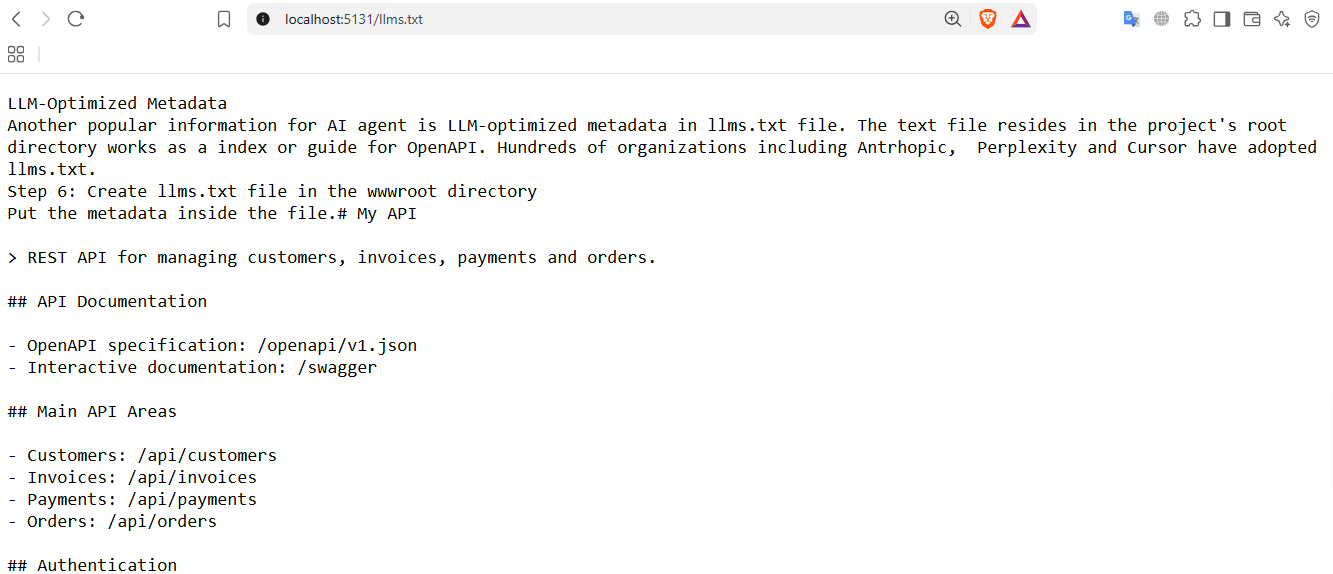
Another popular piece of information for AI agents is LLM-optimized metadata in the llms.txt file. The text file resides in the project's root directory and works as an index or guide for OpenAPI. Hundreds of organizations including Anthropic, Perplexity and Cursor, have adopted llms.txt.
Create a llms.txt file in the wwwroot directory. Put the metadata inside the file.
# My API

> REST API for managing customers, invoices, payments and orders.

## API Documentation

- OpenAPI specification: /openapi/v1.json
- Interactive documentation: /swagger

## Main API Areas

- Customers: /api/customers
- Invoices: /api/invoices
- Payments: /api/payments
- Orders: /api/orders

## Authentication

OAuth 2.0 / OpenID Connect.

## Agent Guidance

- Use the OpenAPI specification for the complete list of operations.
- Respect required permissions and scopes.
- Use Idempotency-Key for state-changing operations where required.
- Errors are returned using RFC 7807 Problem Details.
Although we only created the invoice controller here, a real project usually has many more namespaces and controllers, like customers, payments, etc.
Allow static files in Progam.cs
app.UseStaticFiles();llms.txt is a discovery document for the agents, while OpenAPI is a machine-readable contract of your API. I can access the text file.
Run and test APIs
Create endpoint.
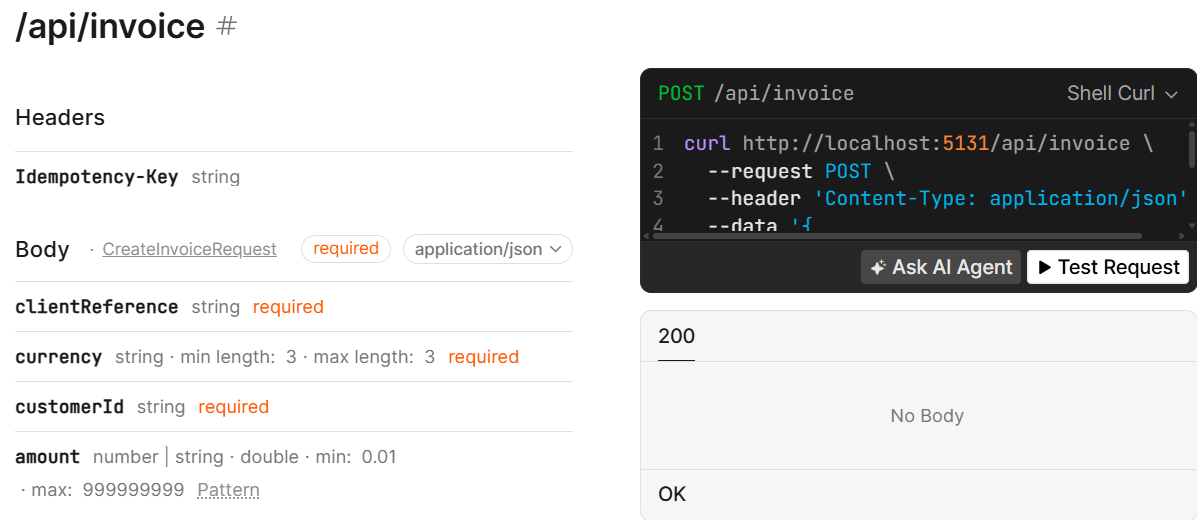
Call it.
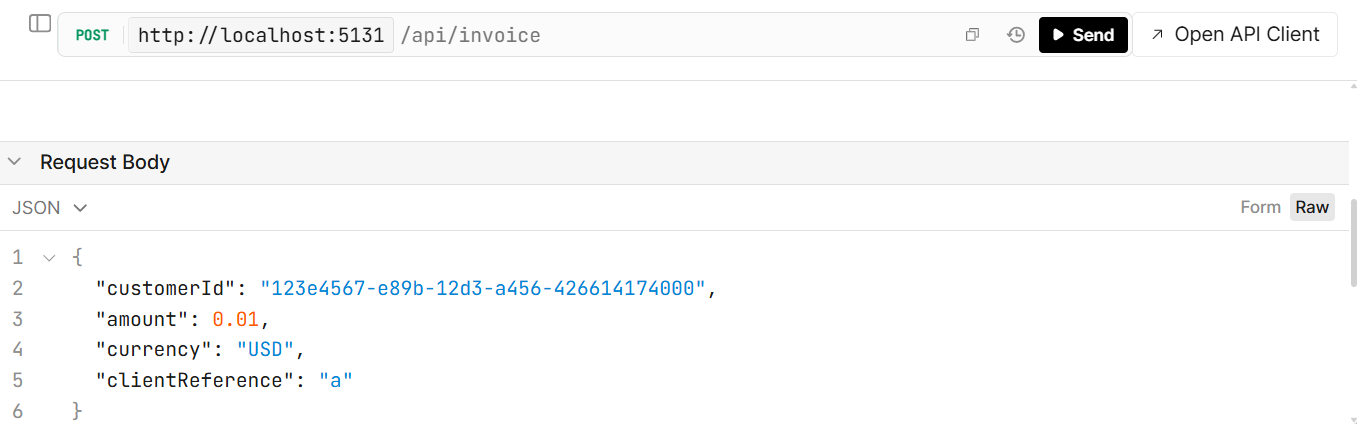
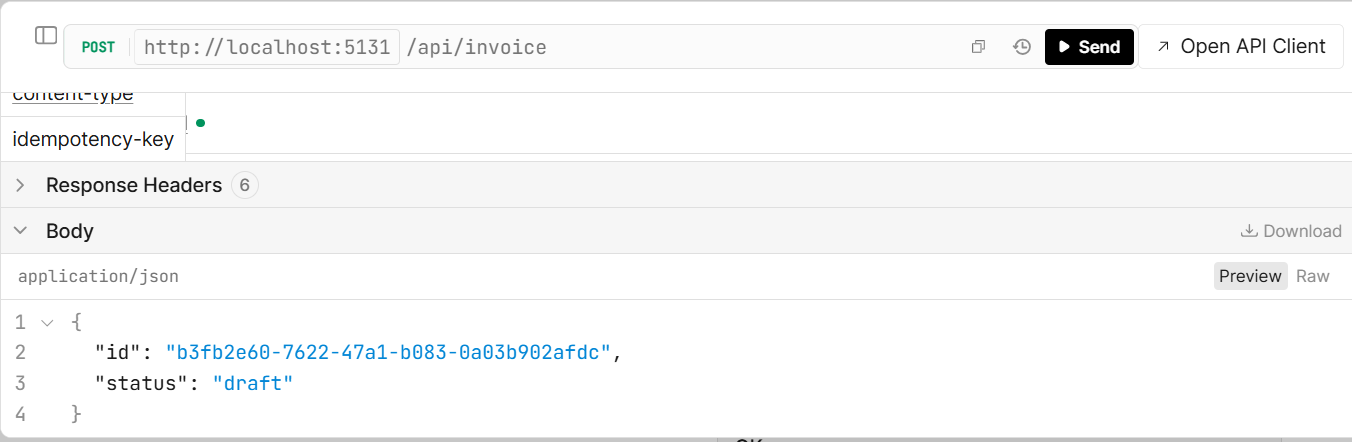
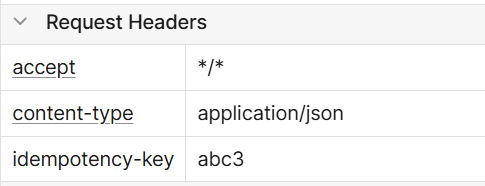
Where I used an idempotency key
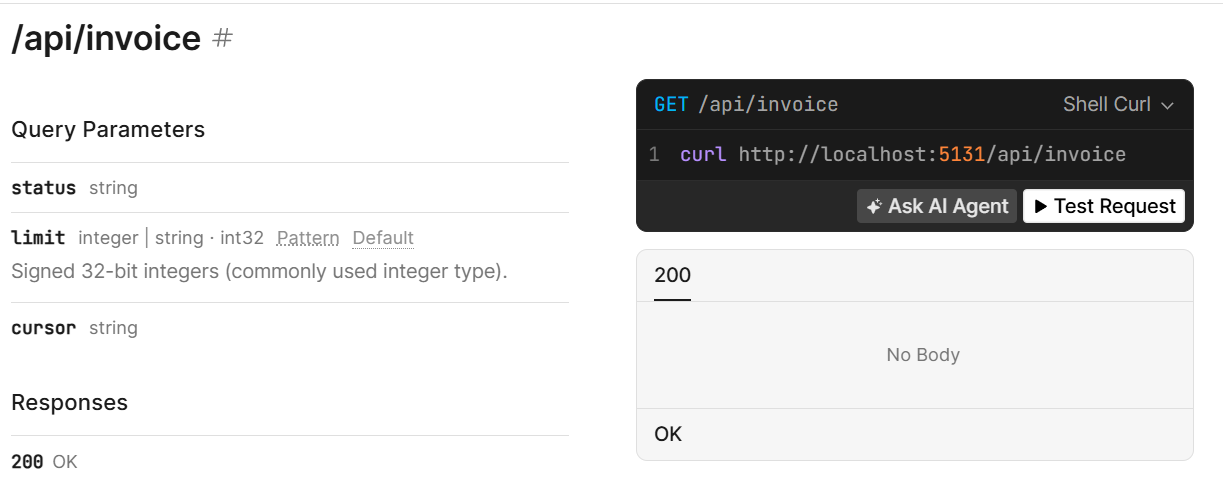
Check GET methods for getting records
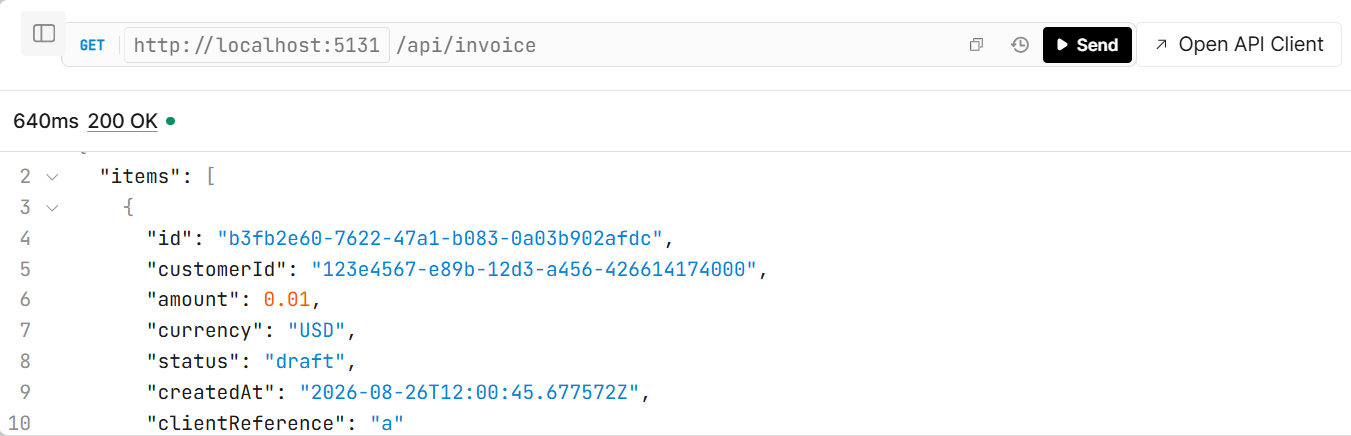
So we can access our new record
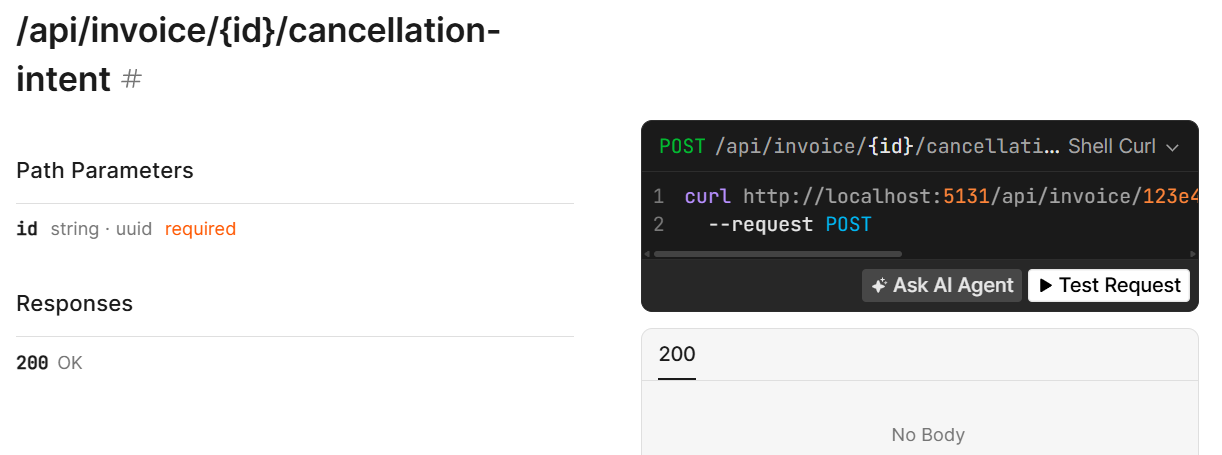
Similarly, we have other endpoints.
Add authentication for Non-Human Consumers
Authentication is already recommended for any project, however, in an AI-ready app, it becomes a necessity. You have to secure your API because AI should be authenticated to access the app's internal data.
Standard OAuth 2.0 and OpenID Connect flows work here, as agents work best with established standards.
builder.Services
    .AddAuthentication("Bearer")
    .AddJwtBearer("Bearer", options =>
    {
        options.Authority =
            "https://auth.example.com";

        options.Audience =
            "agent-api";

        options.RequireHttpsMetadata = true;
    });
Similarly, use the middleware
app.UseAuthentication();Define fine-grained permissions for agents
Mostly, agents should not be given full API access. Use role-based access control (RBAC) to distinguish between agent types, where a read-only information retriever needs a different set of permissions while a planning agent needs broader write access. Adding an authorization policy with fine-grained permission scoping prevents overprivileged agents.
builder.Services.AddAuthorization(options =>
{
    options.AddPolicy(
        "InvoicesRead",
        policy => policy.RequireClaim(
            "scope",
            "invoices:read"));

    options.AddPolicy(
        "InvoicesWrite",
        policy => policy.RequireClaim(
            "scope",
            "invoices:write"));
});
For the invoices, I have added two explicit permissions: read and write. Well, you may not hardcode them for a scalable application, there you need more customization and dynamism. Add to the pipeline.
app.UseAuthorization();Decorate the endpoints.
[Authorize(Policy = "InvoicesRead")]
[HttpGet]
public async Task<IActionResult> GetInvoicesAsync(
	[FromQuery] string? status,
	[FromQuery] int limit = 20,
	[FromQuery] string? cursor = null,
	CancellationToken cancellationToken = default) ...

[Authorize(Policy = "InvoicesWrite")]
[HttpPost]
public async Task<IActionResult> CreateInvoiceAsync(
	[FromHeader(Name = "Idempotency-Key")]
	string idempotencyKey,
	CreateInvoiceRequest request,
	CancellationToken cancellationToken) ...

[Authorize(Policy = "InvoicesRead")]
[HttpGet("{id:guid}")]
public async Task<IActionResult> GetInvoice(
	Guid id,
	CancellationToken cancellationToken) ...

[Authorize(Policy = "InvoicesWrite")]
[HttpPost("{id:guid}/finalize")]
public async Task<IActionResult> FinalizeAsync(
	Guid id,
	CancellationToken cancellationToken) ...

[Authorize(Policy = "InvoicesWrite")]
[HttpPost("{id:guid}/cancellation-intent")]
public async Task<IActionResult> CreateCancellationIntentAsync(
	Guid id,
	CancellationToken cancellationToken) ...

[Authorize(Policy = "InvoicesWrite")]
[HttpPost("cancel")]
public async Task<IActionResult> CancelAsync(
	[FromBody] CancelInvoiceRequest request,
	CancellationToken cancellationToken) ...
Architectural Considerations for AI Agent Integration
AI agents introduce a different set of requirements than traditional API consumers. They can generate unpredictable traffic, execute multi-step workflows, consume large amounts of data, and operate with a degree of autonomy. Designing APIs for these workloads therefore requires consideration of scalability, resilience, security, and how agents discover and interact with available capabilities.
Keep human approval involved
Along with authentication and authorization, the system should have human verification involved for any operation that updates sensitive or critical data or has an irreversible impact, keep human approval in the loop and don't let the agent execute the full workflow autonomously. We restrict agents with authorization as a low-privileged user, so similar to a low-privileged user, you usually add approvals from a higher authority.
Managing Bursty Agent Traffic
A particularly important aspect in AI-friendly APIs is that agentic traffic can be bursty and difficult to predict. An AI agent may call several endpoints to complete one task, such as fetching data, validating it, and then updating it, while a human user would do the same thing in fewer calls through the UI. Dynamic rate limiting, concurrency limits, and tiered quotas can help prevent agent traffic from overwhelming infrastructure or affecting human users. Bulk-operation endpoints can further reduce unnecessary requests by allowing agents to process multiple items within a single operation rather than repeatedly calling individual endpoints. Comprehensive logging and monitoring of agent interactions also helps identify unusual patterns and potential abuse early.
Ethical Data Handling for AI Agents
Machines are intelligent but do not always follow ethical guidelines like us humans. For an application, it is increasingly important that agents collect only the data they need. Decision-makers should minimize how long sensitive information is retained, and anonymize data when long-term storage is required. Data-handling practices should also be clearly documented to define clear boundaries for access. As agents use API data more for reasoning and decision-making, transparency around data sources, privacy, and potential bias becomes an important part of API design rather than merely a compliance requirement.
Model Context Protocol (MCP)
With the inception of AI, another API layer is introduced: MCP. MCP standardizes communication between AI clients and applications, safely abstracting the API to AI agents. ModelContextProtocol.AspNetCore package provides easy creation of MCP or you can use a reliable provider to make your project AI-ready.
Infrastructure for Agent-Driven Scale
Keep in mind that, unlike human users, a single agent can make hundreds of requests in a short period during a multi-step task. Try horizontal scaling, intelligent load balancing, caching strategies, and queue-based processing in the backend before traffic spikes degrade the experience for human consumers.
Building Agent-Friendly Abstractions
An API should not change so dramatically that AI finds it difficult to evolve and understand. Plugin architectures and function-oriented interfaces are good choices, letting you add new capabilities without disrupting existing workflows. More importantly, these abstractions should represent meaningful business capabilities rather than exposing low-level technical operations. Agents generally reason in terms of goals and actions, not database tables or internal implementation details.
Conclusion
The way software interacts with APIs is evolving. Traditionally, developers wrote the logic that determined which endpoint to call, when to call it, and how to handle the response. AI agents can increasingly make those decisions themselves. Agents like coding agents, booking agents, business agents, and application bots complete tasks on behalf of the user. Your API project should catch this train. Making an API agent-ready isn't about adding an AI endpoint. It's about making the existing API predictable, discoverable, secure, and understandable to machines. I dug into some important foundations that make your backend agent-friendly.
Code: https://github.com/elmahio-blog/AgentReadyApi.git
elmah.io: Error logging and Uptime Monitoring for your web apps
This blog post is brought to you by elmah.io. elmah.io is error logging, uptime monitoring, deployment tracking, and service heartbeats for your .NET and JavaScript applications. Stop relying on your users to notify you when something is wrong or dig through hundreds of megabytes of log files spread across servers. With elmah.io, we store all of your log messages, notify you through popular channels like email, Slack, and Microsoft Teams, and help you fix errors fast.

See how we can help you monitor your website for crashes Monitor your website