
EF Core query translation: Why does some LINQ never become SQL?
We know that every Entity Framework Core (EF Core) LINQ query has a corresponding SQL query. That equivalent SQL is actually executed under the hood. Some LINQ expressions involve. NET-specific code, such as calling a method, using a reflection filter, or accessing files. You may have found several code blocks of your query that could not be translated. Why does it happen? In today's post, I will cover the reasons along with on-ground examples.
LINQ Queries Translation
We will write different LINQ queries in a real project and examine what results they yield. I will use a Console application with a PostgreSQL database as an example.
Step 1: Create a project
dotnet new console -n EfTranslationDemo
cd EfTranslationDemo
Step 2: Install NuGet packages
dotnet add package Microsoft.EntityFrameworkCore
dotnet add package Microsoft.EntityFrameworkCore.Design
dotnet add package Npgsql.EntityFrameworkCore.PostgreSQL
Step 3: Model for the table
This will be a single-table application consisting of the Perfume model.
public class Perfume
{
    public int Id { get; set; }

    public string Name { get; set; } = string.Empty;

    public string Brand { get; set; } = string.Empty;

    public decimal Price { get; set; }

    public int Rating { get; set; }

    public DateTime ReleaseDate { get; set; }
}
Step 4: Create a database
To speed up the process, I have already created the database and the Perfumes table.
CREATE DATABASE perfumedb;

CREATE TABLE public."Perfumes" (
    "Id" serial PRIMARY KEY,
    "Name" varchar(255) NOT NULL DEFAULT '',
    "Brand" varchar(255) NOT NULL DEFAULT '',
    "Price" decimal(10,2) NOT NULL,
    "Rating" integer NOT NULL,
    "ReleaseDate" timestamp NOT NULL DEFAULT (NOW() AT TIME ZONE 'UTC')
);
Step 5: Set up the DB context
using EfTranslationDemo.Models;
using Microsoft.EntityFrameworkCore;

namespace EfTranslationDemo.Data;

public class ApplicationDbContext: DbContext
{
    public DbSet<Perfume> Perfumes => Set<Perfume>();

    protected override void OnConfiguring(DbContextOptionsBuilder options)
    {
        options
            .UseNpgsql("Your Connection string with db name perfumedb")
            .LogTo(Console.WriteLine);
    }
}
Step 6: Seed data
To begin with, I will seed some data programmatically.
using EfTranslationDemo.Data;
using EfTranslationDemo.Models;
using Microsoft.EntityFrameworkCore;

using var context = new ApplicationDbContext();

context.Database.EnsureCreated();

SeedData(context);

static void SeedData(ApplicationDbContext context)
{
    if (context.Perfumes.Any())
        return;

    context.Perfumes.AddRange(
        new Perfume { Name="Sauvage", Brand="Dior", Price=120, Rating=9, ReleaseDate=new DateTime(2018,1,1,0,0,0, DateTimeKind.Utc)},
        new Perfume { Name="Bleu De Chanel", Brand="Chanel", Price=150, Rating=10, ReleaseDate=new DateTime(2017,1,1,0,0,0, DateTimeKind.Utc)},
        new Perfume { Name="Aventus", Brand="Creed", Price=300, Rating=10, ReleaseDate=new DateTime(2015,1,1,0,0,0, DateTimeKind.Utc)},
        new Perfume { Name="F Black", Brand="Ferragamo", Price=60, Rating=7, ReleaseDate=new DateTime(2019,1,1,0,0,0, DateTimeKind.Utc)}
    );

    context.SaveChanges();
}
Fast forward, the data is seeded to the database

Step 7: LINQ queries testing
1. Query with price filter
A simple query to fetch perfumes with a price of more than 100.
Console.WriteLine("Full translable");
var query1 = context
    .Perfumes
    .Where(p => p.Price > 100)
    .Select(p => new { p.Name, p.Price });

Console.WriteLine(query1.ToQueryString());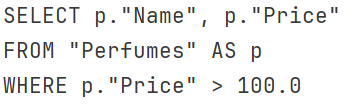
2. Filter with Name
We will filter the data with the name starting with 'B'.
var query2 = context
    .Perfumes
    .Where(p => p.Name.StartsWith("B"));

Console.WriteLine(query2.ToQueryString());
StartsWith() translates to SQL's LIKE . Similarly, EndsWith and Contains are also translated.
3. Client Side Execution
Another translatable but performance-heavy solution is
var perfumes = context
    .Perfumes
    .ToList()
    .Where(p => p.Price > 100);

Console.WriteLine(perfumes.Count());
It loads all the data in memory first, then applies a filter on the stored data. Such a solution can cause significant problems, especially when the data is large.
4. External list filter
We can write a translatable filter with an external list
var brands = new List<string> { "Dior", "Creed" };

var query = context
    .Perfumes
    .Where(p => brands.Contains(p.Brand));

Console.WriteLine(query.ToQueryString());
EF Core converts the C# in-memory list into SQL constants.
5. DateTime filter
Any filter with parsing datetime will work the same as any other.
var query = context
    .Perfumes
    .Where(p => p.ReleaseDate.Year > 2016);

Console.WriteLine(query.ToQueryString());
Common DateTime properties are supported.
6. Custom method filter
What you cannot do in a LINQ query is to filter by a method. LINQ can't find an SQL equivalent of it.
static bool IsLuxury(Perfume perfume)
{
    return perfume.Price > 200;
}

var query = context
    .Perfumes
    .Where(p => IsLuxury(p));

Console.WriteLine(query.ToQueryString());
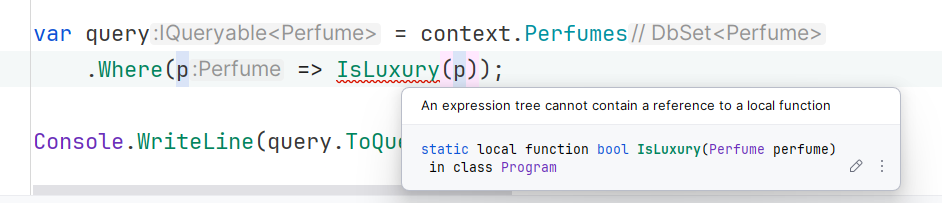
EF Core cannot inspect the body of arbitrary C# methods.
7. Regex matching
We can simply put a regex pattern in the filter as well.
var query = context
    .Perfumes
    .Where(p => Regex.IsMatch(p.Name, "^A"));

Console.WriteLine(query.ToQueryString());

var result = query.ToList();
Console.WriteLine(result.Count());
8. Non-Translatable Projection
string GetCategory(decimal price)
{
    return price > 150 ? "Luxury" : "Regular";
}

var query = context
    .Perfumes
    .Select(p => new
    {
        p.Name,
        Category = GetCategory(p.Price)
    });

Console.WriteLine(query.ToQueryString());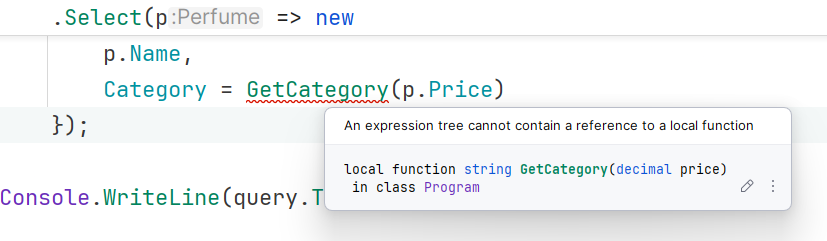
The right way
var query = context
    .Perfumes
    .Select(p => new
    {
        p.Name,
        Category = p.Price > 150 ? "Luxury" : "Regular"
    });

Console.WriteLine(query.ToQueryString());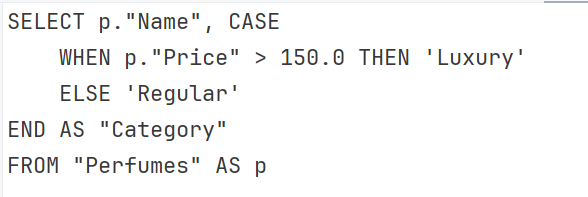
9. Reflection
.NET does not have an equivalent in SQL.
var query = context
    .Perfumes
    .Where(p => p.GetType().GetProperty("Price") != null);

Console.WriteLine(query.ToQueryString());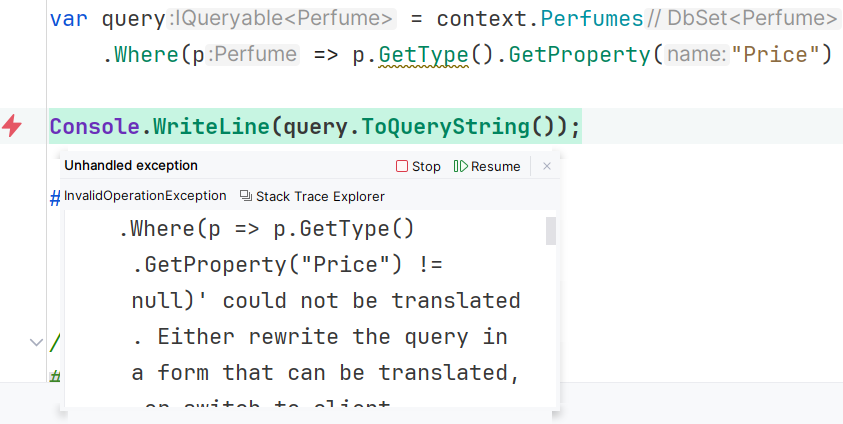
10. File System Access
var query = context
    .Perfumes
    .Where(p => File.Exists($"brands/{p.Brand}.txt"));

Console.WriteLine(query.ToQueryString());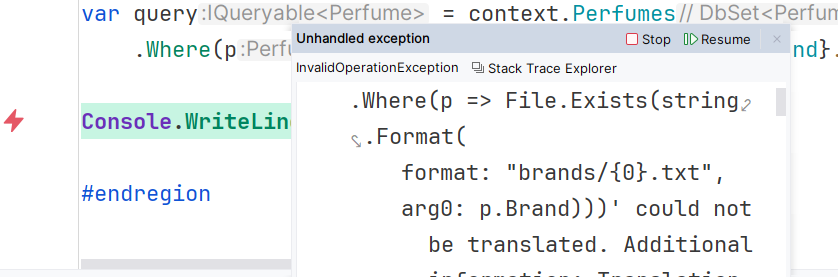
11. Random number generation
var query = context
    .Perfumes
    .Where(p => Random.Shared.Next(0, 10) > 5);

Console.WriteLine(query.ToQueryString());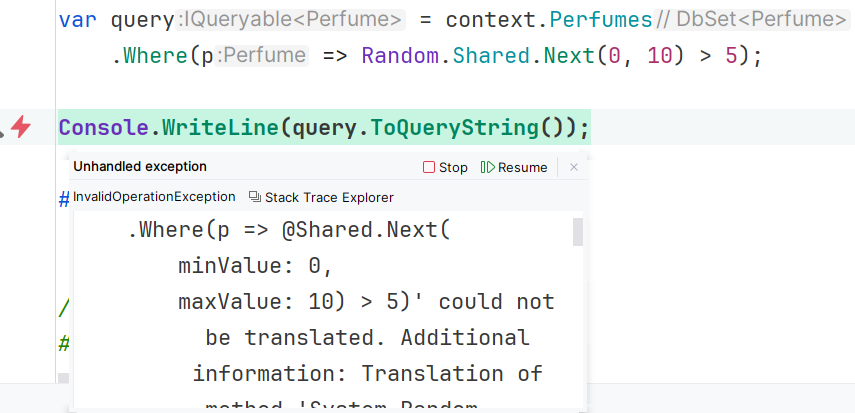
A filter using random number generation did not translate.
12. string.Compare method
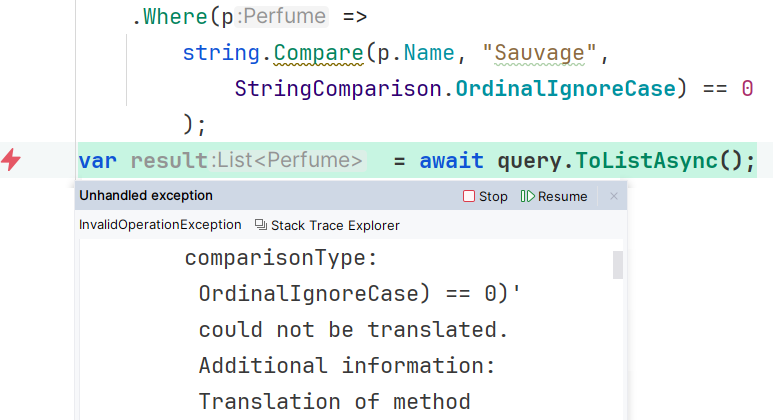
One of the cool methods that we often use for string comparison is string.Comparison. Unfortunately, you cannot use it in a LINQ query.
var query = context
    .Perfumes
    .Where(p =>
        string.Compare(p.Name, "Sauvage",
            StringComparison.OrdinalIgnoreCase) == 0
        );
var result  = await query.ToListAsync();
Console.WriteLine(query.ToQueryString());
Why does EF Core have limitations in translating LINQ queries?
One question arises that even after years of improvement and enhancement, EF Core does not translate some common C# expressions in LINQ. Actually, LINQ does not merely read and execute any query. It first creates an expression tree of the query. Next, these trees are converted to SQL. SQL queries are a declarative language that describes what data you want, not how to compute it step by step. So, methods' bodies are not parsed, as in our case with the IsLuxury method, where expressions do not analyze arbitrary method bodies for translation. Also, C# is a full programming language, whereas SQL lacks many of the features of a programming language. Neither can it read its logic, as SQL servers cannot execute .NET runtime code.
EF Core is responsible for translating an expression tree to database-specific SQL. We know that every database has its own SQL dialect. For example, DATE_PART('year', column) in a PostgreSQL expression, while the SQL Server equivalent is YEAR(column). So EF must maintain different translators for each database. It does not rely on a single translator, so there are limitations in translating each and every query across diverse database providers. Finally, some .NET runtime features are specific to the program, such as random number generation, ordinal string comparison, and reflection, which are impossible to translate.
Conclusion
EF Core is a popular ORM and the default choice for many developers for database operations. EF Core uses LINQ for querying and enables you to use databases as if they were in C#. However, the underlying database cannot fully replicate a complete programming language like C#. Many programming expressions and filtering logic cannot be translated into a database query. Calling a method in a LINQ query, using reflection, and ordinal string comparison are examples of limitations in EF Core. SQL is specifically designed to fetch data and is not a programming language. It does not have the .NET runtime, so it cannot execute .NET features. In this post, I have gone through many examples that can be translated into SQL and some common queries that cannot.
Code: https://github.com/elmahio-blog/EfTranslationDemo.git
elmah.io: Error logging and Uptime Monitoring for your web apps
This blog post is brought to you by elmah.io. elmah.io is error logging, uptime monitoring, deployment tracking, and service heartbeats for your .NET and JavaScript applications. Stop relying on your users to notify you when something is wrong or dig through hundreds of megabytes of log files spread across servers. With elmah.io, we store all of your log messages, notify you through popular channels like email, Slack, and Microsoft Teams, and help you fix errors fast.

See how we can help you monitor your website for crashes Monitor your website