Why IEnumerable Can Kill Performance in Hot Paths
For F1 racing, choosing the right car is as important as your expertise. No matter how skilled you are, if you race in an ordinary car, you can't stand out. You need to understand the race and use the F1 racing car. The same goes for programming. Going with the wrong option can hurt your application. If your application contains high-throughput junctions prone to bottlenecks, you are left with choices for different collections. Today, I will explore popular data collection options, including IEnumerable and List, and examine how IEnumerable can hinder hot paths.

IEnumerable in C#
IEnumerable is an interface that represents a forward-only sequence of elements. It represents a behaviour that can be deferred or materialized based on implementation. It exposes a single method, GetEnumerator() that returns an IEnumerator<T> object you can iterate sequentially. However, it does not support indexing.
List in C#
A list is a dynamic collection that resizes automatically and allows access to elements by index. The List class provides methods such as Add, Remove, and AddRange. A List is materialized, loading all data into memory. In fact, List implements IEnumerable.
IEnumerable analysis with benchmark
To observe actual ground effects, let's create a console application where we can benchmark IEnumerable with a concrete List.
Step 1: Create the project
dotnet new console -n IEnumerableBenchmark
cd IEnumerableBenchmark
Step 2: Install the BenchmarkDotNet library
dotnet add package BenchmarkDotNet
Step 3: Prepare the benchmarking code
Here, we will define everything in the Program.cs file:
using BenchmarkDotNet.Attributes;
using BenchmarkDotNet.Running;
using System;
using System.Collections.Generic;
using System.Linq;
using System.Runtime.InteropServices;

BenchmarkRunner.Run<EnumerationBenchmarks>();

[MemoryDiagnoser]
public class EnumerationBenchmarks
{
    private List<int> _list = null!;
    private IEnumerable<int> _interfaceEnumerable = null!;
    private IEnumerable<int> _linqEnumerable = null!;
    private IEnumerable<int> _yieldEnumerable = null!;
    private int[] _array = null!;

    [Params(1000, 100_000)]
    public int N;

    [GlobalSetup]
    public void Setup()
    {
        // Independent data sources
        _list = Enumerable.Range(1, N).ToList();

        _array = Enumerable.Range(1, N).ToArray();

        _interfaceEnumerable = Enumerable.Range(1, N);

        _linqEnumerable = Enumerable.Range(1, N)
                                    .Where(x => x % 2 == 0)
                                    .Select(x => x * 2);

        _yieldEnumerable = CreateYieldSequence(N);
    }

    private IEnumerable<int> CreateYieldSequence(int count)
    {
        for (int i = 1; i <= count; i++)
        {
            if (i % 2 == 0)
                yield return i * 2;
        }
    }

    // -------------------------------
    // List - for (optimized)
    // -------------------------------
    [Benchmark(Baseline = true)]
    public int List_For()
    {
        int sum = 0;
        var list = _list;
        int count = list.Count;

        for (int i = 0; i < count; i++)
        {
            var x = list[i];
            if (x % 2 == 0)
                sum += x * 2;
        }

        return sum;
    }

    // -------------------------------
    // List - foreach
    // -------------------------------
    [Benchmark]
    public int List_Foreach()
    {
        int sum = 0;

        foreach (var x in _list)
        {
            if (x % 2 == 0)
                sum += x * 2;
        }

        return sum;
    }

    // -------------------------------
    // IEnumerable - foreach
    // -------------------------------
    [Benchmark]
    public int IEnumerable_Foreach()
    {
        int sum = 0;

        foreach (var x in _interfaceEnumerable)
        {
            if (x % 2 == 0)
                sum += x * 2;
        }

        return sum;
    }

    // -------------------------------
    // Array - foreach
    // -------------------------------
    [Benchmark]
    public int Array_Foreach()
    {
        int sum = 0;

        foreach (var x in _array)
        {
            if (x % 2 == 0)
                sum += x * 2;
        }

        return sum;
    }

    // -------------------------------
    // LINQ Deferred Execution
    // -------------------------------
    [Benchmark]
    public int Linq_Deferred()
    {
        return _linqEnumerable.Sum();
    }

    // -------------------------------
    // Yield State Machine
    // -------------------------------
    [Benchmark]
    public int Yield_Enumeration()
    {
        int sum = 0;

        foreach (var x in _yieldEnumerable)
        {
            sum += x;
        }

        return sum;
    }

    // -------------------------------
    // Multiple Enumeration
    // -------------------------------
    [Benchmark]
    public int Multiple_Enumeration()
    {
        int sum = 0;

        if (_linqEnumerable.Any())
        {
            foreach (var x in _linqEnumerable)
            {
                sum += x;
            }
        }

        return sum;
    }

    // -------------------------------
    // Span<T>
    // -------------------------------
    [Benchmark]
    public int Span_For()
    {
        int sum = 0;
        var span = CollectionsMarshal.AsSpan(_list);

        for (int i = 0; i < span.Length; i++)
        {
            var x = span[i];
            if (x % 2 == 0)
                sum += x * 2;
        }

        return sum;
    }
}
I defined a list and an IEnumerable. In the Setup, we will initialize each one with 1000 and 100000 elements. There are several other testers to get how IEnumerable performs as deferred and as materialized collections, as shown in the methods.
Step 4: Run the project
Let's run our project in release mode
dotnet run -c Release
So, the results show the cost of IEnumerable.
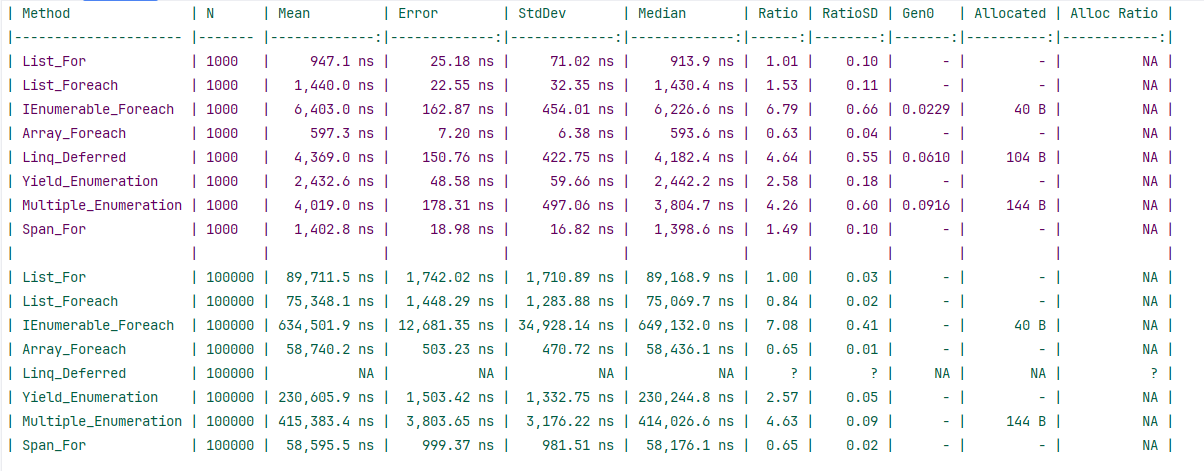
As per the results, List outperformed IEnumerable by up to 7x. Thanks to contiguous memory allocation and JITs array optimization, arrays outclass the list, too. But flexibility and numerous handy methods make the list more usable in most scenarios. The single test does not prove that IEnumerable should be abandoned. In fact, you will not want to overload memory by loading the entire dataset if it is extremely large. Then theIEnumerable's behaviour took effect. The List is a help for small to medium-sized collections and requires frequent manipulation, such as adding and removing items. As immediate execution loads data immediately, lists are ideal when you need data to be readily available and need frequent manipulation.
Using IEnumerable in hot paths slows performance and does not support data manipulation. Usually, applications do not load all data at once; instead, they use filtering or pagination when fetching data. In such cases, lists leverage immediate execution.
Conclusion
We may not need to emphasize the importance of performance in any application. We already know the importance of keeping the operations as fast as possible. Identifying and mitigating the hot path is one link in this chain. I shared one underrated point about using the right collection in such bottleneck areas. Being cautious about IEnumerable in hot paths, can be good for the application and your peace of mind.
Code: https://github.com/elmahio-blog/IEnumerableBenchmark
elmah.io: Error logging and Uptime Monitoring for your web apps
This blog post is brought to you by elmah.io. elmah.io is error logging, uptime monitoring, deployment tracking, and service heartbeats for your .NET and JavaScript applications. Stop relying on your users to notify you when something is wrong or dig through hundreds of megabytes of log files spread across servers. With elmah.io, we store all of your log messages, notify you through popular channels like email, Slack, and Microsoft Teams, and help you fix errors fast.

See how we can help you monitor your website for crashes Monitor your website