Using Strategy Pattern with Dependency Injection in ASP.NET Core
Selection logic is a prominent part of many applications. Whether you add a simple environment toggle, a UI mode decision, or apply a discount, you have to rely on user input. Sometimes, simply using an intuitive if-else or a switch case can work. However, when conditions are growing or a complex algorithm selection is required, simple conditional statements can't work. Your code becomes exhaustive and hard to maintain. The Strategy pattern rescues the situation, adheres to the open/closed principle, and keeps the logic maintainable. This article walks you through a practical, straightforward example of the strategy pattern: choosing between Regular, VIP, and Student discount strategies at runtime.
What is the Strategy pattern?
The Strategy design pattern is a behavioral pattern used when you need to switch between different algorithms at runtime. The strategy pattern encapsulates algorithms and selects the right one when needed, usually based on an input. This pattern provides a flexible, maintainable solution to an algorithm-selection problem, keeping the code cleaner and easier to extend. If you need to add a new algorithm, just add another class instead of touching the existing logic, adhering to the open/closed principle.
What is the problem without the Strategy pattern?
To understand the usability of the strategy pattern, we need to identify the problems we may face without it. Suppose we offer different discounts to different users based on their membership. A naive solution is to use an if-else statement or a switch case. Let's do it and evaluate the implementation.
Step 1: Create a Console application
dotnet new console -n StrategyPatternDemo
cd StrategyPatternDemo
Step 2: Create DiscountService class
In the service, we will define discount calculation with a conditional statement.
public class DiscountService
{
    public decimal GetDiscount(string customerType, decimal amount)
    {
        if (customerType.ToLower() == "regular")
        {
            return amount * 0.05m;
        }
        else if (customerType.ToLower() == "vip")
        {
            return amount * 0.20m;
        }
        else
        {
            return 0;
        }
    }
}
Step 3: Use the service in the Strategy Pattern Sword.cs
using StrategyPatternDemo;

Console.Write("Enter customer type (regular/vip): ");
var type = Console.ReadLine();

Console.Write("Enter amount: ");
var amount = decimal.Parse(Console.ReadLine());

var service = new DiscountService();
var discount = service.GetDiscount(type, amount);
var final = amount - discount;

Console.WriteLine($"Discount: {discount}");
Console.WriteLine($"Final Price: {final}");
Step 4: Run and test
Let's test it
dotnet runOutput
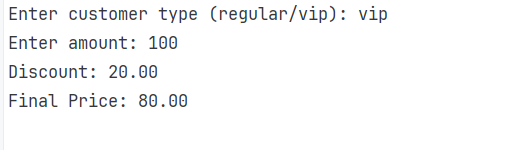
It works as expected. But the code contains design and maintainability flaws.
- The solution violates the Open/Closed principle. Adding a new membership will require changes to the core method, such as adding an else-if block.
- All the discount logic is tightly coupled in a single class and lacks separation of concerns or single responsibility.
- Conjoined code makes testing harder. To ensure the functionality, you have to test the monster every time.
- As the conditions grow, you can fall into a spiral of conditions. Imagine if you have 20 memberships, that will be a nightmare for maintainability.
Implementing the strategy pattern in a console application
In our example, let's address the above issues using the Strategy Pattern.
Step 1: Define Strategy Interface
Adding the discount strategy interface
public interface IDiscountStrategy
{
    decimal ApplyDiscount(decimal amount);
}
Step 2: Add concrete strategies
Adding separate implementations of each algorithm
public class RegularDiscount : IDiscountStrategy
{
    public decimal ApplyDiscount(decimal amount) => amount * 0.05m;
}
For Vip
public class VipDiscount : IDiscountStrategy
{
    public decimal ApplyDiscount(decimal amount) => amount * 0.20m;
}
Notice that none of the strategies implement validation or error handling. In real-world code, you would probably want to look into that. This part has been left out of this post since the focus is around splitting the business logic out in strategies.
Step 3: Define context class
public class DiscountService
{
    private readonly IDiscountStrategy _strategy;

    public DiscountService(IDiscountStrategy strategy)
    {
        _strategy = strategy;
    }

    public decimal GetDiscount(decimal amount) => _strategy.ApplyDiscount(amount);
}
The Context class in the strategy pattern holds a reference to a strategy interface (IDiscountStrategy in our case). It receives a strategy from outside. It does not implement logic itself, instead, it delegates work to the strategy, while the concrete classes define their logic.
Step 4: Use the strategy in the Program.cs
Console.WriteLine("Enter customer type (regular/vip): ");
string type = Console.ReadLine()?.ToLower();

IDiscountStrategy strategy;

// Manually picking strategy — no switch needed, but you *can* if you want.
if (type == "vip")
    strategy = new VipDiscount();
else
    strategy = new RegularDiscount();

var service = new DiscountService(strategy);

Console.Write("Enter amount: ");
decimal amount = decimal.Parse(Console.ReadLine());

var discount = service.GetDiscount(amount);
var finalPrice = amount - discount;

Console.WriteLine($"Discount applied: {discount}");
Console.WriteLine($"Final price: {finalPrice}");
Output
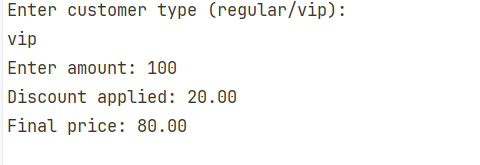
We understand basic principles of the strategy pattern. We can proceed with our primary target: implementing the strategy pattern in ASP.NET Core.
Implementing the strategy pattern in an ASP.NET Core API
Step 1: Create a .NET Core api
Run the following command in the terminal
dotnet new webapi -n StrategyPatternApi
cd StrategyPatternApi
Step 2: Add concrete strategies
Adding separate implementations of each algorithm
public class RegularDiscount : IDiscountStrategy
{
    public decimal ApplyDiscount(decimal amount) => amount * 0.05m;
}
For Vip
public class VipDiscount : IDiscountStrategy
{
    public decimal ApplyDiscount(decimal amount) => amount * 0.20m;
}
Step 3: Define context class
public class DiscountService
{
    private readonly Func<string, IDiscountStrategy> _strategyFactory;

    public DiscountService(Func<string, IDiscountStrategy> strategyFactory)
    {
        _strategyFactory = strategyFactory;
    }

    // public API: ask for a discount by customer type
    public decimal GetDiscount(string customerType, decimal amount)
    {
        var strategy = _strategyFactory(customerType);
        return strategy.ApplyDiscount(amount);
    }
}
DiscountService plays the context role in the strategy pattern. DiscountService has a property Func<string, IDiscountStrategy> _strategyFactory that holds a factory delegate. The Func delegate returns an appropriate implementation of IDiscountStrategy based on the given type. Func allows the service to request a strategy at runtime by name/key without knowing the DI container internals or concrete types.
Step 4: Add a controller with the endpoint
[ApiController]
[Route("api/[controller]")]
public class PricingController : ControllerBase
{
    private readonly DiscountService _pricingService;

    public PricingController(DiscountService pricingService)
    {
        _pricingService = pricingService;
    }

    [HttpGet]
    public IActionResult Get([FromQuery] string type, [FromQuery] decimal amount)
    {
        var discount = _pricingService.GetDiscount(type, amount);
        var final = amount - discount;
        return Ok(new { type = type ?? "regular", amount, discount, final });
    }
}
Step 5: Configure Program.cs
Add the concrete services in dependency injection (DI) in the Program.cs file
services.AddTransient<RegularDiscount>();
services.AddTransient<VipDiscount>();
They are transient because discount strategies are stateless, so creating a new instance each time is fine. Note that I haven't injected them with IDiscountStrategy any implementing service because ASP.NET Core decides this automatically. Hence, the final code will look like this:
using StrategyPatternApi;

var builder = WebApplication.CreateBuilder(args);
var services = builder.Services;

builder.Services.AddEndpointsApiExplorer();
builder.Services.AddSwaggerGen();

// Register concrete strategy types so they can be resolved by the factory
services.AddTransient<RegularDiscount>();
services.AddTransient<VipDiscount>();

services.AddSingleton<Func<string, IDiscountStrategy>>(sp => key =>
{
    var k = (key ?? "").Trim().ToLowerInvariant();
    return k switch
    {
        "vip" => sp.GetRequiredService<VipDiscount>(),
        // add more cases if you add more strategies
        _ => sp.GetRequiredService<RegularDiscount>()
    };
});

// Register the service that uses the factory
services.AddScoped<DiscountService>();

// Add controllers (or leave for minimal endpoints)
services.AddControllers();

var app = builder.Build();

if (app.Environment.IsDevelopment())
{
    app.UseSwagger();
    app.UseSwaggerUI();
}
app.MapControllers();
app.Run();
In DI, the decisive part is:
services.AddSingleton<Func<string, IDiscountStrategy>>(sp => key =>
{
    var k = (key ?? "").Trim().ToLowerInvariant();
    return k switch
    {
        "vip" => sp.GetRequiredService<VipDiscount>(),
        // add more cases if you add more strategies
        _ => sp.GetRequiredService<RegularDiscount>()
    };
});
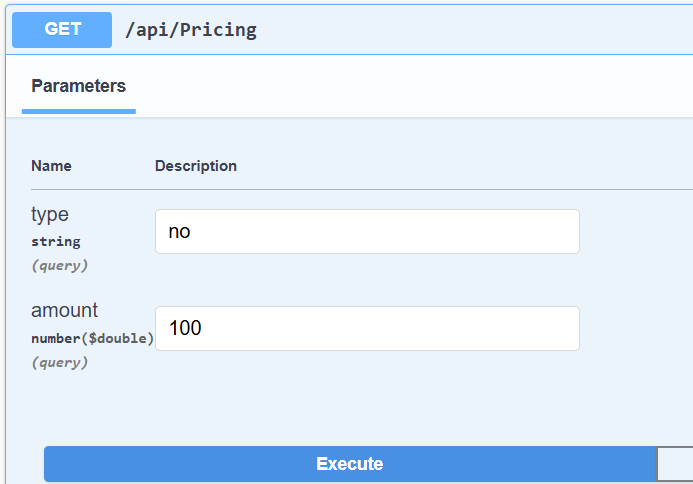
As explicitly stated, the switch condition resolves the appropriate concrete strategy via DI based on the type value. If any condition does not match, I made a default choice to get RegularService.
Step 6: Run and test
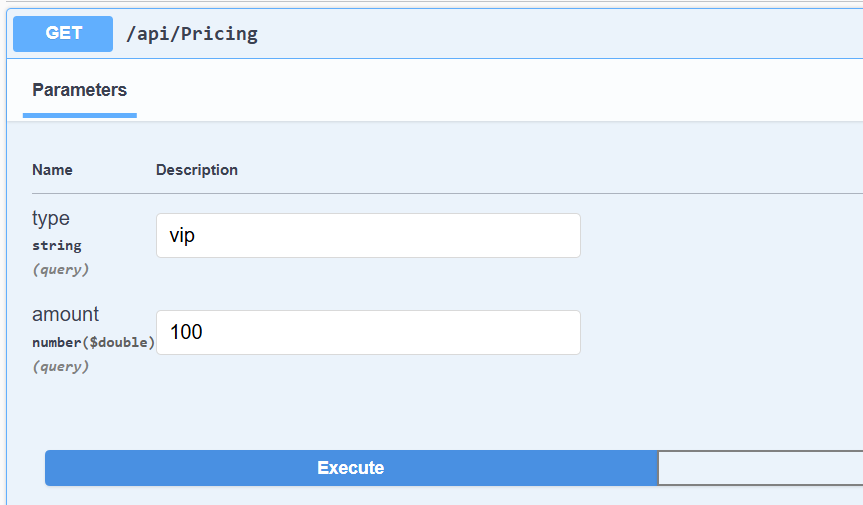
dotnet runNow running the project
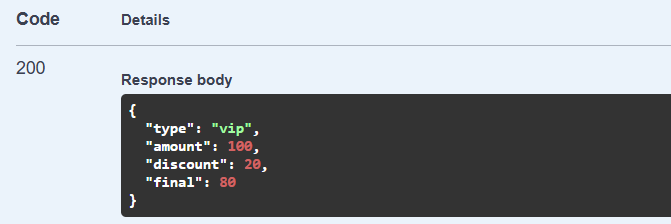
Extension of algorithms in the ASP.NET Core strategy pattern
The Open/Close principle is one of the benefits of the Strategy Pattern. Let's continue with our example of how we can add a new discount within the bounds of the Open/Close principle.
Step 1: Add the Student discount's concrete strategy
public class StudentDiscount : IDiscountStrategy
{
    public decimal ApplyDiscount(decimal amount) => amount * 0.10m;
}
Step 2: Register a new service
services.AddTransient<StudentDiscount>();
Step 3: Update factory switch
services.AddSingleton<Func<string, IDiscountStrategy>>(sp => key =>
{
    var k = (key ?? "").Trim().ToLowerInvariant();
    return k switch
    {
        "vip" => sp.GetRequiredService<VipDiscount>(),
        "student" => sp.GetRequiredService<StudentDiscount>(),
        _ => sp.GetRequiredService<RegularDiscount>()
    };
});
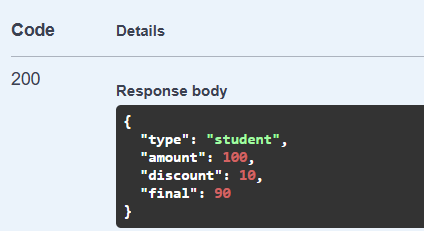
To add a new strategy implementation, we simply need to add the strategy code and inject it via dynamic DI.
Step 4: Run and test
dotnet run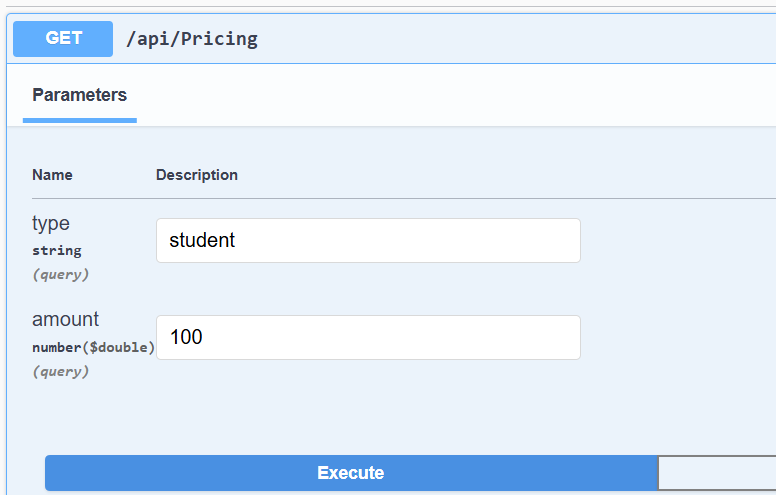
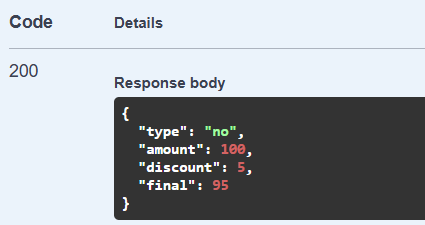
By default value
Conclusion
Writing long if-else or cases is tiring. Every time you need to add a condition, you have to dive into the well and add one condition. The same happens while debugging. The strategy pattern provides a modular solution that keeps the code intact while dynamically allowing you to extend conditions. In this blog post, I highlighted the need for a strategy pattern and showed how to implement it in an ASP.NET Core API.
Example 1: https://github.com/elmahio-blog/StrategyPatternDemo
Example 2: https://github.com/elmahio-blog/StrategyPatternApi
elmah.io: Error logging and Uptime Monitoring for your web apps
This blog post is brought to you by elmah.io. elmah.io is error logging, uptime monitoring, deployment tracking, and service heartbeats for your .NET and JavaScript applications. Stop relying on your users to notify you when something is wrong or dig through hundreds of megabytes of log files spread across servers. With elmah.io, we store all of your log messages, notify you through popular channels like email, Slack, and Microsoft Teams, and help you fix errors fast.

See how we can help you monitor your website for crashes Monitor your website