Polymorphic Relationships in EF Core: Three Approaches
Database schema and entity design are the pavement of most applications. If the entities are paved well, the application can provide great performance. Otherwise, it can lead to pitfalls. One key aspect of entity design is dealing with polymorphic relationships. EF Core supports several ways to implement inheritance, so in this post, I will explore the best ways to handle these relationships.
To see these concepts in action, we need to look at the specific implementation strategies EF Core offers. We will start with the most common approach, which maps an entire class hierarchy to a single database table.
Table-per-Hierarchy (TPH) Inheritance (EF Core-native) polymorphic relationship implementation
One polymorphic relationship EF Core provides is Table-per-Hierarchy (TPH). A single table stores data for all inherited types, differentiated by a discriminator column. I will use an enum for the discriminator. In fact, TPH is the default mapping of EF Core. Let us create a project to showcase TPH.
Step 1: Create a project
dotnet new console -o EfCoreTphStep 2: Install the required packages
dotnet add package Microsoft.EntityFrameworkCore
dotnet add package Microsoft.EntityFrameworkCore.SqlServer
dotnet add package Microsoft.EntityFrameworkCore.Tools
Step 3: Define models
Add the discriminator enum:
public enum EmployeeTypeEnum: byte
{
    FullTimeEmployee = 1,
    PartTimeEmployee = 2,
    Contractor = 3
}
Add the model Employee:
public abstract class Employee
{
    public int Id { get; set; }
    public string Name { get; set; } = string.Empty;
    public string Email { get; set; } = string.Empty;
    public DateTime HireDate { get; set; } = DateTime.UtcNow.Date;
    public decimal BaseSalary { get; set; }
}
I've made it abstract to function as a base class. Next, add the Contractor sub-class:
public class Contractor: Employee
{
    public DateTime ContractEndDate { get; set; }
    public string AgencyName { get; set; } = string.Empty;
}
And add another subclass named FullTimeEmployee:
public class FullTimeEmployee: Employee
{
    public decimal AnnualBonus { get; set; }
    public int VacationDays { get; set; }
}
And finally, add the PartTimeEmployee subclass:
public class PartTimeEmployee: Employee
{
    public decimal HourlyRate { get; set; }
    public int WeeklyHours { get; set; }
}
Step 4: Set up DbContext
As a decisive step, I will specify how I want to handle relationships.
using Microsoft.EntityFrameworkCore;

public class ApplicationDbContext: DbContext
{
    public DbSet<Employee> Employees => Set<Employee>();

    protected override void OnConfiguring(DbContextOptionsBuilder options)
    {
        options.UseNpgsql(
            "Connection string with db name tphDb");
    }

    protected override void OnModelCreating(ModelBuilder modelBuilder)
    {
        modelBuilder.Entity<Employee>()
            .HasDiscriminator<EmployeeTypeEnum>("EmployeeType")
            .HasValue<FullTimeEmployee>(EmployeeTypeEnum.FullTimeEmployee)
            .HasValue<PartTimeEmployee>(EmployeeTypeEnum.PartTimeEmployee)
            .HasValue<Contractor>(EmployeeTypeEnum.Contractor);
    }
}
Inside the OnModelCreating method, I configure EF Core to store all derived types in a single table and use a column to indicate which CLR type each row represents, following TPH. That discriminator is EmployeeType, which in this case is an enum.
Step 5: Configure Program.cs
using Microsoft.EntityFrameworkCore;

using var db = new ApplicationDbContext();

var fullTime = new FullTimeEmployee
{
    Name = "Ali Hamza",
    Email = "ali@company.com",
    HireDate = DateTime.UtcNow.AddYears(-2),
    BaseSalary = 150000,
    AnnualBonus = 30000,
    VacationDays = 25
};

var partTime = new PartTimeEmployee
{
    Name = "James Anderson",
    Email = "james@anderson.com",
    HireDate = DateTime.UtcNow.AddMonths(-6),
    BaseSalary = 0,
    HourlyRate = 1200,
    WeeklyHours = 20
};

var contractor = new Contractor
{
    Name = "Frank Doe",
    Email = "Frank@agency.com",
    HireDate = DateTime.UtcNow.AddMonths(-3),
    BaseSalary = 0,
    ContractEndDate = DateTime.UtcNow.AddMonths(9),
    AgencyName = "TechStaff Ltd"
};

db.Employees.AddRange(fullTime, partTime, contractor);
db.SaveChanges();

Console.WriteLine("Employees inserted.");

var partTimers =
    await db.Employees.OfType<PartTimeEmployee>().ToListAsync();

foreach (var item in partTimers)
{
    Console.WriteLine(item.Name);
    Console.WriteLine(item.Email);
    Console.WriteLine(item.HireDate);
    Console.WriteLine(item.BaseSalary);
    Console.WriteLine(item.WeeklyHours);
    Console.WriteLine(item.HourlyRate);
}

var employees = await db.Employees.ToListAsync();

foreach (var emp in employees)
{
    Console.WriteLine($"[{emp.GetType().Name}] {emp.Name}");

    if (emp is FullTimeEmployee fte)
    {
        Console.WriteLine($"  Bonus: {fte.AnnualBonus}");
    }
    else if (emp is PartTimeEmployee pte)
    {
        Console.WriteLine($"  Hourly Rate: {pte.HourlyRate}");
    }
    else if (emp is Contractor c)
    {
        Console.WriteLine($"  Agency: {c.AgencyName}");
    }
}
We can fetch records either by a specific type, like PartTimeEmployee or with Employees using the polymorphic nature.
Step 6: Run migration
Migrate the database with all of the changes:
dotnet ef migrations add InitialDbdotnet ef database updateLet us look inside the InitialDb migration to see the generated code:
using System;
using Microsoft.EntityFrameworkCore.Migrations;
using Npgsql.EntityFrameworkCore.PostgreSQL.Metadata;

#nullable disable

namespace EfCoreTph.Migrations
{
    /// <inheritdoc />
    public partial class InitialDb : Migration
    {
        /// <inheritdoc />
        protected override void Up(MigrationBuilder migrationBuilder)
        {
            migrationBuilder.CreateTable(
                name: "Employees",
                columns: table => new
                {
                    Id = table.Column<int>(type: "integer", nullable: false)
                        .Annotation("Npgsql:ValueGenerationStrategy", NpgsqlValueGenerationStrategy.IdentityByDefaultColumn),
                    Name = table.Column<string>(type: "text", nullable: false),
                    Email = table.Column<string>(type: "text", nullable: false),
                    HireDate = table.Column<DateTime>(type: "timestamp with time zone", nullable: false),
                    BaseSalary = table.Column<decimal>(type: "numeric", nullable: false),
                    EmployeeType = table.Column<byte>(type: "smallint", nullable: false),
                    ContractEndDate = table.Column<DateTime>(type: "timestamp with time zone", nullable: true),
                    AgencyName = table.Column<string>(type: "text", nullable: true),
                    AnnualBonus = table.Column<decimal>(type: "numeric", nullable: true),
                    VacationDays = table.Column<int>(type: "integer", nullable: true),
                    HourlyRate = table.Column<decimal>(type: "numeric", nullable: true),
                    WeeklyHours = table.Column<int>(type: "integer", nullable: true)
                },
                constraints: table =>
                {
                    table.PrimaryKey("PK_Employees", x => x.Id);
                });
        }

        /// <inheritdoc />
        protected override void Down(MigrationBuilder migrationBuilder)
        {
            migrationBuilder.DropTable(
                name: "Employees");
        }
    }
}
A single table is created, with all common properties non-nullable and type-specific properties nullable.
The table and seed data in the database look like this:
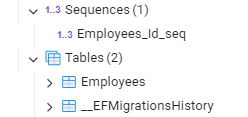
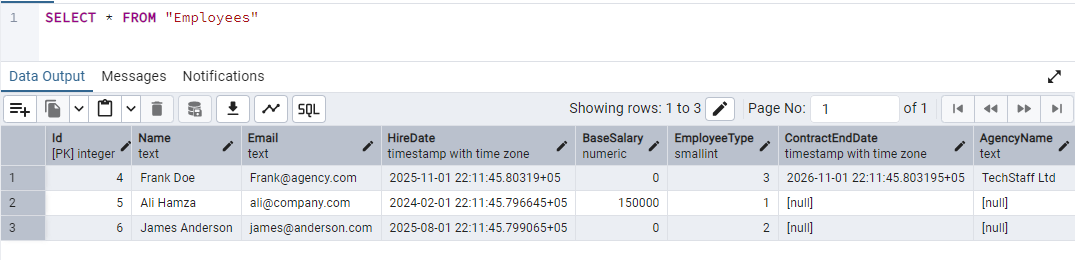

We observe that type-specific columns are null for records of other types.
Step 7: Run and test the application
Let's run the project:
dotnet run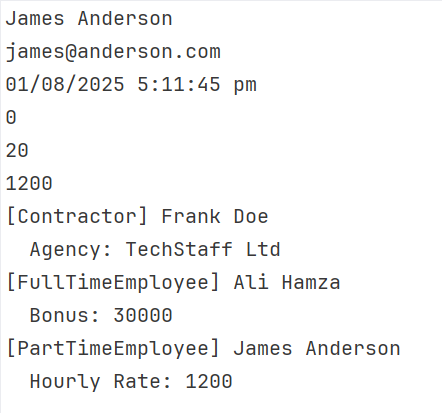
When is TPH best
- For domain-driven design, TPH is best suited to lower complexity and is fully supported by EF Core.
- It offers the least complexity, and LINQ works naturally.
- Optimal when types are closely related, and there are fewer chances of null values.
When to avoid TPH
- Sometimes strength becomes a liability. So is the case with TPH. If your entities are unrelated, then a single table can be overwhelmed by null values.
- Due to null columns, TPH can be inefficient if you have too many derived entities.
Table-Per-Type (TPT) EF core polymorphic relationship implementation
Another type of relationship EF offers is Table-Per-Type (TPT). As the name suggests, parent and child entities contain their own table joined via foreign keys. Let's check how we can do it with a new sample project.
Step 1: Create a project
dotnet new console -o EfCoreTptStep 2: Install the required packages
dotnet add package Microsoft.EntityFrameworkCore
dotnet add package Microsoft.EntityFrameworkCore.SqlServer
dotnet add package Microsoft.EntityFrameworkCore.Tools
Step 3: Define models
We will create the same models as in the sample above.
Step 4: Set up DbContext
using Microsoft.EntityFrameworkCore;

namespace EfCoreTpt.Data;

public class ApplicationDbContext: DbContext
{
    public DbSet<Employee> Employees => Set<Employee>();

    protected override void OnConfiguring(DbContextOptionsBuilder options)
    {
        options.UseNpgsql(
            "connection string with db name tptDb");
    }

    protected override void OnModelCreating(ModelBuilder modelBuilder)
    {
        modelBuilder.Entity<Employee>().UseTptMappingStrategy();

        modelBuilder.Entity<FullTimeEmployee>().ToTable("FullTimeEmployees");
        modelBuilder.Entity<PartTimeEmployee>().ToTable("PartTimeEmployees");
        modelBuilder.Entity<Contractor>().ToTable("Contractors");
    }
}
Here, with UseTptMappingStrategy I have to specify the base type of Employee with TPT mapping. You can see that other types are also mapped to their table.
Step 5: Configure Program.cs
using var db = new ApplicationDbContext();

var fullTime = new FullTimeEmployee
{
    Name = "Ali Hamza",
    Email = "ali@company.com",
    HireDate = DateTime.UtcNow.AddYears(-2),
    BaseSalary = 150000,
    AnnualBonus = 30000,
    VacationDays = 25
};

var partTime = new PartTimeEmployee
{
    Name = "James Anderson",
    Email = "james@anderson.com",
    HireDate = DateTime.UtcNow.AddMonths(-6),
    BaseSalary = 0,
    HourlyRate = 1200,
    WeeklyHours = 20
};

var contractor = new Contractor
{
    Name = "Frank Doe",
    Email = "Frank@agency.com",
    HireDate = DateTime.UtcNow.AddMonths(-3),
    BaseSalary = 0,
    ContractEndDate = DateTime.UtcNow.AddMonths(9),
    AgencyName = "TechStaff Ltd"
};

db.Employees.AddRange(fullTime, partTime, contractor);
db.SaveChanges();

Console.WriteLine("Employees inserted.");

var employees = db.Employees.ToList();

foreach (var emp in employees)
{
    Console.WriteLine($"[{emp.GetType().Name}] {emp.Name}");

    switch (emp)
    {
        case FullTimeEmployee f:
            Console.WriteLine($"  Bonus: {f.AnnualBonus}");
            break;

        case PartTimeEmployee p:
            Console.WriteLine($"  Hourly: {p.HourlyRate}");
            break;

        case Contractor c:
            Console.WriteLine($"  Agency: {c.AgencyName}");
            break;
    }
}
Step 6: Run migration
Again, let us update the database:
dotnet ef migrations add InitialDbdotnet ef database updateAnd look at the generated migration class:
using System;
using Microsoft.EntityFrameworkCore.Migrations;
using Npgsql.EntityFrameworkCore.PostgreSQL.Metadata;

#nullable disable

namespace EfCoreTpt.Migrations
{
    /// <inheritdoc />
    public partial class InitialDb : Migration
    {
        /// <inheritdoc />
        protected override void Up(MigrationBuilder migrationBuilder)
        {
            migrationBuilder.CreateTable(
                name: "Employees",
                columns: table => new
                {
                    Id = table.Column<int>(type: "integer", nullable: false)
                        .Annotation("Npgsql:ValueGenerationStrategy", NpgsqlValueGenerationStrategy.IdentityByDefaultColumn),
                    Name = table.Column<string>(type: "text", nullable: false),
                    Email = table.Column<string>(type: "text", nullable: false),
                    HireDate = table.Column<DateTime>(type: "timestamp with time zone", nullable: false),
                    BaseSalary = table.Column<decimal>(type: "numeric", nullable: false)
                },
                constraints: table =>
                {
                    table.PrimaryKey("PK_Employees", x => x.Id);
                });

            migrationBuilder.CreateTable(
                name: "Contractors",
                columns: table => new
                {
                    Id = table.Column<int>(type: "integer", nullable: false),
                    ContractEndDate = table.Column<DateTime>(type: "timestamp with time zone", nullable: false),
                    AgencyName = table.Column<string>(type: "text", nullable: false)
                },
                constraints: table =>
                {
                    table.PrimaryKey("PK_Contractors", x => x.Id);
                    table.ForeignKey(
                        name: "FK_Contractors_Employees_Id",
                        column: x => x.Id,
                        principalTable: "Employees",
                        principalColumn: "Id",
                        onDelete: ReferentialAction.Cascade);
                });

            migrationBuilder.CreateTable(
                name: "FullTimeEmployees",
                columns: table => new
                {
                    Id = table.Column<int>(type: "integer", nullable: false),
                    AnnualBonus = table.Column<decimal>(type: "numeric", nullable: false),
                    VacationDays = table.Column<int>(type: "integer", nullable: false)
                },
                constraints: table =>
                {
                    table.PrimaryKey("PK_FullTimeEmployees", x => x.Id);
                    table.ForeignKey(
                        name: "FK_FullTimeEmployees_Employees_Id",
                        column: x => x.Id,
                        principalTable: "Employees",
                        principalColumn: "Id",
                        onDelete: ReferentialAction.Cascade);
                });

            migrationBuilder.CreateTable(
                name: "PartTimeEmployees",
                columns: table => new
                {
                    Id = table.Column<int>(type: "integer", nullable: false),
                    HourlyRate = table.Column<decimal>(type: "numeric", nullable: false),
                    WeeklyHours = table.Column<int>(type: "integer", nullable: false)
                },
                constraints: table =>
                {
                    table.PrimaryKey("PK_PartTimeEmployees", x => x.Id);
                    table.ForeignKey(
                        name: "FK_PartTimeEmployees_Employees_Id",
                        column: x => x.Id,
                        principalTable: "Employees",
                        principalColumn: "Id",
                        onDelete: ReferentialAction.Cascade);
                });
        }

        /// <inheritdoc />
        protected override void Down(MigrationBuilder migrationBuilder)
        {
            migrationBuilder.DropTable(
                name: "Contractors");

            migrationBuilder.DropTable(
                name: "FullTimeEmployees");

            migrationBuilder.DropTable(
                name: "PartTimeEmployees");

            migrationBuilder.DropTable(
                name: "Employees");
        }
    }
}
One notable aspect here is the use of foreign keys to link tables. TPT is the only one that uses foreign keys to represent the inheritance itself. Other strategies can still use FKs for normal relationships (like Employee has a Laptop).
The database and data now look like this:
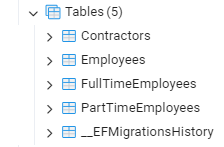
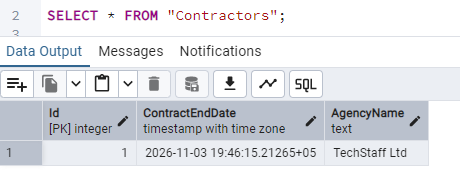
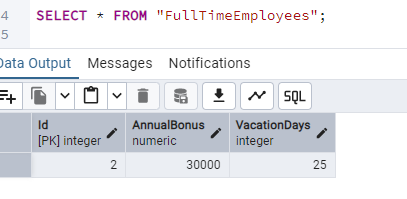
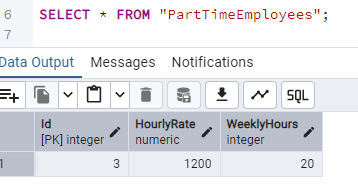
Although I added records using the base class, they are written into their respective tables.
Step 7: Run and test the application
dotnet runEF Core generates joins in every query, such as:
SELECT ...
FROM Employees e
LEFT JOIN FullTimeEmployees f ON e.Id = f.Id
LEFT JOIN PartTimeEmployees p ON e.Id = p.Id
LEFT JOIN Contractors c ON e.Id = c.Id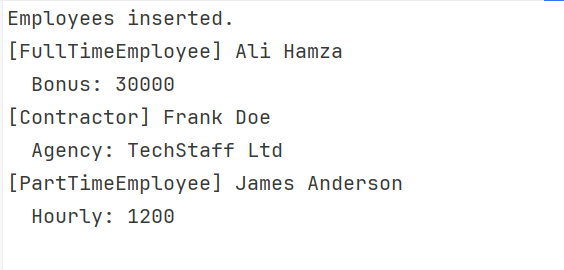
When is TPT best
- With each type having its own table, the database schema remained clean.
- The database is inherently well normalized.
- Records contain minimal nulls. TPT is optimal when your application has big inheritance trees.
When to avoid TPT
- TPT can be problematic in performance-critical systems, potentially slowing data reading.
- Queries heavily rely on joins.
Table-Per-Concrete (TPC) EF Core polymorphic relationship implementation
The last approach in EF Core polymorphic relationships is Table-Per-Concrete-Class (TPC). The parent class has no table, while each concrete class contains its own table. Each table repeats inherited fields as its columns. Like with the previous types, let us create a sample project to show how it works.
Step 1: Create a project
dotnet new console -o EfCoreTpcStep 2: Install the required packages
dotnet add package Microsoft.EntityFrameworkCore
dotnet add package Microsoft.EntityFrameworkCore.SqlServer
dotnet add package Microsoft.EntityFrameworkCore.Tools
Step 3: Define models
We will use the same models as in the sample above.
Step 4: Set up DbContext
This is the most crucial step, as with the others. Here, I will specify how I want to deal with relationships:
using Microsoft.EntityFrameworkCore;

public class ApplicationDbContext: DbContext
{
    public DbSet<Employee> Employees => Set<Employee>();
    public DbSet<FullTimeEmployee> FullTimeEmployees => Set<FullTimeEmployee>();
    public DbSet<PartTimeEmployee> PartTimeEmployees => Set<PartTimeEmployee>();
    public DbSet<Contractor> Contractors => Set<Contractor>();

    protected override void OnConfiguring(DbContextOptionsBuilder options)
    {
        options.UseNpgsql(
            "Connectionstring with db name tpcDb");
    }

    protected override void OnModelCreating(ModelBuilder modelBuilder)
    {
        modelBuilder.Entity<Employee>()
            .UseTpcMappingStrategy();
    }
}
The code modelBuilder.Entity().UseTpcMappingStrategy() instructs EF Core to use TPC mappings.
Step 5: Configure Program.cs
using var db = new ApplicationDbContext();

var fullTime = new FullTimeEmployee
{
    Name = "Ali Hamza",
    Email = "ali@company.com",
    HireDate = DateTime.UtcNow.AddYears(-2),
    BaseSalary = 150000,
    AnnualBonus = 30000,
    VacationDays = 25
};

var partTime = new PartTimeEmployee
{
    Name = "James Anderson",
    Email = "james@anderson.com",
    HireDate = DateTime.UtcNow.AddMonths(-6),
    BaseSalary = 0,
    HourlyRate = 1200,
    WeeklyHours = 20
};

var contractor = new Contractor
{
    Name = "Frank Doe",
    Email = "Frank@agency.com",
    HireDate = DateTime.UtcNow.AddMonths(-3),
    BaseSalary = 0,
    ContractEndDate = DateTime.UtcNow.AddMonths(9),
    AgencyName = "TechStaff Ltd"
};

db.Employees.AddRange(fullTime, partTime, contractor);
db.SaveChanges();

Console.WriteLine("Employees inserted.");

var employees = db.Employees.ToList();

foreach (var emp in employees)
{
    Console.WriteLine($"[{emp.GetType().Name}] {emp.Name}");
}
Here, I am leveraging polymorphic behaviour by inserting records into the Employees data set.
Step 6: Run migration
Create a migration and update the database:
dotnet ef migrations add InitialDbdotnet ef database updateThe new migration class looks like this:
using System;
using Microsoft.EntityFrameworkCore.Migrations;

#nullable disable

namespace EfCoreTpc.Migrations
{
    /// <inheritdoc />
    public partial class InitialDb : Migration
    {
        /// <inheritdoc />
        protected override void Up(MigrationBuilder migrationBuilder)
        {
            migrationBuilder.CreateSequence(
                name: "EmployeeSequence");

            migrationBuilder.CreateTable(
                name: "Contractors",
                columns: table => new
                {
                    Id = table.Column<int>(type: "integer", nullable: false, defaultValueSql: "nextval('\"EmployeeSequence\"')"),
                    Name = table.Column<string>(type: "text", nullable: false),
                    Email = table.Column<string>(type: "text", nullable: false),
                    HireDate = table.Column<DateTime>(type: "timestamp with time zone", nullable: false),
                    BaseSalary = table.Column<decimal>(type: "numeric", nullable: false),
                    ContractEndDate = table.Column<DateTime>(type: "timestamp with time zone", nullable: false),
                    AgencyName = table.Column<string>(type: "text", nullable: false)
                },
                constraints: table =>
                {
                    table.PrimaryKey("PK_Contractors", x => x.Id);
                });

            migrationBuilder.CreateTable(
                name: "FullTimeEmployees",
                columns: table => new
                {
                    Id = table.Column<int>(type: "integer", nullable: false, defaultValueSql: "nextval('\"EmployeeSequence\"')"),
                    Name = table.Column<string>(type: "text", nullable: false),
                    Email = table.Column<string>(type: "text", nullable: false),
                    HireDate = table.Column<DateTime>(type: "timestamp with time zone", nullable: false),
                    BaseSalary = table.Column<decimal>(type: "numeric", nullable: false),
                    AnnualBonus = table.Column<decimal>(type: "numeric", nullable: false),
                    VacationDays = table.Column<int>(type: "integer", nullable: false)
                },
                constraints: table =>
                {
                    table.PrimaryKey("PK_FullTimeEmployees", x => x.Id);
                });

            migrationBuilder.CreateTable(
                name: "PartTimeEmployees",
                columns: table => new
                {
                    Id = table.Column<int>(type: "integer", nullable: false, defaultValueSql: "nextval('\"EmployeeSequence\"')"),
                    Name = table.Column<string>(type: "text", nullable: false),
                    Email = table.Column<string>(type: "text", nullable: false),
                    HireDate = table.Column<DateTime>(type: "timestamp with time zone", nullable: false),
                    BaseSalary = table.Column<decimal>(type: "numeric", nullable: false),
                    HourlyRate = table.Column<decimal>(type: "numeric", nullable: false),
                    WeeklyHours = table.Column<int>(type: "integer", nullable: false)
                },
                constraints: table =>
                {
                    table.PrimaryKey("PK_PartTimeEmployees", x => x.Id);
                });
        }

        /// <inheritdoc />
        protected override void Down(MigrationBuilder migrationBuilder)
        {
            migrationBuilder.DropTable(
                name: "Contractors");

            migrationBuilder.DropTable(
                name: "FullTimeEmployees");

            migrationBuilder.DropTable(
                name: "PartTimeEmployees");

            migrationBuilder.DropSequence(
                name: "EmployeeSequence");
        }
    }
}
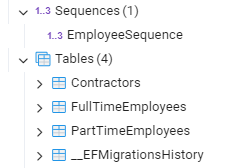
The code migrationBuilder.CreateSequence(name: "EmployeeSequence") specifies global ID generation across the hierarchy. Instead of independent identity generators, EF Core uses one shared sequence.
The database now looks like this:
Step 7: Run and test the application
dotnet run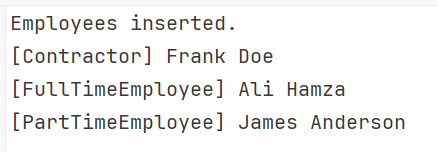
A high-level view of the generated query is:
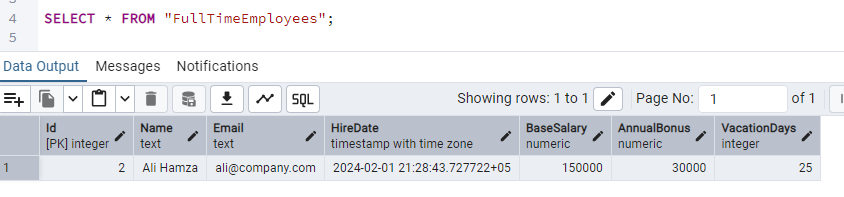
SELECT ... FROM FullTimeEmployees
UNION ALL
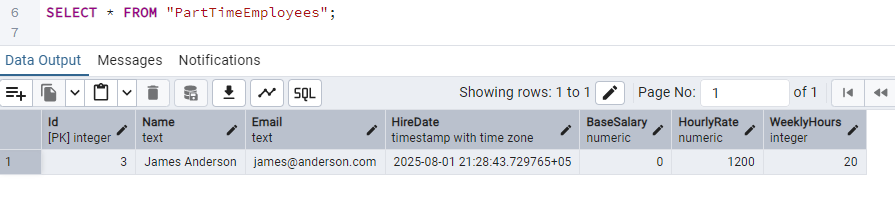
SELECT ... FROM PartTimeEmployees
UNION ALL
SELECT ... FROM Contractors
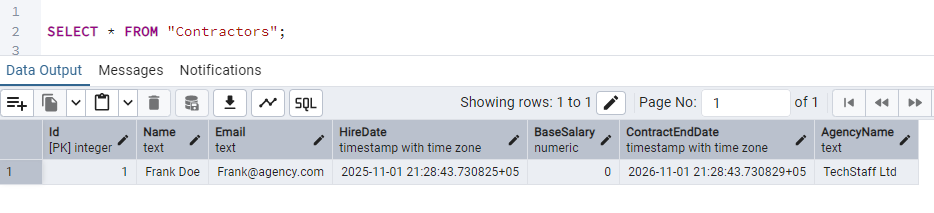
And the rows returned look like in the following screenshots:
When is TPC best
- TPC applies when the application requires performing extensive queries on concrete types.
- When you are designing a fast read-heavy system.
- When you want to keep clean tables with no nulls.
When to avoid TPC
- TPC can slow down when the application has many polymorphic queries.
- Do not use with large inheritance trees.
- Not optimal, frequent schema changes.
- Duplicated columns can be problematic for some users.
Conclusion
Entity Framework provides different ways to design entities. They are not fixed for any use, but we tried to see by example how each one creates tables and how its internal relationships work. A quick summary of the types and features can be seen here:
| Feature | TPH (Hierarchy) | TPT (Type) | TPC (Concrete) |
| Tables | One single table | One base + One per type | One per concrete type |
| Performance | Fastest (No joins) | Slowest (Many joins) | Fast for specific types |
| Nullability | Many nullable columns | No nulls (normalized) | No nulls (denormalized) |
| Best For | Simple hierarchies | Complex, strict schemas | Large sets, specific queries |
In this blog post, I delved deeper into TPH, TPT, and TPC. I hope it helps you decide on which strategy to use for your database design.
Code: https://github.com/elmahio-blog/PolymorphicRelEfCore
elmah.io: Error logging and Uptime Monitoring for your web apps
This blog post is brought to you by elmah.io. elmah.io is error logging, uptime monitoring, deployment tracking, and service heartbeats for your .NET and JavaScript applications. Stop relying on your users to notify you when something is wrong or dig through hundreds of megabytes of log files spread across servers. With elmah.io, we store all of your log messages, notify you through popular channels like email, Slack, and Microsoft Teams, and help you fix errors fast.

See how we can help you monitor your website for crashes Monitor your website