Implementing strongly-typed IDs in .NET for safer domain models
As developers, we know that user requests can be unpredictable. When they request data, it is either successfully returned or not found. However, a "not found" result usually happens in two ways. First, the user might request a record, such as a basketball player, by passing an ID that doesn't exist. Second, they might pass the wrong type of ID, like a Team ID, while trying to fetch a Player. The first situation is common, but the second should be handled to avoid logic pitfalls. Enforcing this validation for every entity can be a humongous task when your application contains hundreds of entities. In this post, I will provide a way out of this situation so you can restrict your application from passing IDs interchangeably among entities.
Primitive obsession
Primitive obsession refers to a situation where we use primitive data types, such as int, string, or bool, to represent complex data. Usually, values like URLs, Addresses, or identities are saved as strings. This creates a hidden breach of encapsulation because it forces you to add an extra layer of validation somewhere else in the code.
For domain-specific entities like URLs or addresses, you can use owned entities. However, to define domain-specific identities, we need strongly-typed IDs.
Primitive Id implementation for EF Core model entity
Let's first understand the problem with the traditional way. I will create a console application with a PostgreSQL database to catch the issue at hand.
Step 1: Create the project
dotnet new console -n IntIdsDemo
cd IntIdsDemo
Step 2: Install necessary packages
dotnet add package Microsoft.EntityFrameworkCore
dotnet add package Microsoft.EntityFrameworkCore.Design
dotnet add package Npgsql.EntityFrameworkCore.PostgreSQL
Step 3: Define models
I'll create models to represent a player, a team, and the relationship between them.
Player
namespace IntIdsDemo.Domain.Entities;

public class Player
{
    public int Id { get; private set; }
    public string Name { get; private set; } = string.Empty;

    private Player() { } // Required by EF Core

    public Player(string name)
    {
        Name = name;
    }
}
Team
namespace IntIdsDemo.Domain.Entities;

public class Team
{
    public int Id { get; private set; }
    public string Name { get; private set; } = string.Empty;

    private Team() { }

    public Team(string name)
    {
        Name = name;
    }
}
PlayerTeam to join them
namespace IntIdsDemo.Domain.Entities;

public class PlayerTeam
{
    public int Id { get; private set; }
    public int PlayerId { get; set; }
    public int TeamId { get; set; }

    private PlayerTeam() { }

    public PlayerTeam(int playerId, int teamId)
    {
        PlayerId = playerId;
        TeamId = teamId;
    }
}
Step 4: Configure ApplicationDbContext
using IntIdsDemo.Domain.Entities;
using Microsoft.EntityFrameworkCore;

namespace IntIdsDemo.Data;

public class ApplicationDbContext: DbContext
{
    public DbSet<Player> Players => Set<Player>();
    public DbSet<Team> Teams => Set<Team>();
    public DbSet<PlayerTeam> PlayerTeams => Set<PlayerTeam>();

    protected override void OnConfiguring(DbContextOptionsBuilder options)
    {
        options.UseNpgsql(
            "Connection string with database simpleIdsDb");
    }

    protected override void OnModelCreating(ModelBuilder modelBuilder)
    {
    }
}
Step 5: Define Program.cs
using IntIdsDemo.Data;
using IntIdsDemo.Domain.Entities;

using var db = new ApplicationDbContext();

// Seed data
var player1 = new Player("Ali");
var player2 = new Player("Hamza");
var team = new Team("Warriors");

db.Players.Add(player1);
db.Players.Add(player2);
db.Teams.Add(team);
db.SaveChanges();

Console.WriteLine("Player & Team saved");

// Simple assignment method
void AssignPlayerToTeam(int playerId, int teamId)
{
    var playerTeam = new PlayerTeam(playerId, teamId);
    db.PlayerTeams.Add(playerTeam);
    db.SaveChanges();
}

AssignPlayerToTeam(player2.Id, team.Id);
AssignPlayerToTeam(team.Id, player2.Id);

Player player = db.Players.Find(team.Id);

if (player != null)
{
    Console.WriteLine($"Player Id (int): {player.Id}");
    Console.WriteLine($"Player Name: {player.Name}");
}

player = db.Players.Find(player2.Id);

if (player != null)
{
    Console.WriteLine($"Player Id (int): {player.Id}");
    Console.WriteLine($"Player Name: {player.Name}");
}
I am initializing 2 players and 1 team here. Later, I assign player 2 to the team. First, I did it correctly as per the method's requirement, with AssignPlayerToTeam(player2.Id, team.Id); While in the second part, which is logically wrong, the compiler will give a green signal to AssignPlayerToTeam(team.Id, player2.Id). Next, I am observing an issue with fetching data. I can easily pass teamId as the parameter for the Find method, where playerId (db.Players.Find(team.Id)) is expected. But since we are using the primitive type of int, it will compile without any errors.
Step 6: Run the migration
We need to create an empty database
CREATE DATABASE simpleIdsDb;
And create a migration and update the database
dotnet ef migrations add InitialCreate
dotnet ef database update
Step 7: run the project
dotnet run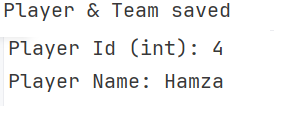
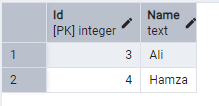
Let's check the database. The Players table contains the following rows:
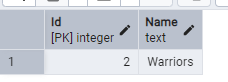
The Teams table contains a single row:
And finally, the PlayerTeams table contains two relationship rows:
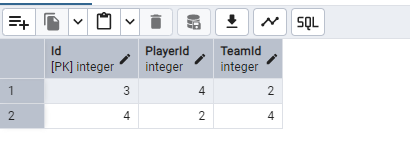
As you can see, the assignment is done, and PlayerId and TeamId were assigned interchangeably. To prevent this at the database level, we would have to add specific constraints. However, at the coding level, this remains a significant issue. While the console output shows that the player was not found with team.Id, this behavior can still lead to data inconsistency or unexpected runtime errors.
Strongly-Typed ID implementation for safer domain model
To keep focus on strongly-typed ID implementations, I will continue a similar project.
Step 1: Create the project
dotnet new console -n StronglyTypedIdsDemo
cd StronglyTypedIdsDemo
Step 2: Install necessary packages
dotnet add package Microsoft.EntityFrameworkCore
dotnet add package Microsoft.EntityFrameworkCore.Design
dotnet add package Npgsql.EntityFrameworkCore.PostgreSQL
Step 3: Create the Strongly-Typed IDs
Traversing to the directory Domain/Ids/ and add the following code for creating a player ID
namespace StronglyTypedIdsDemo.Domain.Ids;

public readonly record struct PlayerId(int Value)
{
    public override string ToString() => Value.ToString();
}
And the following for creating a team ID
namespace StronglyTypedIdsDemo.Domain.Ids;

public readonly record struct TeamId(int Value)
{
    public override string ToString() => Value.ToString();
}
And finally, the player/team relational ID
namespace StronglyTypedIdsDemo.Domain.Ids;

public readonly record struct PlayerTeamId(int Value)
{
    public override string ToString() => Value.ToString();
}
struct are the best fit for strongly-typed IDs. A struct cannot contain null, while a class would allow it null, heap allocation, and reference semantics. readonly ensures immutability and cannot be modified after creation. As we know record is a value object, record struct will give you value-based equality automatically.
Step 4: Create the Entity
Go to the directory StronglyTypedIdsDemo.Domain.Entities and add the following model classes
using StronglyTypedIdsDemo.Domain.Ids;

namespace StronglyTypedIdsDemo.Domain.Entities;

public class Player
{
    public PlayerId Id { get; private set; }
    public string Name { get; private set; } = string.Empty;

    private Player() { }

    public Player(string name)
    {
        Name = name;
    }
}
using StronglyTypedIdsDemo.Domain.Ids;
namespace StronglyTypedIdsDemo.Domain.Entities;
public class Team
{
public TeamId Id { get; private set; }
public string Name { get; private set; } = string.Empty;
private Team() { }
public Team(string name)
{
Name = name;
}
}using StronglyTypedIdsDemo.Domain.Ids;
namespace StronglyTypedIdsDemo.Domain.Entities;
public class PlayerTeam
{
public PlayerTeamId Id { get; private set; }
public PlayerId PlayerId { get; private set; }
public TeamId TeamId { get; private set; }
private PlayerTeam() { }
public PlayerTeam(PlayerId playerId, TeamId teamId)
{
PlayerId = playerId;
TeamId = teamId;
}
}These classes look similar to the first application but all ID types have been switched out for the strongly typed versions.
Step 5: Configure the DbContext
using Microsoft.EntityFrameworkCore;
using Microsoft.EntityFrameworkCore.Storage.ValueConversion;
using StronglyTypedIdsDemo.Domain.Entities;
using StronglyTypedIdsDemo.Domain.Ids;

namespace StronglyTypedIdsDemo.Data;

public class ApplicationDbContext: DbContext
{
    public DbSet<Player> Players => Set<Player>();
    public DbSet<Team> Teams => Set<Team>();
    public DbSet<PlayerTeam> PlayerTeams => Set<PlayerTeam>();

    protected override void OnConfiguring(DbContextOptionsBuilder options)
    {
        options.UseNpgsql(
            "Connection string with db name strongIdsDb");
    }

    protected override void OnModelCreating(ModelBuilder modelBuilder)
    {
        var playerIdConverter = new ValueConverter<PlayerId, int>(
            id => id.Value,
            value => new PlayerId(value));

        modelBuilder.Entity<Player>(entity =>
        {
            entity.HasKey(x => x.Id);

            entity.Property(x => x.Id)
                .HasConversion(playerIdConverter)
                .ValueGeneratedOnAdd();

            entity.Property(x => x.Name)
                .IsRequired();
        });

        var teamIdConverter = new ValueConverter<TeamId, int>(
            id => id.Value,
            value => new TeamId(value));

        modelBuilder.Entity<Team>(entity =>
        {
            entity.HasKey(x => x.Id);

            entity.Property(x => x.Id)
                .HasConversion(teamIdConverter)
                .ValueGeneratedOnAdd();

            entity.Property(x => x.Name)
                .IsRequired();
        });

        var playerTeamIdConverter = new ValueConverter<PlayerTeamId, int>(
            id => id.Value,
            value => new PlayerTeamId(value));

        modelBuilder.Entity<PlayerTeam>(entity =>
        {
            entity.HasKey(x => x.Id);

            entity.Property(x => x.Id)
                .HasConversion(playerTeamIdConverter)
                .ValueGeneratedOnAdd();

            entity.Property(pt => pt.PlayerId)
                .HasConversion(playerIdConverter)
                .IsRequired();

            entity.Property(pt => pt.TeamId)
                .HasConversion(teamIdConverter)
                .IsRequired();
        });
    }
}
I used ValueConverter<PlayerId, int> that tells EF Core to use PlayerId but save the value as int. similarly TeamId and PlayerTeamId are configured. Notice that adding a connection string through code is not recommended and only done for simplicity. Always use external configuration for this.
Step 6: Configure Program.cs
using StronglyTypedIdsDemo.Data;
using StronglyTypedIdsDemo.Domain.Entities;
using StronglyTypedIdsDemo.Domain.Ids;

using var db = new ApplicationDbContext();

// Seed data
var player1 = new Player("Ali");
var player2 = new Player("Hamza");
var team = new Team("Warriors");

db.Players.Add(player1);
db.Players.Add(player2);
db.Teams.Add(team);
db.SaveChanges();

Console.WriteLine("Player & Team saved");

// Simple assignment method
void AssignPlayerToTeam(PlayerId playerId, TeamId teamId)
{
    var playerTeam = new PlayerTeam(playerId, teamId);
    db.PlayerTeams.Add(playerTeam);
    db.SaveChanges();
}

AssignPlayerToTeam(player2.Id, team.Id);

// ⚠️ Wrong order of parameter
AssignPlayerToTeam(team.Id, player2.Id);

// ⚠️ Wrong ID type for Find
Player player = db.Players.Find(team.Id);

if (player != null)
{
    Console.WriteLine($"Player Id (int): {player.Id}");
    Console.WriteLine($"Player Name: {player.Name}");
}

player = db.Players.Find(player2.Id);

if (player != null)
{
    Console.WriteLine($"Player Id (int): {player.Id}");
    Console.WriteLine($"Player Name: {player.Name}");
}
In the code, I'm adding a record manually . In the line AssignPlayerToTeam(team.Id, player2.Id), a compiler error is shown.

The compiler now detects when we try to use the incorrect IDs when adding a user to a team.
Sep 7: run migrations
We need to create an empty database
CREATE DATABASE strongIdsDb;
And add the migration and run it
dotnet ef migrations add InitialCreate
dotnet ef database update
Step 8: Run and test
dotnet runThe second error is now revealed, since we are trying to use a team ID as the parameter for the Find method on the Players table
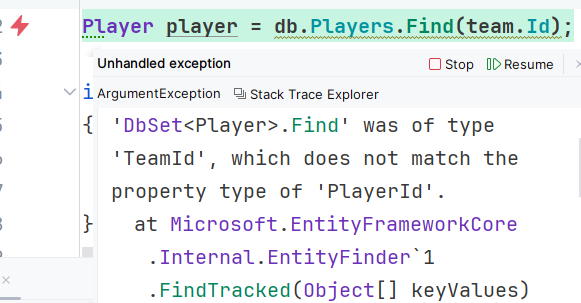
This means we are on the right track. Remove erroneous code and everything looks great
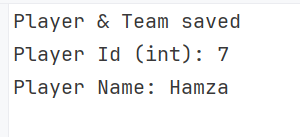
What strongly-typed IDs have improved?
- Primitive IDs can lead to id-mixup at compile time. Defining identity structure. Each entity eliminates this shortcoming.
- The traditional approach lacks domain meaning, whereas a strongly typed ID contains explicit intent.
- Strongly-typed IDs removed the ambiguity of method signatures that happens when int, Guid, or other primitive types are used.
- Traditionally, bugs are skipped at compile time, leading to runtime errors, while strongly-typed IDs catch ID mismatches at compile time.
Conclusion
Robustness is a big win for any application. Your code should handle issues right at the gateway. One common problem most people overlook is primitive obsession. Using types like ints for IDs allows you to pass IDs of different entities interchangeably. You can validate them manually, but that requires extra verbose code elsewhere, which breaks encapsulation. In this post, I have provided a solution using strongly-typed IDs to resolve that problem. We first looked at the traditional approach and observed the real-world issues caused by primitive obsession. Using separate value-object IDs makes your domain model much safer.
Code: https://github.com/elmahio-blog/StronglyTypedIdsDemo
elmah.io: Error logging and Uptime Monitoring for your web apps
This blog post is brought to you by elmah.io. elmah.io is error logging, uptime monitoring, deployment tracking, and service heartbeats for your .NET and JavaScript applications. Stop relying on your users to notify you when something is wrong or dig through hundreds of megabytes of log files spread across servers. With elmah.io, we store all of your log messages, notify you through popular channels like email, Slack, and Microsoft Teams, and help you fix errors fast.

See how we can help you monitor your website for crashes Monitor your website