New in .NET 10 and C# 14: Fast Model Validation for APIs
.NET 10 is officially out, along with C# 14. Microsoft has released .NET 10 as Long-Term Support (LTS) as a successor to .NET 8. Like every version, it is not just an update but brings something new to the table. In this series, we will explore which aspects of software can be upgraded with the latest release.
Model validation is a constant performance "tax" on every request, yet it remains non-negotiable for ensuring data integrity and a good user experience. While developers once faced a trade-off between strict validation and high throughput, .NET 10 eliminates this friction. In this post, I'll examine the benchmarks to see how these shifts dramatically reduce latency in .NET 10.
APIs Model Validation Benchmarking with .NET 8 and .NET 10
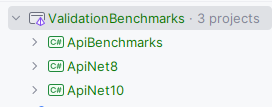
To start testing the improvements, I have created a solution named ValidationBenchmarks where three projects will reside. The structure looks like this:
.NET 8 API project
The project will contain an API with a single endpoint. Let's create it.
Step 1: Create a .NET 8 project
mkdir ApiNet8
cd ApiNet8

dotnet new webapi -n ApiNet8 --framework net8.0
Step 2: Create DTO (validation target)
using System.ComponentModel.DataAnnotations;

namespace ApiNet8.Models;

public sealed class CreateDeviceRequest
{
    [Required]
    public string DeviceId { get; set; } = default!;

    [Range(-40, 85)]
    public double Temperature { get; set; }

    [Range(0, 100)]
    public int BatteryLevel { get; set; }

    [Required]
    public DateTime Timestamp { get; set; }
}
The model is a minimal representation of telemetry data where DeviceId and Timestamp are mandatory while Temperature and BatteryLevel are restricted to be in a valid range.
Step 3: Create controller
using ApiNet8.Models;
using Microsoft.AspNetCore.Mvc;

namespace ApiNet8.Controllers;

[ApiController]
[Route("devices")]
public class DevicesController : ControllerBase
{
    [HttpPost]
    public IActionResult Create(CreateDeviceRequest request)
    {
        return Ok(new { Message = "Device accepted (.NET 8)" });
    }
}
The controller contains a single POST endpoint to create a device. The method takes our model as input.
Step 4: Configure Progam.cs
var builder = WebApplication.CreateBuilder(args);

builder.Services.AddControllers();

var app = builder.Build();

app.MapControllers();
app.Run();
If you have create a MVC API before, you will see nothing different from the default template here.
.NET 10 API project
Let's create a similar project for .NET 10.
Step 1: Create a .NET 10 project
mkdir ApiNet10
cd ApiNet10

dotnet new webapi -n ApiNet10 --framework net10.0
Steps 2, 3, and 4 are exactly the same as from the .NET 8 steps.
Benchmark project
Once we have set up both target projects, we will set up a benchmark to evaluate them.
Step 1: Create the project
Our benchmark project will be a console application using the BenchmarkDotNet package.
dotnet new console -n ApiBenchmarks
cd ApiBenchmarks
Step 2: Install the BenchmarkDotNet package
dotnet add package BenchmarkDotNetFor more information about benchmarking, check out How to Monitor Your App's Performance with .NET Benchmarking.
Step 3: Add Benchmarking code
using System.Text;
using BenchmarkDotNet.Attributes;

namespace ApiBenchmarks;
[MemoryDiagnoser]
public class ValidationBenchmarks
{
    private HttpClient _client8 = default!;
    private HttpClient _client10 = default!;
    private StringContent _invalidPayload = default!;

    [GlobalSetup]
    public void Setup()
    {
        _client8 = new HttpClient
        {
            BaseAddress = new Uri("http://localhost:5008")
        };

        _client10 = new HttpClient
        {
            BaseAddress = new Uri("http://localhost:5010")
        };

        var json = """
                   {
                       "deviceId": "",
                       "temperature": 120,
                       "batteryLevel": 150,
                       "timestamp": null
                   }
                   """;

        _invalidPayload = new StringContent(
            json,
            Encoding.UTF8,
            "application/json"
        );
    }

    [Benchmark]
    public async Task Net8_Invalid_Model()
        => await _client8.PostAsync("/devices", _invalidPayload);

    [Benchmark]
    public async Task Net10_Invalid_Model()
        => await _client10.PostAsync("/devices", _invalidPayload);
}
Here, I initialized two clients, _client8 for calling the API of the .NET 8 project and _client10 to call the endpoint of the .NET 10 project. To represent an invalid payload, I created an _invalidPayload field. To test the worst case, I violated all the validations.
Step 4: Call the benchmark in Program.cs
using ApiBenchmarks;
using BenchmarkDotNet.Running;

BenchmarkRunner.Run<ValidationBenchmarks>();
Step 5: Run the projects
Open 3 terminals, on the first one run
cd ApiNet8
dotnet run --urls "http://localhost:5100"
Run the following on the Second one
cd ApiNet10
dotnet run --urls "http://localhost:5200"
While on the third one
cd ApiBenchmarks
dotnet run -c Release
So each of the API will be running on the designated port.
Result

Let's break down how .NET performed about 3x faster in several ways.
- Earlier model validation relied heavily on reflection, such as discovering attributes like
[Required],[Range], and[StringLength]. Applying reflection on properties adds to the time. .NET 10 generates validation metadata at build time and replaces reflection with precomputed accessors. This actually saves a runtime check that happened earlier due to reflection. - .NET 10 uses
Span<T>where possible, and avoids LINQ in hot paths. - Attributes executed as object-oriented (OO) components, relying on virtual method calls and object-based values in prior versions. Classes provide a flexible solution, but they were expensive to the CPU. .NET 10 precomputes validation metadata and replaces virtual, object-based execution with direct, typed method calls. That means the .NET 10 keeps validation attributes as an OO API but replaces their runtime execution with precomputed, direct calls that are cheaper for the CPU.
- During attribute invocation, expensive boxed values were used along with context objects. .NET 10 eliminated boxing for value types and introduced a shared validation context where safe.
- .NET 10 replaced repeated metadata traversal of evaluating each attribute and building
ModelStateentries with fewer temporary strings, lazy creation of error messages, and smarter reuse ofModelErrorobjects. This ensured low GC pressure and better stability of latency. The provision helps in APIs where validation errors often occur, such as auth endpoints, ingestion APIs, and public APIs. - .NET 10 has better p95 / p99 latency, less jitter, more predictable execution, fewer unpredictable branches, and less runtime metadata walking. The results are visible in StdDev, which is 3x less than its counterpart.
Conclusion
.NET 10 is released in November 2025 and is supported for three years as a long-term support (LTS) release. It brings the latest version of C# with many refinements. In the blog post for our .NET 10 and C# 14 series, I highlighted improvements to the model validations. .NET 10 has changed the nature of the validation process from reflection to precomputed, faster calls. We saw a dramatic cut down of 3x in parameters like StdDev and Error due to better p99 latency and less jittering in the latest version.
Code: https://github.com/elmahio-blog/ValidationBenchmarks
elmah.io: Error logging and Uptime Monitoring for your web apps
This blog post is brought to you by elmah.io. elmah.io is error logging, uptime monitoring, deployment tracking, and service heartbeats for your .NET and JavaScript applications. Stop relying on your users to notify you when something is wrong or dig through hundreds of megabytes of log files spread across servers. With elmah.io, we store all of your log messages, notify you through popular channels like email, Slack, and Microsoft Teams, and help you fix errors fast.

See how we can help you monitor your website for crashes Monitor your website