New in .NET 10 and C# 14: Enhancements in APIs Request/Response Pipeline
.NET 10 is officially out, along with C# 14. Microsoft has released .NET 10 as Long-Term Support (LTS) as a successor to .NET 8. Like every version, it is not just an update but brings something new to the table. In this series, we will explore which aspects of software can be upgraded with the latest release. Today, in the series of What is new in .NET 10 and C#14, we will evaluate on-ground changes in the APIs using minimal examples.
APIs don't need any introduction. From loading the cart to your mobile to showing this blog on your computer, everything is fetched by APIs. In today's dynamic websites, a simple action requires multiple API calls. So, a simple lag can hurt users' experience, no matter what application you build. .NET 10 brings some thoughtful changes for APIs. Some major improvements, like JIT inlining and lower GC burden, made things faster across operations. However, there are enhancements in API pipelining as well. Let's observe how API operations are improved in .NET 10.
Benchmarking Minimal APIs with .NET 8 and .NET 10
I have created a directory MinimalApiComparison where three projects will reside. Consider the structure:
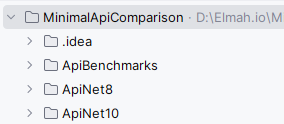
One folder per API version and another for the benchmarks.
.NET 8 minimal API project
Let's start by creating a minimal API on .NET 8.
Step 1: Create a .NET 8 project
mkdir ApiNet8
cd ApiNet8

dotnet new webapi -n ApiNet8 --framework net8.0
Step 2: Set up the code
var builder = WebApplication.CreateBuilder(args);
var app = builder.Build();

app.MapGet("/weather", () =>
{
    return new WeatherForecast(DateTime.Now, 25, "Sunny");
});

app.Run();

public record WeatherForecast(DateTime Date, int TemperatureC, string Summary);
Just a single endpoint named /weather.
.NET 10 Minimal API project
Now, let's set up a similar project for .NET 10.
Step 1: Create a .NET 10 project
mkdir ApiNet10
cd ApiNet10

dotnet new webapi -n ApiNet10 --framework net10.0
Step 2: Set up the code
var builder = WebApplication.CreateBuilder(args);

builder.Services.ConfigureHttpJsonOptions(o =>
{
    o.SerializerOptions.AllowOutOfOrderMetadataProperties = true;
});

var app = builder.Build();

app.MapGet("/weather", static () =>
    {
        return new WeatherForecast(DateTime.Now, 25, "Sunny");
    })
    .WithName("GetWeather")
    .WithSummary("Faster pipeline in .NET 10");

app.Run();

public record WeatherForecast(DateTime Date, int TemperatureC, string Summary);
The property AllowOutOfOrderMetadataProperties allows skipping strict ordering checks in JSON deserialization. It is an optimisation step that reduces parsing branches in compilation and speeds up model binding. static () => Prevents closure allocation by restricting the lambda from capturing variables. In preceding versions, lambda saves the inner variable in Gen 0 memory. While in the latest updates, static lambda results in 0 allocation and a faster, memory-efficient API.
Benchmark project
Once we set up both target projects, let us move to the benchmark to evaluate them.
Step 1: Create the project
Our benchmark project will be a console application.
dotnet new console -n ApiBenchmarks
cd ApiBenchmarks
Step 2: Install the BenchmarkDotNet package
We are using `BenchmarkDotNet to observe the results. For more information about this package, check out How to Monitor Your App's Performance with .NET Benchmarking.
dotnet add package BenchmarkDotNetStep 3: Set up the URLs benchmarking code
using System.Net.Http.Json;
using BenchmarkDotNet.Attributes;
using BenchmarkDotNet.Order;

[MemoryDiagnoser]
[SimpleJob(warmupCount: 3, iterationCount: 10)]
[Orderer(SummaryOrderPolicy.FastestToSlowest)]
public class ApiComparisonBenchmarks
{
    private readonly HttpClient _client8;
    private readonly HttpClient _client10;

    public ApiComparisonBenchmarks()
    {
        _client8 = new HttpClient { BaseAddress = new Uri("http://localhost:5100") };
        _client10 = new HttpClient { BaseAddress = new Uri("http://localhost:5200") };
    }

    [Benchmark]
    public async Task WeatherNet8()
    {
        var result = await _client8.GetFromJsonAsync<WeatherForecast>("/weather");
    }

    [Benchmark]
    public async Task WeatherNet10()
    {
        var result = await _client10.GetFromJsonAsync<WeatherForecast>("/weather");
    }
}

public record WeatherForecast(DateTime Date, int TemperatureC, string Summary);
I created two methods WeatherNet8 to hit the .NET 8 minimal API and WeatherNet10 for the .NET 10 version. I have specified server URLs with each client explicitly. The [Benchmark] decorator will do the rest of the job.
Step 4: Run the projects
Open 3 terminals, on the first one run:
cd ApiNet8
dotnet run --urls "http://localhost:5100"
Run the following on the second one:
cd ApiNet10
dotnet run --urls "http://localhost:5200"
While on the third one:
cd ApiBenchmarks
dotnet run -c Release
So each of the API will be running on the designated port. ApiBenchmark hits its endpoint at /weather and performs benchmarking.
Output
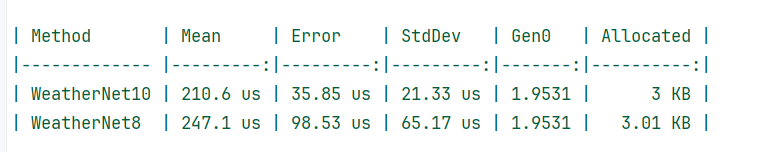
We can observe a difference in the same api of both projects. .NET 10 did the job quite fast, and other parameters are also lower, indicating the performance improvements in the latest version. .NET 10 has 3x smaller Standard deviation and error due to less jitter in execution times by the grace of JIT improvements and JSON parsing novelty. Pipeline configurations like AllowOutOfOrderMetadataProperties and static () => reduced the per-request overhead. AllowOutOfOrderMetadataProperties lowers CPU burden and reduces System.Text.Json paths in compilation. And static lambda not only eliminated closure allocation but made the delegate work faster with lower Garbage Collector pressure.
Our big win was not only in the pipeline configuration but also in faster request-response improvements in ASP.NET Core. .NET 10 has optimized middleware dispatch overhead, added static pipeline analysis and faster endpoint selection, resulting in lower mean and tail latency. Our observation was just on a minimal API with small objects. These enhancements will bring noticeable results when you work on real projects with larger API operations.
Conclusion
.NET 10 is released in November 2025 and is supported for three years as a long-term support (LTS) release. For the APIs pipeline, .NET 10 brought key enhancements. In this post, I showed these enhancements with on-ground benchmark analysis. Better JIT inlining, lower CPU and GC pressure, and numerous other factors have contributed to better APIs.
Source code: https://github.com/elmahio-blog/MinimalApiComparison-.git
elmah.io: Error logging and Uptime Monitoring for your web apps
This blog post is brought to you by elmah.io. elmah.io is error logging, uptime monitoring, deployment tracking, and service heartbeats for your .NET and JavaScript applications. Stop relying on your users to notify you when something is wrong or dig through hundreds of megabytes of log files spread across servers. With elmah.io, we store all of your log messages, notify you through popular channels like email, Slack, and Microsoft Teams, and help you fix errors fast.

See how we can help you monitor your website for crashes Monitor your website