New in .NET 10 and C# 14: EF Core 10's Faster Production Queries
.NET 10 is officially out, along with C# 14. Microsoft has released .NET 10 as Long-Term Support (LTS) as a successor to .NET 8. Like every version, it is not just an update but brings something new to the table. In this series, we will explore which aspects of software can be upgraded with the latest release. Today, I will evaluate the improvements in EF Core's data fetching that .NET 10 brought.
If you are a .NET developer, you will most likely choose EF Core for database operations in your application. You are not alone, actually EF Core is a leading ORM for .NET applications due to its handy snippets and extensive features. Any data fetching operation looks easy with the ORM. However, it is not that simple under the hood. Lots of work goes into fetching the data and posting it to your application. .NET 10 made several improvements to support the process and enhance EF Core's part of the task. From JIT's better inlining to cleaner row materialization, we will calculate with benchmark the older version of the framework and the latest one.
EF Core Data fetching in .NET 8 and .NET 10
To benchmark the fetching performance, I will use a .NET 8 API and a .NET 10 API, each with the same PostgreSQL database below. To make the data size considerable, I have inserted 200000 records. Let's go through the steps for setting up the database.
Step 1: Create a PostgreSQL database
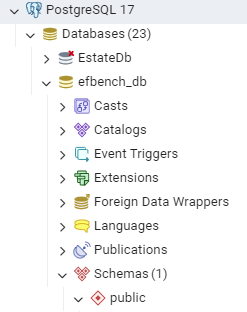
I have named the database efbench_db.
Step 2: Create the Users table and insert data
CREATE TABLE "Users" (
    "Id" SERIAL PRIMARY KEY,
    "Name" TEXT NOT NULL,
    "OrganizationId" INT NOT NULL
);

INSERT INTO "Users" ("Name", "OrganizationId")
SELECT
    'User ' || g,
    (g % 10) + 1
FROM generate_series(1, 200_000) g;
The new table can be inspected using a bit of SQL.
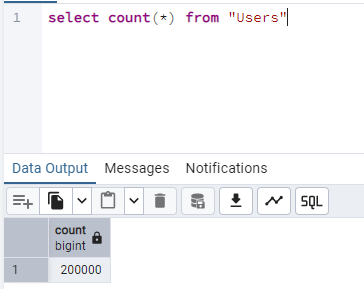
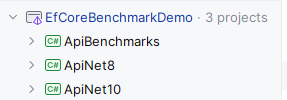
For the C# code, I will create a project structure looking like this:
EF Core data access with .NET 8 and C#12
Let us start by creating the project for querying user data from .NET 8.
Step 1: Create a Web Api project in .NET 8
dotnet new webapi -n ApiNet8 -f net8.0
Step 2: Install the necessary NuGet packages
dotnet add package Microsoft.EntityFrameworkCore --version 8.*
dotnet add package Npgsql.EntityFrameworkCore.PostgreSQL --version 8.*
Here we specified package versions that will install the latest compatible version with .NET 8.
Step 3: Define the model
namespace ApiNet8.Models;

public class User
{
    public int Id { get; set; }
    public string Name { get; set; } = string.Empty;
    public int OrganizationId { get; set; }
}
Step 4: Configure AppDbContext
using ApiNet8.Models;
using Microsoft.EntityFrameworkCore;

namespace ApiNet8.Data;

public class AppDbContext: DbContext
{
    public DbSet<User> Users => Set<User>();

    public AppDbContext(DbContextOptions<AppDbContext> options)
        : base(options) { }
}
Step 5: Add the connection string to appsettings.json
{
  "Logging": {
    "LogLevel": {
      "Default": "Information",
      "Microsoft.AspNetCore": "Warning"
    }
  },
  "ConnectionStrings": {
    "DefaultConnection": "Host=localhost;Port=5432;Database=efbench_db;Username=postgres;Password=pass"
  },
  "AllowedHosts": "*"
}
Step 6: Set up Program.cs
I have injected the connection string and AppDbContext in Program.cs. So our final file looks like this:
using ApiNet8.Data;
using Microsoft.EntityFrameworkCore;

var builder = WebApplication.CreateBuilder(args);

var connectionString = builder.Configuration.GetConnectionString("DefaultConnection");

builder.Services.AddDbContext<AppDbContext>(options =>
{
    options.UseNpgsql(connectionString);
});

var app = builder.Build();

app.MapGet("/users/{orgId:int}", async (int orgId, AppDbContext db) =>
{
    return await db.Users
        .AsNoTracking()
        .Where(u => u.OrganizationId == orgId)
        .Select(u => new { u.Id, u.Name })
        .ToListAsync();
});

app.Run();
One important thing that the Program.cs contains a minimal API to fetch users filtered by OrganizationId using a projection.
EF Core data access with .NET 10 and C#14
It is time to introduce the same code but for .NET 10.
Step 1: Create a .NET 10 API project
dotnet new webapi -n ApiNet10 -f net10.0Step 2: Add the required packages
dotnet add package Microsoft.EntityFrameworkCore --version 10.*
dotnet add package Npgsql.EntityFrameworkCore.PostgreSQL --version 10.*
Steps 3, 4, and 5 are the same as the preceding project.
Step 6: Add configuration to Program.cs
using ApiNet10.Data;
using Microsoft.EntityFrameworkCore;

var builder = WebApplication.CreateBuilder(args);

// EF Core 10 pipeline optimizations
builder.Services.ConfigureHttpJsonOptions(o =>
{
    o.SerializerOptions.AllowOutOfOrderMetadataProperties = true;
});

// Read connection string from appsettings
var connectionString = builder.Configuration.GetConnectionString("DefaultConnection");

// Register DbContext
builder.Services.AddDbContext<AppDbContext>(options =>
{
    options.UseNpgsql(connectionString);
});

var app = builder.Build();

app.MapGet("/users/{orgId:int}",
    static async (int orgId, AppDbContext db) =>
        await db.Users
            .AsNoTracking()
            .Where(u => u.OrganizationId == orgId)
            .Select(u => new { u.Id, u.Name })
            .ToListAsync()
);

app.Run();
A few noticeable differences here are allowing out-of-order metadata and static keyword in minimal API fetching, which allows skipping strict ordering checks in JSON deserialization. It is an optimisation step that reduces parsing branches in compilation and speeds up model binding. static () => Prevents closure allocation by restricting the lambda from capturing variables. In preceding versions, lambda saves the inner variable in Gen 0 memory. While in the latest updates, static lambda results in 0 allocation and a faster, memory-efficient API.
API Benchmark project
Finally, we can add our referee, the API benchmark project.
Step 1: Add a Console project to the solution
dotnet new console -n ApiBenchmarks
Step 2: Install the required NuGet packages
dotnet add package BenchmarkDotNet
dotnet add package Microsoft.Extensions.Http
Step 3: Add Benchmarking code
I added the ApiBenchmarks class.
using BenchmarkDotNet.Attributes;
using System.Net.Http.Json;

namespace DefaultNamespace;

[MemoryDiagnoser]
public class ApiBenchmarks
{
    private readonly HttpClient _net8 =
        new() { BaseAddress = new Uri("http://localhost:5267") };

    private readonly HttpClient _net10 =
        new() { BaseAddress = new Uri("http://localhost:5186") };

    [Benchmark]
    public async Task Net8_EFCore8()
    {
        await _net8.GetFromJsonAsync<object[]>("/users/5");
    }

    [Benchmark]
    public async Task Net10_EFCore10()
    {
        await _net10.GetFromJsonAsync<object[]>("/users/5");
    }
}
Dedicated HTTP clients will call the endpoint of the respective project. While the [Benchmark] attribute evaluates performance on each method.
Step 4: Set up Program.cs
using BenchmarkDotNet.Running;

BenchmarkRunner.Run<ApiBenchmarks>();
Here, I call the BenchmarkRunner.Run method to run the tests.
Step 5: Run the projects
Open 3 terminals, on the first one run
cd ApiNet8
dotnet run --project Api.Net8
On the second
cd ApiNet10
dotnet run --project Api.Net10
On the final terminal
cd ApiBenchmarks
dotnet run -c Release
Output

.NET 10 performance is 25 to 50% better in the benchmark metrics. Although query and EF Core are the same, the impact is due to .NET 10's execution speedup. Some vital reasons behind this improvement are
- JIT inlines methods and optimizes escape analysis better. .NET 10 performs fast dictionary and span operations. They flattened the pipeline, eliminating unpredictable branches in hot paths. Hence EF Core does not dangle in these complexities.
- .NET 10 brought faster
ExpressionVisitorand caching of traversal results. Previously, EF Core had to walk expression trees multiple times and allocate helper objects. Now your code has a single-pass expression analysis and fewer allocations. - One big blow is in Row Materialization that involves EF Cores data reading from the source to mapping in the .NET object. EF Core goes through multiple abstraction layers, reads columns defensively to handle null values and conversion checks, traverses additional branches for entity tracking, and generic materializers. .NET 10's inlining straightened the materialization flow, applied stronger devirtualization, upgraded nullable checks so EF Core can skip redundant null checks safely. Faster generic specialization made value handling cheaper.
- JIT optimization of the hot path helped EF Core run without regression, saving decisive time.
Conclusion
.NET 10 is released in November 2025 and is supported for three years as a long-term support (LTS) release. It brings the latest version of C# with many refinements. In the blog post for our .NET 10 and C# 14 series, I visualized with benchmarked the impact of .NET 10 improvements on EF Core data fetching. .NET 10's game-changer enhancements are its JIT inlining optimizations and request pipeline streamlining that massively impacted every feature. Same worked with EF Core's data fetching, along with other icebreakers that I discussed.
Code: https://github.com/elmahio-blog/EfCoreBenchmarkDemo.git
elmah.io: Error logging and Uptime Monitoring for your web apps
This blog post is brought to you by elmah.io. elmah.io is error logging, uptime monitoring, deployment tracking, and service heartbeats for your .NET and JavaScript applications. Stop relying on your users to notify you when something is wrong or dig through hundreds of megabytes of log files spread across servers. With elmah.io, we store all of your log messages, notify you through popular channels like email, Slack, and Microsoft Teams, and help you fix errors fast.

See how we can help you monitor your website for crashes Monitor your website